
Updated March 31, 2023
Introduction to JSON Serialize
JSON serializer converts an object to its string. The reverse is also possible which is known as Deserialization. JSON is a format that encodes an object to a string. On the transmission of data or storing is a file, data need to be in byte strings, but as complex objects are in JSON format. Serialization converts these objects into byte strings which is JSON serialization. After these byte strings are transmitted, the receiver recovers the original object from the string known as Deserialization.
Syntax:
ECMAScript 5 has given native functions JSON.stringify() and JSON.parse() for serialization of objects and restore Javascript objects.
Object = {var1:1, var2:{var3:[id, name]}};

Serialized_object = JSON.stringify(Object);

JSON.stringify() to serialize Javascript objects.
Objects, Arrays, Strings, Boolean, Finite Numbers, and NULL can be serialized. Infinity, NULL, and NaN can be serialized to null. As serialization translates data structures or objects into a format that can be serialized and transmitted
Examples of JSON Serialize
Following are the examples of json serialize are given below:
Example #1
Code:
<!DOCTYPE html>

<html>

<head>

<body>

<script>

var json = {"employeeName": "Amar", "employeeID": 763088};

data = JSON.stringify(json);

document.write('type of data is '+ typeof data + '</br>');

document.write(data);

</script>

</body>

</html>
Output:

Example #2
Below example serializes a JavaScript Object into a JSON String with JSON.stringify(). This json string is passed to JSON.parse() to create JS value.
Code:
<!DOCTYPE html>

<html>

<head>

<title>JSON Object Serialization</title>

<style>body{font-family:Sans-Verdana;}</style>

</head>

<body>

<p>Serializes an object and then

parses the same string into an appropriate JavaScript Object.</p>

<script >

var employee = {

"name": "Amar",

"technology": [

"JavaScript",

"Java",

"HTML CSS",

],

version: 2,

year: 2017

};

var jsonString = JSON.stringify(employee, ["name", "technology"]);

document.write(jsonString);

var employeeName = JSON.parse(jsonString);

document.write("<br><br>" + employeeName.name);

</script>

</body>

</html>
Output:

Example #3
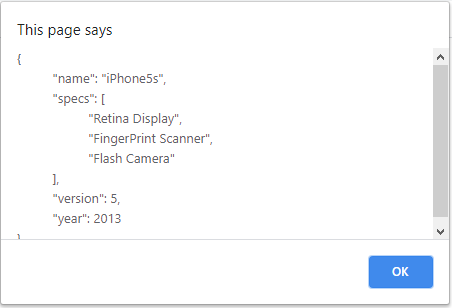
Javascript JSON object serialization using a numerical value. The argument is used to control white spaces and control indentation. The maximum indentation value is 10, greater than that, sets the value to 10.
Code:
<!DOCTYPE html>

<html>

<head>

<title>JSON Object Serialization Example Using Numerical Value </title>

<style>body{font-family:Verdana;}</style>

</head>

<body>

<script >

var phone = {

"name": "iPhone5s",

"specs": [

"Retina Display",

"FingerPrint Scanner",

"Flash Camera",

],

version: 5,

year: 2013

};

var jsonString = JSON.stringify(phone, null,10);

alert(jsonString);

</script>

</body>

</html>
Output:
In C#, JSON Serialization, it supports two data structures.
- Collection of name/ value pairs
- Ordered list of values.
Object: An object begins with ‘{‘ and ends with ‘}’ and comma ‘,’ to separate each name-value pair.
var sample = {“employeeName” : “ Amar”, “age” : “23”, “employer” : “Incento”}
Array: It is a value ordered set, begins with ‘[‘ and end with ‘]’
var sample = [{ “sample1” : {“employeeName” : “ Amar”, “age” : “23”, “employer” : “Incento”}}, { “sample2” : {“employeeName” : “ Amar”, “age” : “23”, “employer” : “Incento”}}]
String: Assembly Unicode character which is enclosed in quotation masks.
var sample = “{\”employeeName\” : Amar, \”age\” : 24, \”, \“employer” : “Incento”’}
JSON serialization can be in below was,
- With JavaScriptSerializer class.
- Using DataContractJsonSerializer class
- Using JSON.Net library
JSON serializer also converts .NET object into equivalent JSON,
public class JsonSerializer; => initializes new instance of JSON Serializer class.
JsonSerializer can be used directly and can able to read and write JSON text to a stream via JsonTextReader and JsonTextWriter. JsonSerializer has a number of other properties for customizing the serialization of JSON. For JSON serialization, if JSON.stringify is not available, a new function is defined to accept a single object parameter. The parameter can be a single value, array, or complex object.
If an array or an object is passed, logic is iterated through the mentioned properties.
JSON.stringify(): JSON.stringify() serializes value to JSON notation as below,
- If values are Boolean, Number, String objects, are converted to corresponding values by stringification
- If the value has toJSON() method, it is the responsibility of which data has to be serialized
- If the value is Undefined, function, or symbols, they are not valid JSON values. These values are either omitted or changed to NULL
- Numbers Infinity, NaN, and also the value of null, are all considered NULL.
- For all Object instances like Map, Set, WeakSet, and WeakMap, only enumerable properties will be serialized
We have seen serialization in javascript and C# here, let us go through Serialization in Java,
- For Java Serialization, the user need not depend on third-party tools or libraries and configurations
- Comparatively, Java Serialization is easy to understand at the start.
- Every developer has good knowledge of Serializing Java objects.
- Transient fields are not initiated as Java does not call out constructor for memory allocation
- The result is Java is to be compressed and hence Java Serialization is not so efficient.
- This Serialization can be used when the size of the result matters during deployment
- Long term storage of the serialized result is not an issue in Java
Conclusion
Considering all the above points we have discussed let’s summarize this article. We have gone through what JSON serialize means and how it works, how JSON.stringify() method in javascript works for serializing JSON objects. Illustrated a few examples of JSON serialize and also have seen a few points on how JSON serialize works in C# programming language and Java Language. Based on the user requirement, objects, arrays, strings, a Boolean value, and NUL values can be serialized using JSON Serialize.
Recommended Articles
This is a guide to JSON Serialize. Here we also discuss the Introduction and syntax of json serialize along with different examples and its code implementation. You may also have a look at the following articles to learn more –

