

Updated March 17, 2023

What is a Power BI?
The following article provides an outline for Is Power BI Free? Power BI is a visualization tool by Microsoft to make stunning reports and dashboards. The objective is to make reports that help the user with decision-making. Decision-making is a very important step in any given task. What Power BI does is helps in making the decisions.
How does Power BI Work?
Now, in order to make those decisions, you need data, business data. This data can be of all kinds, excel data, warehouse data, unstructured data, blogs, videos, images. Business decisions are made on the basis of all the data collected. The whole point of Power BI is to pull that data in order to analyze and visualize the data, irrespective of where it comes from and what form it is collected in.
Power BI is broken up into different pieces and let’s understand what these components are:
- Power BI Desktop: This can be downloaded for free from the Microsoft website.
- Power BI Service: This is a cloud service in the MS cloud offerings and the point of the service is enabling and sharing collaboration.
- Power BI Mobile App: Lets you use Power BI on your mobile or tablets. It also allows you to do annotations and setting alerts right from your phone.
What are the Actions one can Perform in Power BI?
There are various actions you can perform on Power BI. This can help perform more actions on the data and get more insights that help in making informed decisions.
- Connect to multiple data sources (more than 70)
- Export the results to Powerpoint, Excel, etc
- Publish the results to a web
- Collaboration with peers, other apps
- Embed API’s and controls
Is it Similar to Data Warehouse?
Create calculated columns, change measures and dimensions without IT involvement and ETL tools; Data warehouses normally require data to be uploaded to the warehouse and then analyze, thereby making it IT-dependent and difficult to iterate in short periods Self-service application with Natural Language Processing and graphical Designer tool with online publishing so data can be shared from a central location.
A typical Power BI process is choosing which tables and views to extract from into Power BI (in a visual environment without writing SQL scripting), previewing the data, importing the data to create a data model which includes tables, measures, columns and hierarchies, and then cleansing, enriching and formatting the data into Reports and Dashboards.
Advantages and Disadvantages
Below are the advantages and disadvantages mentioned:
Advantages:
- Powerful and Global Data discovery
- Interactive Guided Analysis
- Accessibility of Colossal Learning Assets
- Simple Coordination with Excel
- Good Report Perception
- Broad Database Availability
- Mobile Data Discovery
- Upgraded Collaboration
Disadvantages:
- Not the best decision for dealing with mass information
- Hang ordinarily while taking care of immense arrangements of information
- Complex
- Dashboards and reports must be impart to clients who have similar email spaces
- Won’t acknowledge records bigger than 250 MB
- There is a 1GB utmost for each dataset. As a workaround, you can make numerous datasets
- The arrangement can convey on-introduce utilizing the Power BI Report Server, in any case, the cost rises drastically
Power BI is Available in two Versions: Power BI Free and Power BI Pro
The pro version charges $9.99 per month per user. Power BI also provides another version that is Premium. The cost is determined by capacity pricing.
Following is the comparison features of Power BI Free and Power BI Pro:
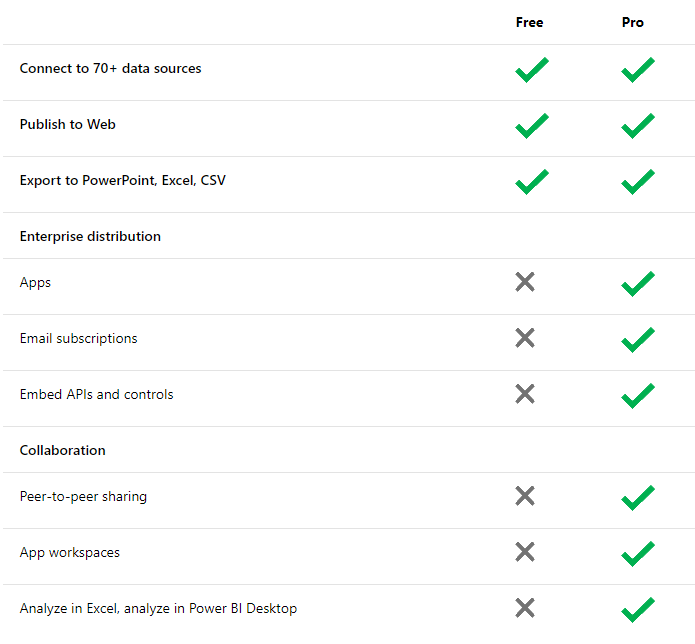
Features in Power BI Announced by Microsoft Officials
Below are the features mentioned:
- Dashboards: All the data can be accessed from a single screen. Live dashboards show the visualizations and KPIs from data on the device as well as that stored on the cloud.
- New visualizations: Visualization of data is made easier by various tools like Combo charts, fill maps, gauges, treemaps and funnel charts, etc.
- Out-of-the-box connectors for SaaS services: Connectors like Dynamics CRM Online and Dynamics Marketing, GitHub, Marketo, Salesforce, SendGrid, and Zendesk help customers get started with Power BI more quickly.
- Live connectivity to SQL Server Analysis Services: With a connector for SQL Server Analysis Services, a secure connection to Analysis Services can be created. Microsoft Power BI provides all the features necessary for making business decisions.
Recommended Articles
This is a guide to Is Power BI Free? Here we have discussed the Power BI free version and Power BI Pro version with the features, advantages, disadvantages, and technical questions of Power BI. You may also look at the following articles to learn more –

