

Updated August 21, 2023
Difference Between Excel vs CSV
Excel and CSV are often used interchangeably, and the user does not know much about both file types’ differences, main nature, and working. It is just a source of information for the user. Both help the user manage, update, and store data for the user, and almost every organization and corporates use it. In this article today, we will try and understand the key differences between Excel vs CSV and the nature of working of both the file format.
Head to Head Comparison Between Excel vs CSV(Infographics)
Below is the top 8 difference between Excel vs CSV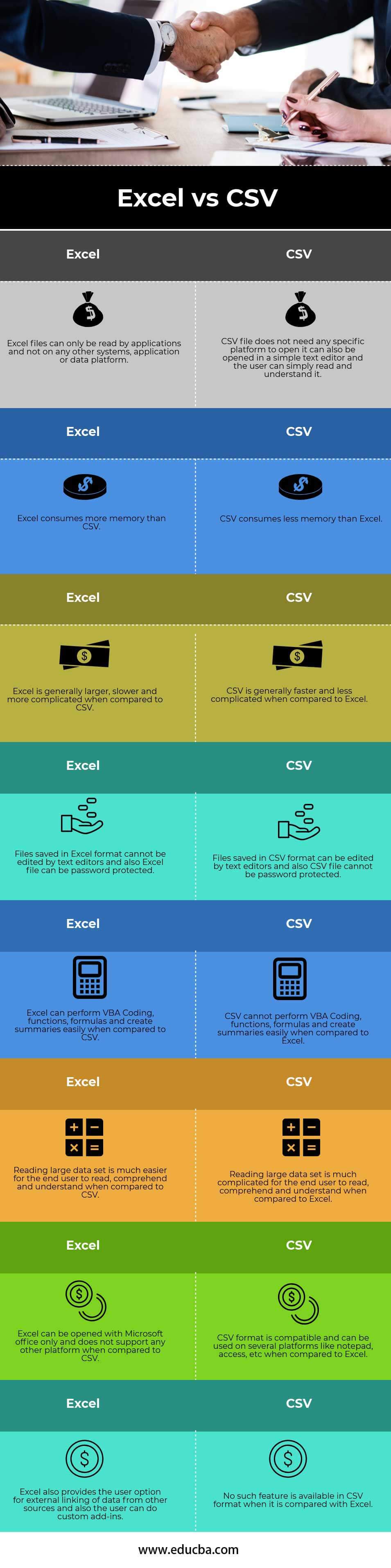
Key Differences Between Excel vs CSV
Let us discuss some of the major differences between Excel vs CSV:
- Excel is a binary file format that holds information for all workbooks and is use in all worksheets. On the other hand, CSV stands for Comma Separated Values. CSV is in plain text format information with a series of values in a sheet and is separated by Commas. CSV is a text which is full of information and is less compatible with Excel
- CSV files are formatted and exported from all databases; it is just a source of information; a CSV file can generate from any database, i.e., Oracle, SQL, Server, MySQL, Sybase, informatics, access, excel, database, etc
- Excel is not only a measure of a store of information but also a tool for a financial analyst to perform a deep analysis of data and numbers. An analyst can build profit and loss statements, do ratio analysis, summarize huge data, and perform functions and formulas in Excel format; it is not just a store of information. On the other hand, we compare Excel with CSV; CSV is only a plain text form of the data set which does not enable the user to perform any deep-dive analysis on the data set and apply functions.
- Excel is superior to the CSV file format; thus, CSV consumes less file size when the user is importing data; it is a much faster format compared to Excel. CSV does not manipulate data and stores it as-is. Excel also allows the user the add-in feature.
Excel vs CSV Comparison Table
Let’s look at the top 8 Comparisons between Excel vs CSV.
|
Excel |
CSV |
| Excel files can only be read by applications and not on any other systems, applications,s or data platform. | CSV file does not need any specific platform to open; it can also open in a simple text editor, and the user can simply read and understand it. |
| Excel consumes more memory than CSV. | CSV consumes less memory than Excel. |
| Excel is generally larger, slower, and more complicated when compared to CSV. | CSV is generally faster and less complicated when compared to Excel. |
| Text editors cannot edit files saved in Excel format, and also, Excel files can be password protected. | Text editors can edit files saved in CSV format, and CSV files cannot be password protected. |
| Excel can perform VBA Coding, functions, formulas, and create summaries easily when compared to CSV. | CSV cannot perform VBA Coding, functions, formulas, and create summaries easily when compared to Excel. |
| Reading large data sets is much easier for the end-user to read, comprehend and understand when compared to CSV. | Reading large data sets is much more complicated for the end-user to read, comprehend and understand when compared to Excel. |
| Excel can be opened with Microsoft Office only and does not support any other platform compared to CSV. | CSV format is compatible and use on several platforms like Notepad, access, etc., compared to Excel. |
| Excel also provides the user option for external linking of data from other sources, and also, the user can do custom add-ins. | No such feature is available in CSV format compared with Excel. |
Conclusion
Both Excel vs CSV have their limitations and advantages and can work in tandem with each other. They complement each other in a way, and their workings are quite different. Most people would find that Excel is sufficient for most spreadsheet needs. There is no need to use CSV unless you have some specialized application that is irreplaceable and does not recognize the data in an Excel file.
Recommended Articles
This has been a guide to the top difference between Excel vs CSV. We also discuss the Excel vs CSV key differences with infographics and comparison tables. You may also have a look at the following articles to learn more.

