


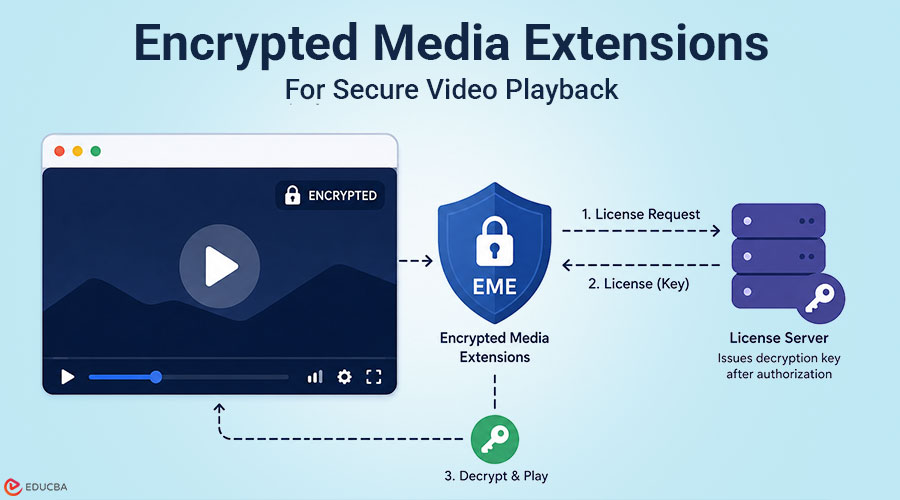
EME is described as the web’s cross-browser DRM standard. That description is true at one layer of the stack and misleading at every layer below it. The Encrypted Media Extensions specification, ratified as a W3C Recommendation in 2017, standardizes how JavaScript communicates with Content Decryption Modules inside browsers. The specification’s abstract clearly explains that EME is not intended to define a content protection or Digital Rights Management system.
The API surface is consistent. The CDM behavior underneath it is not. This piece covers what EME is at the specification level, how the five-step API sequence works in practice, what the browser-CDM matrix looks like, where CENC helps and where it stops, and four failure modes that appear only after raw EME is deployed. The goal is a working answer to one question: what does raw EME integration actually cost, and when does a player SDK or managed platform get you to the same security outcome faster?
TL;DR
- EME (Encrypted Media Extensions) is a W3C specification connecting browser JavaScript to Content Decryption Modules (CDMs). It is not a DRM system; it is the communication channel for DRM.
- Three CDMs cover real browser traffic: Widevine in Chrome, Firefox, and Chromium-based Edge; FairPlay in Safari; PlayReady in legacy EdgeHTML and IE11.
- The EME API runs five steps: requestMediaKeySystemAccess → createMediaKeys → setMediaKeys → generateRequest → license exchange with your server.
What Encrypted Media Extensions (EME) Actually Is?
EME is a standardized message relay between browser JavaScript and browser-native Content Decryption Modules, not a DRM system, and not an encryption standard. The W3C specification (2017) defines an API surface. Browser vendors implement that surface by shipping their own CDMs: closed-source, often hardware-backed software that handles key unwrapping, media decryption, and enforcement of output protection. In one sentence, EME standardizes the relay. The CDM owns the cryptography.
How EME Extends HTMLMediaElement?
EME is not a standalone API. It is an extension to HTMLMediaElement, adding mediaKeys (read-only), setMediaKeys(), and an encrypted event handler to the standard video element. Three responsibilities, three owners: the browser fires the event, your code handles the routing, and the CDM handles the decryption. Only the middle one belongs to your application.
What is a Content Decryption Module?
A CDM is closed-source software, hardware-backed on devices with a Trusted Execution Environment (TEE), handling cryptographic operations that the JavaScript layer cannot access. This distinction has direct consequences for content authorization, which the production bugs section covers.
Why Browsers Needed EME After Adobe Flash and Microsoft Silverlight?
Before EME, browser DRM meant proprietary plugins. Adobe Flash carried its own DRM implementation. Microsoft Silverlight carried PlayReady. Netflix’s Silverlight-based web player had already been retired. In 2026, every browser-based streaming platform: Netflix, Disney+, and Amazon Prime Video, runs on EME-based DRM delivery. The plugin era is gone. The CDM fragmentation that replaced it is not.
The 5-Step Encrypted Media Extensions (EME) Flow
Understanding each object in the EME flow is what makes the CDM fragmentation visible before you reach the halfway point of an integration.
Step 1: Key System Detection
The browser checks support using:
- requestMediaKeySystemAccess()
Key systems include:
- widevine.alpha
- apple.fps
- microsoft.playready
If unsupported or non-secure (HTTP), EME fails immediately.
Step 2: MediaKeys Creation
If supported, the browser creates a MediaKeys object and attaches it to the video element.
Step 3: Session Creation
A MediaKeySession is created and linked to the media stream.
Step 4: License Request Generation
The CDM generates a license request based on initialization data.
Step 5: License Exchange and Decryption
The application sends the request to a license server. The response is passed back to the CDM, which decrypts the content. At no point does JavaScript access the actual decryption keys.
The Browser-CDM Matrix
| CDM | Browser Support | Key System | License Format |
| Widevine | Chrome, Firefox, Edge | com.widevine.alpha | Protobuf |
| FairPlay | Safari | com.apple.fps | CKC binary |
| PlayReady | Legacy Edge, IE11, some TV platforms | com.microsoft.playready | XML |
CDM support on Android Chrome follows a different path than desktop Chrome. Chrome on Android treats the device’s OS-level CDM as Widevine L1 by default, meaning mobile Android often achieves hardware-level decryption that the same user’s laptop does not. Teams testing DRM on a desktop browser and assuming equivalent mobile behavior should validate Android playback separately.
1. Widevine in Chrome, Firefox, and Chromium-based Edge
Widevine uses Protobuf-formatted license requests and derives initialization data from a PSSH box in the ISOBMFF container. A Widevine integration tested on a standard laptop will default to L3. When studio content policies require L1, the CDM caps resolution to SD without reporting an error in the license exchange. The integration appears to work. The resolution cap appears on the viewer’s screen.
2. FairPlay in Safari: The CDM with a Structurally Different License Path
FairPlay is where raw EME integration stops being a key system string swap. It uses HLS, not DASH. Initialization data arrives via an skd:// URI in the HLS manifest, not a PSSH box. The license response is a binary Content Key Context (ckc), not JSON or Protobuf. How managed DRM platforms help in this regard: Managed video DRM platforms that are Apple-certified FairPlay vendors, Gumlet, handle Application Server Certificate issuance and renewal as part of the managed service. Teams on these platforms activate FairPlay at the workspace level and never interact with the Apple FPS program directly, removing certificate rotation from their application’s maintenance scope.
3. PlayReady in Legacy Edge and IE11
PlayReady uses an XML-formatted license challenge. Still relevant for Windows enterprise fleets, Samsung Tizen and LG webOS smart TVs, Xbox, and Roku environments where Widevine is not the default CDM. Teams building primarily for consumer web can treat PlayReady as a secondary surface, with Widevine and FairPlay covering the majority of their actual audience.
What CENC Solves, and Where it Stops?
CENC (Common Encryption) is the packaging standard most commonly cited as the solution to multi-CDM complexity. It solves a specific part of the problem, and its boundary is where most planning errors occur. CENC unifies content encryption and key ID mapping, allowing systems to serve the same encrypted media file to Widevine and FairPlay clients from a single packaged asset. However, it does not define how systems deliver licenses.
What CENC Covers?
AES-128 encryption of the media sample, using CTR mode (CENC) for DASH and CBC mode (CBCS) for HLS/CMAF, key ID mapping in initialization segments, and container format compatibility; one encrypted file, multiple CDM consumers.
What CENC Does Not Cover?
The license request message format (Protobuf, XML, or ckc; all proprietary), authentication token format, and validation logic per CDM, session lifecycle handling, CDM-specific error codes, or Widevine’s L1/L2/L3 security level enforcement. CENC means you package content once. It does not mean you deliver licenses once.
4 Production Bugs That Only Appear After Raw Encrypted Media Extensions (EME) Deployment
The API flow works. The CDM matrix is handled. The content is CENC-packaged. Then the edge cases arrive. These four failure modes are categorized here as the Raw EME Failure Taxonomy because no single source in the developer ecosystem documents all four in one place. Each is CDM-specific in cause but implementation-agnostic in solution: the fix in every case is either proactive lifecycle logic or moving to an abstraction layer that handles it by default.
1. Silent Mid-Session Playback Stalls
DRM licenses expire after a fixed duration. When the token expires during playback, the CDM stops decrypting content, often without showing a clear error. In FairPlay, ABR quality switching may trigger a new license request mid-session, causing unexpected playback freezes.
2. Clock Skew Between Client and License Server
If the device clock differs from the license server time by even a few minutes, valid DRM licenses may appear expired or invalid. This issue is common on mobile devices with unreliable time synchronization.
3. Widevine Security Level Downgrades
Widevine supports L1, L2, and L3 security levels. On unsupported devices, playback may silently downgrade from HD/4K to SD quality without any license error. The DRM flow appears successful, but content quality is reduced.
4. CDM-Specific Error Inconsistencies
Different CDMs return different error formats and behaviors. The same issue may produce:
- a silent stall in FairPlay,
- a generic error in Widevine,
- or an XML failure in PlayReady.
This makes cross-browser debugging difficult.
Build vs. Buy: Three Tiers and One Decision Criterion
The question is not whether raw EME works. It does. A more useful question is how much engineering capacity you should devote to CDM compatibility, certificate management, and token lifecycle maintenance instead of the product features that make protecting content worthwhile. For most teams, the answer is: less than raw EME requires. Three tiers reflect three real answers:
1. Raw EME
Appropriate for teams with a dedicated media engineering function, custom entitlement logic that no managed provider can express, or studio licensing agreements requiring direct license server control. Netflix and Disney+ operate at this tier because their scale and content agreements demand it, not because it is the simpler starting point.
2. Player SDK
Shaka Player (Google-maintained, open-source), Video.js with videojs-contrib-eme, and hls.js for HLS/FairPlay delivery abstract the raw EME surface. CDM message relay and error normalization are SDK responsibilities. You still need a license server and must handle the token lifecycle, but you skip CDM-specific branching in your application code.
3. Managed DRM platform
CDM maintenance is eliminated. DRM is configured at the content or workspace level, not built into the application. The right tier for teams whose core product is not video infrastructure itself. In 2026, raw EME is a specialization, not a starting point. Earlier, building from raw EME was the expected baseline for any team taking content security seriously. Today, the availability of well-maintained player SDKs and private video hosting platforms that offer DRM means that teams that build from raw EME without a dedicated media engineer typically end up maintaining complexity that does not produce meaningfully better security outcomes, just more surface area to debug.
Final Thoughts
Encrypted Media Extensions (EME) are designed correctly for their purpose. Standardizing the communication channel between JavaScript and CDMs gave the web a path to browser-based DRM without proprietary plugins, and every major streaming platform now runs on it. The complexity that remains: three CDMs, three license exchange protocols, four categories of production failure, is not a specification failure. EME provides CDMs with a consistent API surface for communication, and it does that effectively.
EME was never designed to normalize CDM behavior, and teams that build timelines around that assumption create the most common source of scope errors in browser DRM projects. The practical takeaway is: most teams building video platforms in 2026 do not need to own the raw CDM surface. Raw EME belongs to teams with dedicated media engineering capacity, custom entitlement requirements, or studio agreements that require direct control of the license server. Decide which tier your team should maintain. Start there, not from the specification.
Frequently Asked Questions (FAQs)
Q1. How Does EME Work in Browsers?
Answer: When a browser encounters encrypted initialization data in a video stream, the media element fires an encrypted event. The application calls Navigator.requestMediaKeySystemAccess() with a CDM-specific key system string, creates a MediaKeys instance, attaches it to the video element, and opens a MediaKeySession. The CDM generates a license request and fires a message event with those bytes. The browser provides the API surface; the CDM performs all cryptographic operations; your code handles the relay. Nothing in that relay is normalized across CDMs.
Q2. Does the EME API work the same way in Chrome and Safari?
Answer: The API shape is identical. The integration path is not. Chrome uses Widevine, which parses initialization data from a PSSH box in an ISOBMFF container and generates a Protobuf-formatted license request. Safari uses FairPlay, which parses an skd:// URI from an HLS manifest, requires a server-side Application Server Certificate from Apple’s developer program, and returns a binary ckc license response, a structurally different exchange with separate server-side handling requirements. Start FairPlay integration testing on the first day of development. Building Chrome integration first and treating Safari as a follow-up phase consistently produces late-stage surprises that are expensive to resolve.
Q3. What is the difference between EME and CENC?
Answer: EME is the browser API for DRM communication between JavaScript and a CDM. CENC (Common Encryption) is the content packaging standard that encrypts media so multiple CDMs can decrypt it from a single asset. CENC handles encryption and key ID mapping. It does not define how systems deliver licenses or how CDMs authenticate requests. A CENC-packaged file can serve both Widevine and FairPlay clients, but each CDM still uses completely separate and proprietary license delivery paths. Neither EME nor CENC solves CDM fragmentation in license delivery, as that fragmentation is the actual integration work.
Q4. Is Widevine L3 secure enough for premium paid content?
Answer: For most SaaS and EdTech use cases, Widevine L3 stops casual piracy: unauthorized downloads and basic link sharing. Studios generally require Widevine L1 for HD and 4K authorization because L3 performs software-based decryption, which means someone could theoretically capture the content from system memory on the playback device. If your platform operates under any content licensing agreement that specifies a security-level requirement, confirm this directly with your licensor before building, and do not assume a successful license exchange indicates L1 compliance.
Recommended Articles
We hope this comprehensive guide to Encrypted Media Extensions (EME) helps you better understand browser-based DRM systems and secure video delivery. Check out these recommended articles for more insights into streaming security, content protection, and modern media technologies.


