


Updated February 10, 2023
Introduction to Drupal Views
We know that drupal provides different features to the developers, so views are one of the features which are provided by drupal. Basically, with the help of views administrators are able to do different tasks such as creating and managing the web content as well they are also able to display the list of content as per requirement. Normally views are nothing but the module which is used for display, or we can say that output.
Key Takeaways
- With the help of a view, we can create the default page with different sorting options.
- Drupal view allows us to customize the view as per our requirements.
- The customization of the view is easy.
- It provides the different types of modules as well as functionality to the developer, so they can easily configure the website with minimum time.
What is Drupal in Views?
Lists of content can be made, managed, and displayed with the view’s module, which is also used by site designers and administrators. The output of a view is referred to as a “display,” and each list managed by the views module is referred to as a “view.” Block or page displays are available, and a single view can have multiple displays. A discretionary route helps, including a framework way and menu thing that can be set for each page-based show of a view. Views that list content (view user type), content revisions (Node view type), or users (view user type) can be created by default. On the views administration page, a view can be added, edited, or deleted, and members of specific user roles can only access it.
How to Create Drupal Views?
Now let’s see how we can create views in drupal as follows.
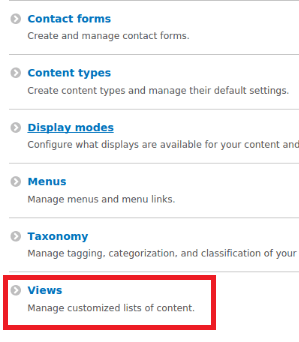
1. First, we need to select Manage; inside the manage menu, we can see the different options but click on the Structure menu. After clicking on Structure, we can see the view option, which is shown in the below screenshot.
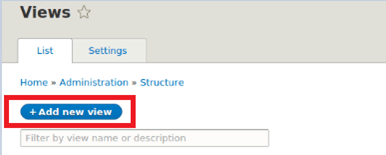
2. In the second step, we need to click on the View tab, and after clicking on the View tab, we get a new screen where we can see the different Add new view buttons, which is shown in the below screenshot.
3. In the next step, we need to click on the Add new view button. We get a new window where we need to provide some basic information about the View such as the name of the view and description. In the tab, we have the setting option, and it provides different options such as type, show, and sort. Here the show is used for the display of web content, logs, comments, as well as many other contents as per our requirement. Type is used to do the basic setting of the web page and custom content, and sorted by is used for the sorting the web content means which we need to display first, newest, or old, as well as we can sort by title, author name means as per requirement we can do the sorting. All tabs as shown in the below screenshot.
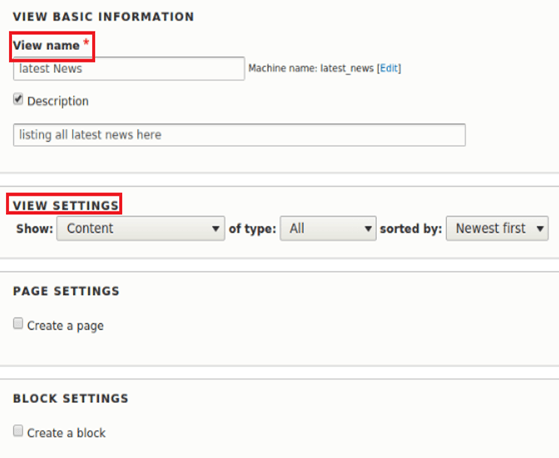
In the above screenshot, we can see the different options, such as Page settings and block settings. Inside the page setting, we have created a page option; after clicking on it, we get different options, such use a pager, create a menu link, and include RSS feeds, as shown in the below screenshot.
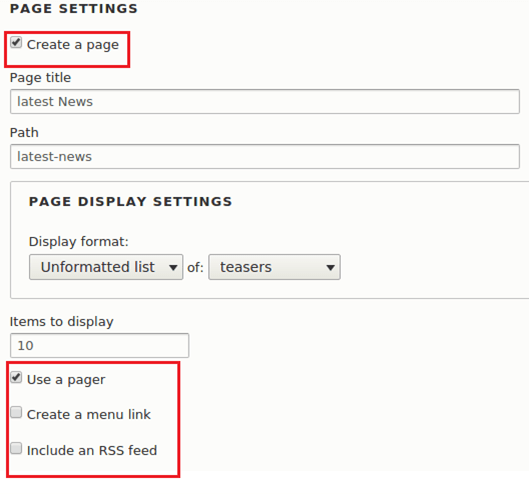
Similarly, when we click on create a block, we get different options such as Display format and Item per block.
4. After filling all the required information, we need to click on the save button, then the control is redirected to the view display configuration page where we can see the different options for configuration as follows:
- Title: It is used to set the title for a specific page of view.
- Format: By using this option, we set the displayed option means we display data.
- Fields: It is used to define which field we need to display.
- Filter Criteria: We can apply the filter criteria as per our requirements.
- Page setting: Here, we can set the permission such as view, menu, and many more.
- Header: It is used to set the custom header to the view page.
- Footer: It is used to set the custom footer to the view page.
As well as it also provides many other options, such as Not Result Behavior, Pager, and Advanced.
How do Drupal Views Work?
The “Add view” page under /admin/structure/views/add to create a view. You need to specify the kind of listing you want to create under “View settings > Show”: users, files, content (nodes), comments, and so on; you can likewise demonstrate how you need to introduce the outcomes: a page that can include a block or an RSS feed. You will be taken to the complete setup interface after completing this initial form, where the configuration options are virtually limitless. The underlying determination for what to show (content, clients, and so on.) is because it serves as the base table from which data is collected; it cannot be changed once it is set. Except for that and the view’s machine name, this interface lets you change every setting at any time. Instead of starting from scratch with a view, let’s look at some examples that come with the Drupal installation profile. We will be able to better comprehend the Views UI interface thanks to this.
Drupal Views Module
Now let’s see what modules are available for views as follows.
- Add contextual filter to view: This is one of the modules used to filter the content as well as it provides the dynamic filter.
- Add display to view: By using a module, we can add the content which we want to display in different formats.
- Add field to view: By using this module, we can add more fields on the screen, and it provides the two methods, such as all display and this page override.
- Add relationship to view: By using relationship, we can join more than one table as per our requirement to display the content.
- Simple block view: It allows us to create the list of our data that we need to place as a block on site.
- Simple page view: It allows us to create a page with a view.
Drupal also provides many other modules which are available based on the version of drupal.
Conclusion
From this article, we are able to understand Drupal views. It provides the basic idea and implementation of Drupal views, and we also see the representation of the Drupal views. At the end we got an idea about uses of drupal views.
Recommended Articles
This is a guide to Drupal Views. Here we discuss the introduction and steps to create drupal views along with its working and modules. You may also have a look at the following articles to learn more –

