


Updated April 20, 2023
Difference Between Docker Containers vs Images
The following article provides an outline for Docker Containers vs Images. Docker containers are writable images whereas images are immutable it means to make changes to images we need to re-write the Dockerfile or make changes into running containers and export it as an image. In other words, containers are running instances of an image whereas images are read-only template that has instructions to create Docker containers. Images include core application and its dependencies.
Head to Head Comparison Between Docker Containers vs Images (Infographics)
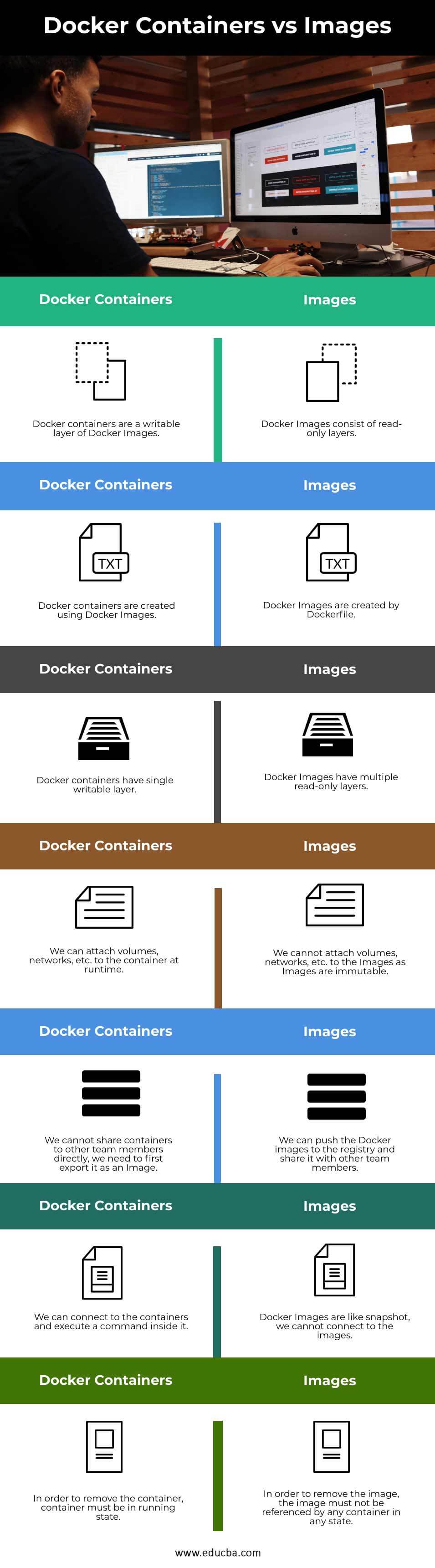
Below are the top 7 differences between Docker Containers and Images:
Key Difference Between Docker Containers vs Images
Let us discuss some of the major key differences between Docker Containers and Images:
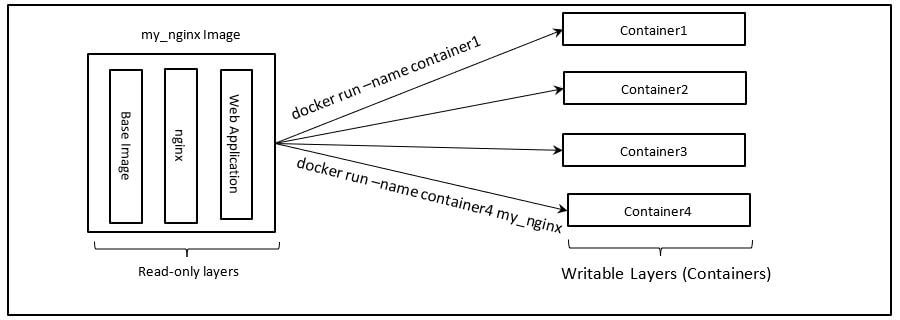
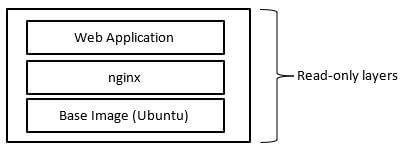
- Architectural Diagram:
Docker Containers:
Docker Images:
- Repository: We cannot store Docker containers to any repository as Docker containers are running instance like VM but it is not similar to VM as Docker containers does not have a full-blown OS. We can store Images in a repository. We have public repository hub.docker.com provided by Docker itself however we can create our own repository on hub.docker.com and keep our Images privately if we want. We can create our own private registry as well.
- Commands:
| Below are the commands to manage Docker containers:
1. To list running Docker containers: docker ps docker container ls use -a flag to list all containers 2. To create a Docker container: docker container create <name_of _the_image> Above command will just create a container, to run a container we need to run: docker container run <name_of_the_image> 3. To stop a Docker container: docker container stop <container_name> We can use container ID in place of container_name as well. 4. To remove a container: docker container rm <container_name> 5. To delete all containers those are not running: docker container prune 6. To check logs of any Docker Container: docker container logs <container_ID> 7. To check all details of any Docker container: docker container inspect <container_ID> 8. To get help about Docker containers commands: docker container –help |
Below are the commands to manage Docker Images:
1. To list Docker images: docker image ls use -a flag to list all images, it includes images with none tag intermediate images that are created while building a new Image. 2. To create or build an image using Dockerfile: docker build -t <image_name> <Dockerfile_loc> 3. To remove a Docker image: docker image rm <Image_ID> We can use Image name in place of Image_ID as well. 4. To delete all Images, including dangling Images: docker image prune 5. To know more about any specific Docker Image: docker image inspect <image_ID> 6. To check layers of any Docker Image: docker image history <image_ID> 7. To get help about Docker Images commands: docker image –help
|
- Creation: We need Docker image to create a Docker container. When we create a container Docker daemon actually just adds a new writeable layer on top of Docker Images. Where we can make changes however changes are not persistent if we are not using any persistent storage or volume as data is lost if the container is removed or destroyed. We need Dockerfile to build our own Docker image. Docker file has a set of instructions to create a Docker Images. Each instruction creates a layer hence, Docker Images are consist of multiple layers and these layers are read-only, we cannot make changes to it once Docker Image is created. We need to update the Docker file and recreate the Docker Image.
- Unique Identifier: Whenever we create a Docker container, Docker daemon assigns a unique ID to it that is called Container ID. We can use this ID to manage Docker containers. We can also give a name to the Docker container for our convenience but it is optional while creating a container. If we don’t specify any name to the container Docker daemon automatically choose any name and assign to it. Whenever we create a Docker image, Docker daemon assigns a unique ID to it that is called Image ID. We have to mandatory give name to the Docker Image while building a Docker Image.
- Sharing: We cannot share the Docker container as it is a running instance of Docker Image. If we want to share the changes that we have made into a Docker container, first we have to export the Docker container as a Docker image. We can share the Docker Images easily with our team-mates as Docker Images are immutable. We can push the Docker images to the registry (repository) so that others can pull it whenever needed.
Docker Containers vs Images Comparison Table
Let’s discuss the top comparison between Docker Containers and Images:
| Sr.no | Docker Containers | Images |
| 1. | Docker containers are a writable layer of Docker Images. | Docker Images consist of read-only layers. |
| 2. | Docker containers are created using Docker Images. | Docker Images are created by Dockerfile. |
| 3. | Docker containers have single writable layer. | Docker Images have multiple read-only layers. |
| 4. | We can attach volumes, networks, etc. to the container at runtime. | We cannot attach volumes, networks, etc. to the Images as Images are immutable. |
| 5. | We cannot share containers to other team members directly, we need to first export it as an Image. | We can push the Docker images to the registry and share it with other team members. |
| 6. | We can connect to the containers and execute a command inside it. | Docker Images are like snapshot, we cannot connect to the images. |
| 7. | In order to remove the container, container must be in running state. | In order to remove the image, the image must not be referenced by any container in any state. |
Conclusion
Docker Containers and Images are the two most important objects of Docker. Docker containers provide consistency to run any application that means it is going to run in the same manner in any environment. Docker Images use a multilayer file system that makes it lightweight as each layer keeps only the differences from the other layers and it also reduces size of application from Gigabytes to Megabytes.
Recommended Articles
This is a guide to Docker Containers vs Images. Here we discuss the Docker Containers vs Images key differences with infographics and comparison table. You may also have a look at the following articles to learn more –

