

What are the Components of Computers?
Components of computers are the essential physical and logical elements that collectively enable a computer system to function. These components enable the computer to accept input, process data, store information, and produce meaningful output. Without any of these core components, a computer system cannot operate efficiently or may fail. In simple terms, computer components are the building blocks that form the structural and operational foundation of a computer system. To understand this concept better, it is helpful to explore the parts of computer and how each element contributes to the system’s overall functionality.
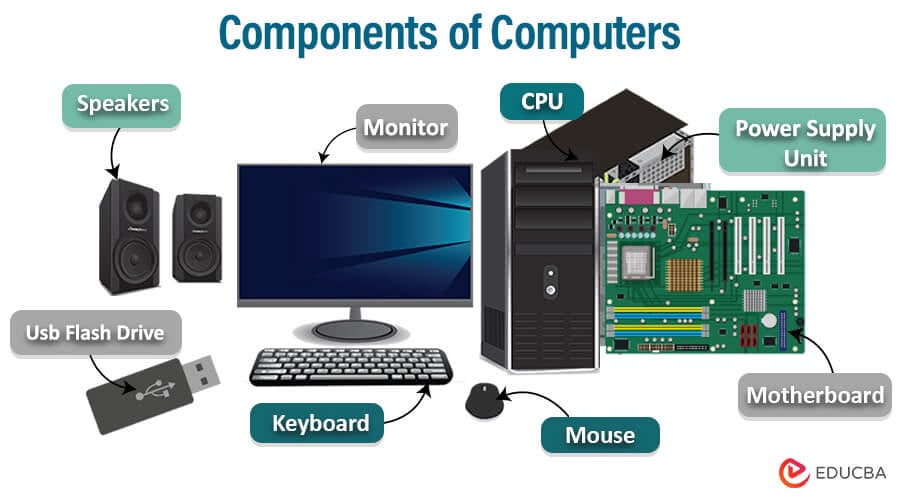
Table of Content
What is a Computer?
A computer is a sophisticated electronic device that processes and stores data, performs calculations, and executes instructions to complete specific tasks. Hardware components such as the CPU, memory, and storage devices store and process computer data. They operate on binary code and can perform various functions across fields, from simple to complex. It is a fundamental tool in multiple areas, including business, education, research, entertainment, and communication.
Block Diagram of Computer Components
A computer system follows a simple functional flow:
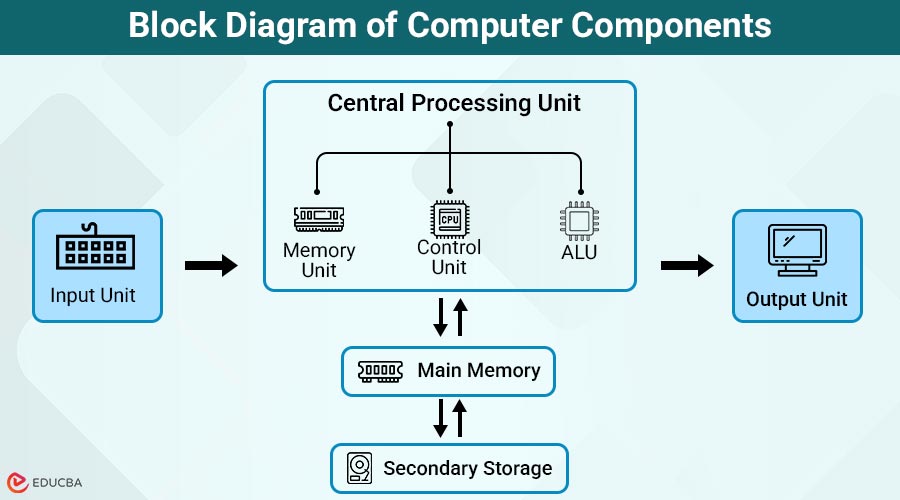
Input Unit → Central Processing Unit → Memory/Storage → Output Unit
- The Input Unit feeds data into the system
- The CPU processes the data
- Memory and Storage hold data temporarily or permanently
- The Output Unit displays the results
This logical structure helps users understand how different computer components interact.
Major Components of Computers System
For a computer system to produce accurate outcomes, its components must work together in harmony, even though they can function independently. Various devices are classified as input or output units in computer systems. Below are the primary components of a computer system’s architecture and functional flow.
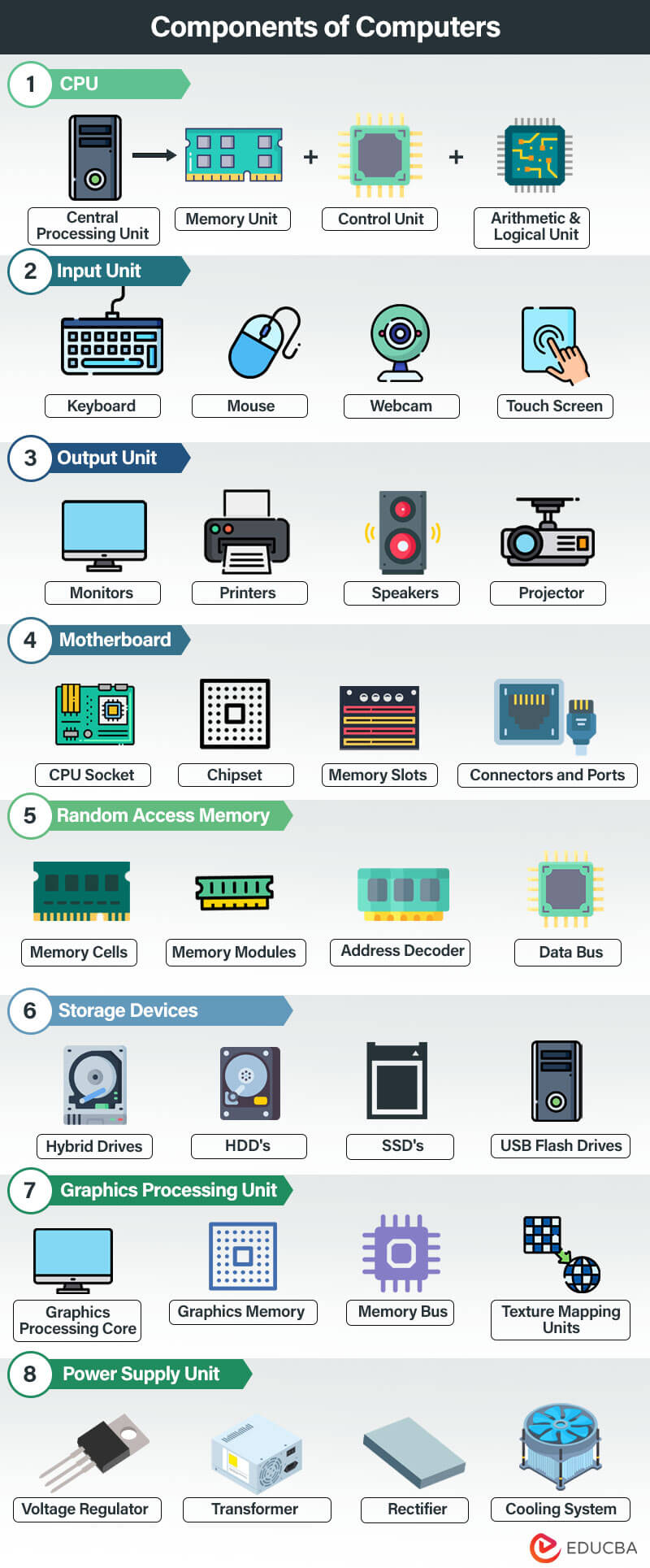
Here is a detailed explanation of the major components of a computer system:
1. Central Processing Unit
The Central Processing Unit (CPU) generally fetches input data or instructions from input units and converts unprocessed input into a machine-readable format, enabling the computer to carry out processing. It comprises three different units:
- Memory Unit: This Unit serves multiple purposes, including storing data received from diverse input devices, providing space for computational operations, caching previous calculations, reserving space for upcoming activities, and buffering temporary information, among others.
- Control Unit: This is the most intricate unit in the processing component of the computer system, which accepts raw data from the input components and executes operations in a controlled manner according to the computer operator’s instructions. This is another unit of a hardware module located inside the central processing unit.
- Arithmetic & Logical Unit: The Arithmetic & Logical Unit plays a significant role in the operation of the computer, where the relevant operations and logical functions are performed. This unit collaborates with other units, like any other component in the computer system, using input from the input unit and the memory/control units to perform various tasks and produce a reliable output.
2. Input Unit
The input unit of a computer is responsible for accepting data and instructions from the user or external sources and converting them into a format that the computer can understand and process. The interface provides a link between the user and the computer system. Multiple input devices are available for this activity, depending on the input requirements of specific tasks.
The following are some of the commonly used input devices for carrying out the activities of the input unit are,
- Keyboard: As the name suggests, a keyboard is a device that comprises many keys for entering instructions and commands on a computer system. The QWERTY layout, with additional function keys such as F1-F12, ALT, CTRL, Shift, and others, is commonly used to build this tool for capturing user input.
- Mouse: Users frequently use the mouse as an input device for pointing and clicking. It includes a scroll wheel for navigating displayed content and a few buttons for selecting items.
- Joystick: A joystick is an input device that sends commands to the computer system for gaming processes. It comprises multiple control buttons and at least one lever control; hence, given the name ‘Joystick.’
- Touch Screen: Touch Screens are a recent advancement in input devices, in which the user interacts with a computer by touching the screen. The touch-action can be performed by a dedicated pen-like device called ‘Stylus’ or using the user’s fingertips.
- Webcam: Webcams capture video and audio, allowing users to engage in video calls, conferences, and live streaming.
3. Output Unit
The output unit of a computer is responsible for presenting processed data and information to the user or external devices. It converts the processed data into a human-readable or machine-readable format for interpretation or further use. The devices that handle output processing should be capable of displaying any data or a combination of data types, including text, numbers, images, audio, video, GIFs, etc.
Here are a few commonly used output devices,
- Monitors: The computer monitors display the results obtained after processing and completing all operations in the central processing unit. The technology for designing display devices has evolved from monochrome monitors to color monitors to the latest LED/LCD displays.
- Printers: Printers are another output device, similar to monitors, but the difference is that the output data received are produced into hard copies. The printer’s performance standards are assessed based on processing speed, printing resolution, processing memory capacity, and color reproduction capabilities.
- Speaker: Speakers produce audio output data in different formats, such as MP3, MPEG, and WMA. This device facilitates sending audible alerts to the user, accessing data via music or audio, and supporting communication systems.
- Projector: A projector is a device that displays a computer’s output on a larger surface or screen. This feature enables sharing of presentations, videos, or images with a broader audience.
4. Motherboard
The motherboard, or mainboard, is a crucial component of a computer system. It serves as a platform that connects and integrates various hardware components, enabling them to communicate and collaborate. The motherboard serves as a central hub, providing electrical and data pathways between components and ensuring proper operation.
Here are a few components of a motherboard:
- CPU Socket: The motherboard has a designated slot called the CPU socket that holds the CPU. Different CPU sockets correspond to different CPU types and architectures.
- Memory Slots: You can insert memory modules, also known as RAM sticks, into the memory slots on the motherboard. The number of memory slots determines the maximum amount of RAM installed on the system.
- Chipset: The chipset on a motherboard comprises integrated circuits that manage data transfer among components, including the CPU, memory, storage devices, and peripherals. It organizes various system functions and determines the compatibility of different elements.
- Connectors and Ports: Motherboards feature a variety of connectors and ports for connecting peripherals and external devices. These include USB ports, audio jacks, Ethernet ports, SATA ports for storage devices, and display connectors like HDMI or DisplayPort.
5. Random Access Memory
Random Access Memory (RAM) is a crucial type of computer memory that provides rapid and temporary storage for data that the CPU needs to access quickly during its operations. As volatile memory, RAM retains its contents only while the computer is powered on; once the computer is restarted or powered off, the data stored in RAM is lost. This characteristic enables RAM to read and write data swiftly, thereby allowing the CPU to process tasks and run programs efficiently.
The key components of RAM include:
- Memory Cells: Memory cells are the fundamental units of RAM. These cells can store binary data (0s and 1s) as electrical charge. Each memory cell represents a bit of information.
- Memory Modules: Memory modules are created by arranging memory chips, such as DIMMs or SODIMMs; insert these into the memory slots on the motherboard. This physical component is responsible for providing RAM.
- Address Decoder: The address decoder selects and activates specific memory cells within the RAM. It interprets memory addresses provided by the CPU and activates the corresponding cells for read or write operations.
- Data Bus: The data bus is a set of electrical pathways that allows the CPU to send and receive data to and from the RAM. It carries data to or from the memory cells.
6. Storage Devices
Computer systems require storage devices to store and retrieve data, files, programs, and the operating system. These devices are essential components. They provide short-term and long-term storage capabilities, allowing users to access and preserve their digital information.
Types of storage devices commonly used in computers:
- Hard Disk Drives (HDDs): HDDs are traditional magnetic storage devices that utilize rotating platters to store data. They offer larger storage capacities at relatively lower costs, but data access speeds are slower than SSDs.
- Solid-State Drives (SSDs): SSDs are storage devices that use flash memory technology to store data electronically. They have no moving parts, resulting in faster data access, improved durability, and lower power consumption than HDDs.
- Hybrid Drives: Hybrid drives combine HDDs and SSDs, offering larger storage capacity than traditional hard drives and faster data retrieval of smaller solid-state cache.
- USB Flash Drives: USB flash drives, often known as thumb drives, are portable storage devices that store data on flash memory. They are small, lightweight, and provide plug-and-play data transfer and storage capabilities.
7. Graphics Processing Unit
A Graphics Processing Unit (GPU) accelerates image and graphics processing on a computer system through a specialized integrated circuit (IC). Its primary responsibility is rendering images, videos, animations, and other graphical elements for display on a monitor or screen.
The components and devices connected to a Graphics Processing Unit (GPU) include:
- Graphics Processing Core: The core of the GPU comprises multiple processing units, known as shaders or stream processors. These processors handle most graphics processing tasks, performing calculations and operations required for rendering graphics.
- Graphics Memory: GPUs have their dedicated memory known as Video RAM (VRAM) or Graphics Memory. The purpose of this memory is to efficiently store the data required to render high-quality graphics in real time, such as textures and frame buffers.
- Memory Bus: The memory bus is responsible for the communication between the GPU and the graphics memory. This determines the speed and bandwidth of data transfer to and from memory.
- Texture Mapping Units (TMUs): TMUs are specialized units within the GPU that handle texture mapping onto 3D objects. They retrieve textures from memory and apply them to objects, thereby enhancing the visual quality and realism of rendered images.
8. Power Supply Unit
The Power Supply Unit (PSU) is an essential component of a computer system that converts incoming electrical power from an outlet into a form usable by the computer’s components. It supplies electrical power to the various hardware components, ensuring their proper functioning.
The components and devices associated with a Power Supply Unit (PSU) include:
- Transformer: The power supply unit (PSU) contains a transformer that converts the high-voltage AC from the wall outlet into a lower voltage appropriate for the computer’s components.
- Rectifier: The rectifier circuit transforms AC power into direct current (DC) power, which is necessary for computer components.
- Voltage Regulator: The voltage regulator circuit stabilizes the output voltage and compensates for fluctuations in the input voltage, thereby ensuring a consistent and reliable power supply. It is essential for the proper functioning of computer components.
- Cooling System: Power supply units generate heat during operation and must dissipate it to maintain optimal operating temperatures. Cooling systems like fans and heat sinks are crucial in achieving this goal.
Frequently Asked Questions (FAQs)
Q1. How do computer components interact with each other?
Answer: The components of a computer system interact with each other using the motherboard, connectors, and cables. This exchange of data and signals enables task completion, information sharing, and smooth system operation.
Q2. Can I upgrade the computer components?
Answer: Yes, it is possible to upgrade several computer components. For example, you can upgrade the CPU, add more RAM, replace the storage device, upgrade the software, or upgrade the Graphics processing unit (GPU). Before making any upgrades, you should consider compatibility and system requirements.
Q3. What component affects computer speed the most?
Answer: CPU, RAM, and storage type (SSD vs HDD) significantly impact performance.
Q4. Is a GPU required for all computers?
Answer: No, standard computers can support integrated graphics, but GPUs are essential for gaming and graphics-intensive tasks.
Conclusion
The components of a computer system are essential elements that work together to perform data processing, storage, and output operations. Each component has a unique function, and a computer’s efficiency depends on how well these components interact. Understanding computer components helps users make informed decisions when purchasing, upgrading, or troubleshooting computer systems.
Recommended Articles
We hope this information on “Components of Computers” benefited you. You can view EDUCBA’s recommended articles for more information.


