

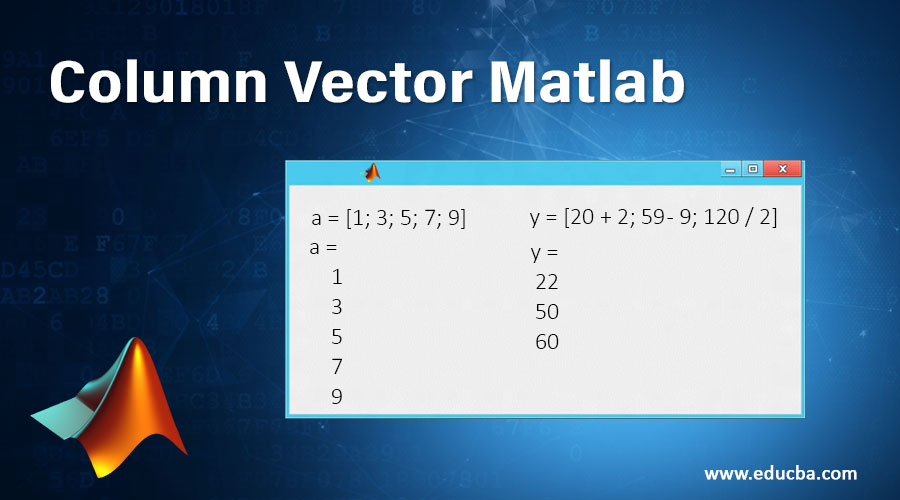
Introduction to Column Vector Matlab
MATLAB is a simple programming language owned and developed by MathWorks. It was started as a programming language for matrices as programming of linear algebra was simple. Matlab can be implemented as batch jobs and also as interactive sessions. In this article, we will understand a very basic and useful element of MATLAB called ‘Column Vector Matlab’.
Uses of Column Vector Matlab:
- Computation
- Simulation
- Modeling
- Data analytics
- Prototyping
- Application development
- Engineering & Scientific graphics
Column vectors in MATLAB are created by keeping the required set of elements in a square bracket. A semicolon is then used for delimiting the elements. In simpler words, we can create a column vector using a square bracket [ ]. Elements in a column vector are then separated by either a newline or a semicolon (newline can be obtained by pressing the Enter key).
Examples of Column Vector Matlab
Now let us understand this by a couple of examples:
Example #1 – Creating a Column Vector with 3 Elements
Code:
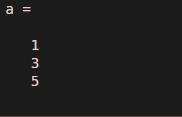
a = [1; 3; 5]
The output that we will get will be a single column with elements 1, 3, 5.
Output:
Example #2 – Creating a Column Vector with 5 Elements
Code:
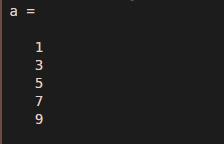
a = [1; 3; 5; 7; 9]
The output that we will get will be a single column with elements 1, 3, 5, 7, 9
Output:
The elements in a column vector may also be the result of arithmetic operations. Let us understand this by the following examples:
Example #3 – Creating a Column Vector with Different Elements
Let us try to create ‘y’, a column vector with elements having the following description:
- 20 inches converted to cm (1 inch is 2.54 cm).
- 140 degrees Fahrenheit converted to Centigrade (conversion formula is Centigrade = 5 (F – 32) / 9).
- 120 lbs in kgs (one kg = 2.2 lbs).
Code:
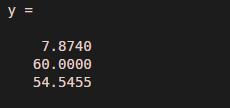
y = [20 / 2.54; (5 / 9) * (140 - 32); 120 / 2.2]
The output that we will get will be a single column with 3 elements.
Output:
Example #4 – Creating a Column Vector with Arithmetic Operations
Let’s take a simpler example which involves simple arithmetic operations:
Code:
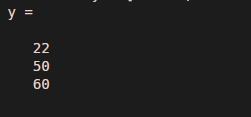
y = [20 + 2; 59 - 9; 120 / 2]
The output that we will get will be a single column with 3 elements.
Output:
Operations Between Row and Column Vector in Matlab
One thing to remember here is that we access elements of a column vector using normal round brackets ( ) which is exactly how we access elements of row vectors. Vector arithmetic is also the same for column vectors and for row vectors. The restriction to be kept in mind is that we cannot mix column and row vectors.
Convert Vectors using Transpose: We can convert our column vector into a row vector by using TRANSPOSE. Creating a row vector from a column vector using Transpose.
Code:
a = [1; 3; 5]’
Output:
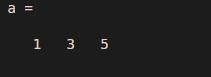
The output that we will get will be a single row with elements 1, 3, 5. As we can observe, instead of getting a column vector here, we have received a row vector. This is because we have used a ‘Transpose’ in the MATLAB command.
Conclusion
- Square brackets can be used to create not only column vectors but also row vectors.
- Square brackets in MATLAB, with elements separated by semicolons, are used for creating column vectors.
- Transpose ‘ converts a column vector into a row vector and vice versa.
- If we define a row vector x = [1 2 3 4] with elements 1, 2, 3, 4, it is completely different from the column vector y = [1; 2; 3; 4] with elements 1, 2, 3, 4. Notice here the difference of a semicolon between the elements.
Recommended Articles
This is a guide to Column Vector Matlab. Here we discuss the basic concept and uses of column vector Matlab along with the examples and code implementation. You may also look at the following articles to learn more –

