


What is Blue-Green Deployment?
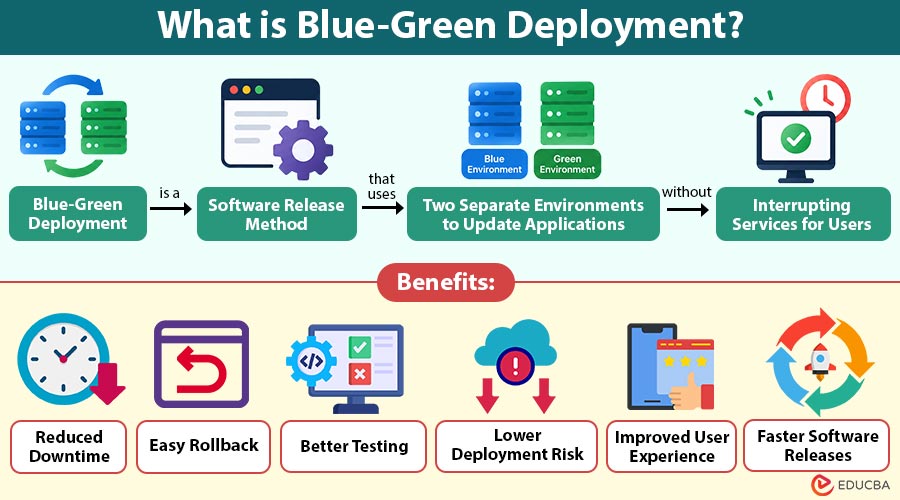
Blue-green deployment is a software release method that uses two separate environments to update applications without interrupting services for users.
When companies update their websites or applications, they need to make sure everything continues working properly. Even a small software update can sometimes cause errors, slow down a website, or affect important features.
Blue-green deployment helps reduce these problems by keeping two versions of an application ready. One version handles users’ requests, while the other is used to prepare and test the new update.
For example, imagine an online shopping website that receives thousands of visitors every day. The company wants to introduce a new payment feature without stopping customers from shopping. With blue-green deployment, developers can test the updated website separately and switch users to it once everything is ready.
This method is commonly used in cloud computing, DevOps, software development, and applications that need to remain available throughout the day.
Table of Contents:
- Meaning
- Working
- Key Components
- Process
- Examples
- Benefits
- Challenges
- Difference
- Applications
- Best Practices
Key Takeaways:
- Blue-green deployment uses two separate environments to release software updates with minimal downtime.
- One environment serves users while developers prepare and test updates in the other.
- Traffic can be switched to the updated environment after successful testing.
- The previous environment allows faster rollback if the new version develops problems.
- Proper testing, database planning, and monitoring are important for successful deployment.
How Does Blue-Green Deployment Work?
Blue-green deployment works by maintaining two environments that can run the same application. These environments are called Blue and Green.
- Blue Environment: This is usually the current version of the application that customers are using.
- Green Environment: This contains the updated version that developers want to release.
Developers first install the new software in the green environment. They test its features, check for errors, and make sure it works correctly. Once testing is complete, the company changes the traffic settings so users start accessing the green environment instead of the blue environment. The green environment then becomes the live version.
If users experience problems after the update, developers can switch traffic back to the blue environment, provided the older version remains compatible with the database and other services.
Key Components of Blue-Green Deployment
Several components work together to make blue-green deployment successful.
- Blue Environment: Runs current version of the application and continues serving users until the new version is ready for release.
- Green Environment: Contains the updated application version where developers can test new features and check for problems before making it live.
- Load Balancer: Directs incoming user requests to the active environment and helps switch traffic from the old version to the new one.
- Testing Tools: Help developers test application features, identify errors, and check whether the updated version works properly before users can access it.
- Monitoring System: Tracks application performance, checks for errors, and helps developers identify problems after the updated version becomes available to users.
- Rollback Plan: Allows developers to quickly switch back to the previous application version if the new update causes errors or unexpected problems.
Process of Blue-Green Deployment
The deployment process generally follows six steps.
Step 1: Prepare Two Environments
The development team sets up blue and green environments with the resources needed to run the application.
Step 2: Keep the Current Version Running
The blue environment continues handling customer requests while developers work on the updated application.
Step 3: Deploy the New Version
Developers install the updated software in the green environment without affecting the existing application.
Step 4: Test the Updated Application
The team checks important features, security, performance, and connections with other services to identify possible problems.
Step 5: Switch User Traffic
After successful testing, the load balancer or traffic-routing system directs users to the green environment.
Step 6: Monitor and Roll Back if Necessary
Developers monitor the updated application. If serious problems appear, they can return traffic to the blue environment when it is safe to do so.
Examples of Blue-Green Deployment
The following examples explain how businesses can use this deployment method.
| Industry | Example |
| E-commerce | An online store updates its checkout page while customers continue shopping. |
| Banking | A banking application introduces new features without interrupting regular account access |
| Healthcare | A hospital updates its appointment booking system while keeping the existing service available. |
| Education | An online learning platform releases new classroom features without stopping ongoing lessons. |
| Travel | A hotel booking website updates its search system while customers continue making reservations. |
Benefits of Blue-Green Deployment
Blue-green deployment offers several benefits for companies that regularly update their software.
- Reduced Downtime: Users can continue accessing the existing application while developers prepare and test the new version.
- Easy Rollback: Teams can return to the previous environment quickly when the updated application experiences problems.
- Better Testing: Developers can check new features in a separate environment before making them available to customers.
- Lower Deployment Risk: Keeping the existing version available reduces the chances of a failed update causing a lengthy service interruption.
- Improved User Experience: Customers experience fewer interruptions when companies release updates to their websites or applications.
- Faster Software Releases: Teams can prepare updates separately and release them once testing and final checks are complete.
Challenges of Blue-Green Deployment
Although blue-green deployment is useful, companies may face certain challenges when using it.
- Higher Infrastructure Costs: Running two environments may require additional servers, storage, and other computing resources.
- Complex Database Changes: Database updates need careful planning because both application versions may need to work with the same data.
- Environment Management: Developers must maintain similar settings and configurations across both environments to prevent unexpected problems.
- Traffic Switching Issues: Incorrect traffic settings may send users to the wrong environment or interrupt their requests.
- Additional Monitoring: Teams need to monitor application performance closely, especially immediately after switching to the updated version.
Difference Between Blue-Green Deployment and Rolling Deployment
The table below highlights the key differences between the two:
| Basis | Blue-Green Deployment | Rolling Deployment |
| Meaning | Uses two separate environments for software releases. | Updates application servers gradually. |
| Process | Switches traffic from the old environment to the new one. | Replaces old application instances in stages. |
| Infrastructure | Usually requires two complete environments. | Can use existing infrastructure. |
| Rollback | Can switch back to the previous environment. | May require reversing updates across multiple instances. |
| Testing | Allows testing in a separate environment before release. | Tests updates as they reach different servers. |
| Cost | Can involve higher temporary infrastructure costs. | Often requires fewer additional resources. |
Applications of Blue-Green Deployment
Blue-green deployment is commonly used in several areas of software development.
- Cloud Applications: Helps businesses release updated cloud services while keeping existing applications available.
- E-commerce Websites: Allows online stores to update product pages, payment features, and shopping systems.
- Banking Applications: Supports software updates while reducing interruptions to customers using digital banking services.
- DevOps Processes: Helps development and operations teams manage software releases through automated deployment workflows.
- Online Platforms: Allows educational, entertainment, and booking platforms to introduce new features with fewer service interruptions.
Best Practices
Companies can follow a few simple practices to make software releases more reliable.
- Test Before Switching: Check important application features and performance before directing users to the updated environment.
- Keep Environments Consistent: Maintain similar configurations in both environments to avoid unexpected differences during deployment.
- Prepare a Rollback Plan: Decide how to restore the previous version if the updated application causes problems.
- Monitor Application Performance: Watch error rates, response times, and other important measurements after switching traffic.
- Plan Database Changes Carefully: Make sure database updates will not prevent the older application version from working if rollback becomes necessary.
Final Thoughts
Blue-green deployment helps software teams release application updates without making major changes directly to the version customers are using. By preparing the new version in a separate environment, developers get an opportunity to test features and identify problems before the release. Although maintaining two environments can increase costs, this approach is useful for businesses that need reliable applications and fewer service interruptions. With proper planning and testing, blue-green deployment can make software updates safer and easier to manage.
Frequently Asked Questions (FAQs)
Q1. Why is blue-green deployment important?
Answer: Blue-green deployment helps companies update applications while reducing downtime. It also provides a way to return to the previous version if problems occur.
Q2. Does blue-green deployment require two servers?
Answer: Not necessarily. It requires two environments, which may use multiple servers, containers, or cloud resources depending on the application’s setup.
Q3. Is blue-green deployment suitable for small businesses?
Answer: Yes. Small businesses can use this method when reliable software updates are important, provided they can manage the additional infrastructure costs.
Q4. Can blue-green deployment prevent all software errors?
Answer: No. It reduces deployment risks, but errors can still occur. Proper testing, monitoring, and rollback planning remain important.
Recommended Articles
We hope that this EDUCBA information on “Blue-Green Deployment” was beneficial to you. You can view EDUCBA’s recommended articles for more information