
Updated September 14, 2023
Difference Between Autocad vs Inventor
AutoCAD is a heavyweight design production platform with post-development features. Autodesk developed and marketed AutoCAD, and they initially released it in 1982 as a desktop app that ran on microcomputers with internal graphics controllers. Autodesk released the latest version of AutoCAD as AutoCAD 360, which also supports mobile and web platforms. Used by various industries, project managers, engineers, architects, town planners, and other professionals. Inventor’s beauty lies in its ability to enable users to blend 2D and 3D data into a single environment, creating a virtual presentation of the output product. This allows the user to validate the product’s form, fit, and function before building it. An inventor has developed a dimension-driven design. Drawing any shape or object is simpler using the inventor.
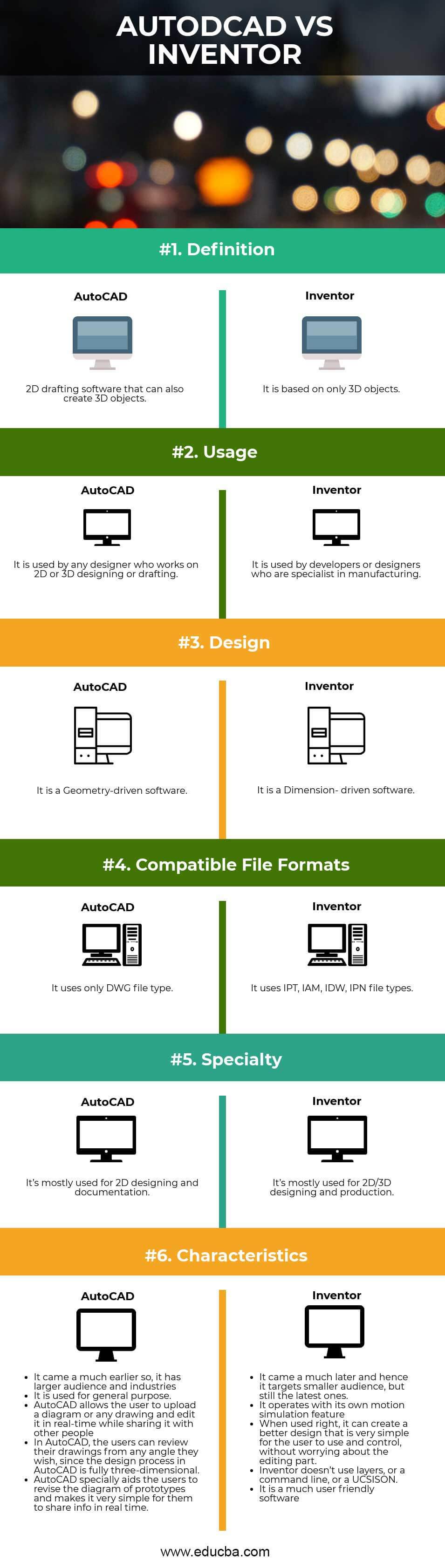
Head To Head Comparison Between Autocad vs Inventor (Infographics)
Below are the top 6 differences between Autocad vs Inventor
Key Differences Between Autocad vs Inventor
Both Autocad vs Inventor are popular choices in the market; let us discuss some of the major Differences Between Autocad vs Inventor:
- AutoCAD is difficult to use and adapt to due to the generic domain, while Inventor is easy to use due to industry specificity.
- AutoCAD works based on designing and discovering new items while Inventor targets users who want to test something in motion. For example, AutoCAD is used to design the robotic machine, while Inventor can be used to imitate how that machine would move when used.
- Designers and drafters prefer AutoCAD over Inventor because it ensures the use of the proper materials before testing.
- If the user needs to work with a technical aspect of a program or device, then using Inventor would be perfect than using AutoCAD.
- Designers and drafters prefer Inventor because it incorporates 3D modeling features by default, whereas AutoCAD lacks these as it was originally a 2D software that later adapted 3D modules.
- An Inventor is visually and technically user-friendly software, as compared to AutoCAD.
- AutoCAD is not a very smart program in comparison to Inventor. The user must draw lines repeatedly if anything he wants to change or move in the drawing later.
- An Inventor can distinguish between assemblies, parts, and 2D drawings, unlike AutoCAD.
- The inventor can update the existing geometry based on the updates within the base part of the geometry. While this base-part proportionality is not available in AutoCAD.
- AutoCAD is a massive design production application that includes cross-sectioning, artificial lighting-based renders, and panoramic rendering for virtual walkthroughs. On the other hand, Inventor is an application typically used after designs are manufactured.
- In Inventor, when a user creates 3D parts like chamfer, hole, and fillet, each of these is stored as independent features. While in AutoCAD, the user finds it difficult, and they must delete and re-create the specific feature.
- The inventor was created primarily for the Manufacturing company. While AutoCAD was made for a larger audience. It was designed for Civil, Plant Design, FM, AEC, and more.
- An inventor does not use layers. That means it sets up all the parameters once and automatically assigns them to the parts from that point. While it is a troublesome task to use layers in AutoCAD.
- Inventor allows the user to use any specific file format or individual parts and assemblies. The inventor has an excellent geometry-based engine that generates all readouts and analysis reports in real-time.
- Since AutoCAD came much before, people are drifted more towards AutoCAD. Inventor, on the other hand, was introduced much later.
- An inventor is much more like a practical demo-giving software where the user learns how his designs work in motion. While AutoCAD is more for creating new models out of imagination.
- Inventor being the latest amongst the two, has the shortest learning curve, gives speedy results, and has a very attractive workflow and interface, while AutoCAD is no less than it, but still, it lacks some features.
AutoCAD vs Inventor Comparison Table
Let’s look at the top comparison between AutoCAD vs Inventor; –
| Basis of Comparison |
AutoCAD |
Inventor |
| Definition | 2D drafting software that can also create 3D objects | It is based on only 3D objects. |
| Usage | Designers who work on 2D or 3D designing or drafting use it frequently. | Developers or designers who specialize in manufacturing often use it. |
| Design | It is a Geometry-driven software | It is a Dimension- driven software |
| Compatible File formats | It uses only the DWG file type | It uses IPT, IAM, IDW, and IPN file types. |
| Specialty | 2D designing and documentation | 2D/3D designing and production |
| Characteristics |
|
|
Conclusion
AutoCAD vs Inventor is two programs that differ in the way of what they can do. In that case, it will be easier for any business to do more concerning designing and using different items in the workplace. Overall, the Inventor is a better choice for 3D drawing. Autodesk invented Inventor in 1999 as an application for 3D mechanical design, simulation, visualization, and documentation. It is CAD software whose sole responsibility is to help the post-design manufacturing process.
Where AutoCAD offers extreme control, Inventor offers ease of use. AutoCAD offers pre-production flexibility and unique designs; Inventor is all about post-development and manufacturing potential.
Recommended Articles
This has been a guide to the top difference between Autocad vs Inventor. Here we also discuss the Autocad vs Inventor key differences with infographics and a comparison table. You may also have a look at the following articles to learn more –

