


What is Application Resiliency?
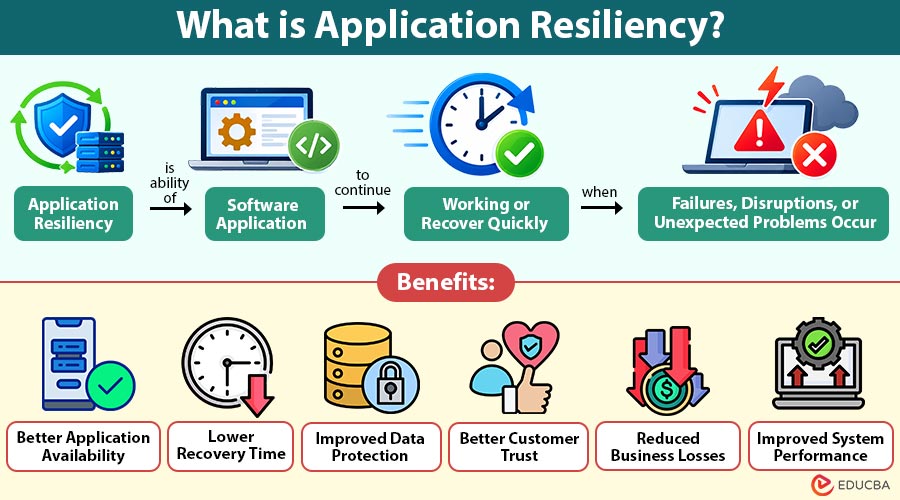
Application resiliency is the ability of a software application to continue working or recover quickly when failures, disruptions, or unexpected problems occur.
Modern businesses depend on applications for daily activities such as processing payments, managing customer information, handling orders, and communicating with employees. Even a short interruption can affect business operations and customer trust.
Application resiliency helps reduce these interruptions by preparing applications to handle unexpected situations. It uses methods such as backup systems, automatic recovery, error handling, and regular testing to keep services available.
For example, if an online shopping application experiences a server failure during a sale, a backup server can take over and allow customers to continue placing orders. This helps prevent service interruptions and reduces business losses.
Table of Contents:
Key Takeaways:
- Application resiliency helps software systems handle unexpected failures and maintain essential services with minimal interruptions.
- Backup systems and automatic recovery methods help applications restore operations quickly after technical disruptions.
- Regular monitoring and testing help development teams identify weaknesses and improve application performance during failures.
- Application resiliency improves service availability, protects business data, and supports uninterrupted business operations.
Importance of Application Resiliency
Application resiliency is important because businesses need their software systems to work without frequent interruptions. It helps organizations:
1. Reduce Downtime
Application resiliency keeps software services available during unexpected technical problems, reducing interruptions and helping employees and customers complete their tasks smoothly.
2. Protect Business Operations
It prevents technical failures from stopping important business activities, allowing employees to continue their work and maintain normal operations.
3. Improve Customer Experience
It helps customers access applications with fewer interruptions, making online services more convenient and improving their overall experience.
4. Protect Data
Backup and recovery systems help protect important business information and restore lost data after unexpected failures or technical disruptions.
5. Support Business Continuity
It helps organizations maintain essential services during technical problems, allowing important activities to continue with minimal disruption.
How Does Application Resiliency Work?
Application resiliency works by preparing software systems to handle failures and recover without major disruption.
The process generally involves the following steps:
1. Identify Possible Failures
Technical teams identify possible risks, including server failures, network problems, software errors, and heavy traffic, before they affect application performance.
2. Prepare Backup Resources
Organizations maintain additional servers, databases, and storage resources to support applications when primary systems become unavailable due to unexpected failures.
3. Detect Problems
Monitoring tools continuously track application activities and identify unusual behavior, performance issues, and errors that may affect normal operations.
4. Manage Failures
Applications use automatic retries, backup systems, and alternative services to handle technical problems without interrupting essential functions.
5. Restore Normal Operations
Recovery processes bring affected application components back to normal, allowing users to access services and continue their activities.
6. Review Performance
Technical teams examine failures, understand their causes, and improve system configurations to reduce the chances of similar problems occurring again.
These steps help applications remain available and reduce the impact of unexpected disruptions.
Types of Application Resiliency
Organizations use different types to make applications more resilient.
1. Fault Tolerance
Fault tolerance allows applications to continue working when individual components fail. It uses backup resources to prevent one failure from affecting the entire system.
2. High Availability
High availability keeps applications accessible with minimal downtime. It uses multiple servers, load balancing, and backup infrastructure to maintain continuous service availability.
3. Disaster Recovery
Disaster recovery helps organizations restore applications and important data after major disruptions, including cyberattacks, hardware failures, natural disasters, or unexpected system damage.
4. Graceful Degradation
Graceful degradation allows applications to provide essential services when certain features become unavailable, helping users continue important activities without complete service interruption.
5. Self-Healing Resiliency
Self-healing resiliency allows applications to detect certain technical problems and automatically restart failed services, replace unhealthy components, or redirect incoming requests.
Key Components of Application Resiliency
Several technical components help applications handle failures and recover effectively.
1. Redundancy
Redundancy maintains additional servers, databases, and resources so applications can continue operating when primary components experience unexpected failures or become unavailable.
2. Load Balancing
Load balancing distributes incoming requests across multiple servers, preventing individual servers from becoming overloaded and helping applications handle increased user traffic.
3. Automatic Failover
Automatic failover transfers application operations to an available backup system when the primary server or service experiences an unexpected failure.
4. Error Handling
Error handling manages unexpected application problems and prevents individual errors from affecting other functions or stopping the entire software system.
5. Monitoring and Logging
Monitoring and logging track application performance, record technical errors, and help development teams identify problems before they seriously affect users.
6. Backup and Recovery
Backup and recovery maintain copies of important application data and help organizations restore information after unexpected failures or system disruptions.
Examples of Application Resiliency
Here are some practical examples of how businesses use application resiliency.
1. Online Banking Application
An online banking application uses backup servers and database recovery systems to maintain banking services. If its primary server fails, another server can handle customer requests and reduce service interruptions.
2. E-Commerce Website
An e-commerce website may experience heavy traffic during festive sales. Load balancing distributes customer requests across multiple servers, while caching helps deliver frequently accessed information quickly. If the payment service becomes temporarily unavailable, the website can allow customers to keep browsing products while the payment issue is resolved.
3. Video Streaming Platform
A video streaming application may use multiple content delivery servers to provide videos to users. If one server experiences problems, requests can be redirected to another available server. This helps users continue watching videos with fewer interruptions.
4. Healthcare Management System
A healthcare application stores patient records, appointment details, and treatment information. Regular backups and recovery systems help protect this information and restore access when technical failures occur.
Benefits of Application Resiliency
Application resiliency provides several benefits to businesses and software development teams.
1. Better Application Availability
Application resiliency helps software remain accessible during unexpected failures, allowing users to access important services without frequent interruptions or unnecessary delays.
2. Lower Recovery Time
Automatic recovery methods help restore affected services quickly, reducing the time required to resolve technical problems and resume normal operations.
3. Improved Data Protection
Regular backups and recovery systems protect important information and help organizations restore application data after unexpected technical failures or disruptions.
4. Better Customer Trust
Consistent application availability allows customers to access services when needed, creating confidence in the business and improving long-term relationships.
5. Reduced Business Losses
Minimizing application downtime helps organizations avoid missed transactions, delayed services, lost productivity, and other financial problems caused by technical failures.
6. Improved System Performance
Resiliency methods help applications manage changing workloads, distribute user requests, and maintain stable performance during periods of increased demand.
Challenges of Application Resiliency
Although application resiliency improves software performance, implementing it can create certain challenges.
1. High Implementation Costs
Building resilient applications requires additional infrastructure, backup resources, monitoring tools, and maintenance, which can increase overall development and operational expenses.
2. Complex System Design
Managing multiple servers, databases, backup systems, and connected services requires careful planning and technical expertise from development and operations teams.
3. Testing Difficulties
Simulating real-world failures and checking recovery performance can be challenging because different technical problems may affect applications in unexpected ways.
4. Data Synchronization
Maintaining consistent information across multiple databases and backup systems requires proper synchronization methods to prevent outdated or conflicting application data.
5. Continuous Monitoring
Applications require regular monitoring to identify technical problems, track performance changes, and ensure recovery systems continue working as expected.
6. Skill Requirements
Development and operations teams need suitable technical knowledge to design, implement, test, and maintain effective application resiliency solutions.
Difference Between Application Resiliency and Application Reliability
The table below highlights the differences between the two:
| Basis | Application Resiliency | Application Reliability |
| Meaning | Ability to handle failures and recover from disruptions. | Ability to perform correctly over time. |
| Main Focus | Managing failures and restoring services. | Maintaining consistent performance. |
| Approach | Uses backups, failover, and recovery methods. | Uses testing, maintenance, and quality checks. |
| Objective | Reduce the impact of unexpected failures. | Prevent errors and maintain correct operations. |
| Example | Switching to a backup server after failure. | Ensuring an application processes transactions correctly. |
Final Thoughts
Application resiliency helps businesses maintain important software services during unexpected disruptions. By using backup systems, automatic recovery, monitoring, and regular testing, organizations can reduce downtime and protect business operations. Although building resilient applications requires proper planning and investment, it helps improve service availability, customer experience, and long-term system stability.
Frequently Asked Questions (FAQs)
Q1. What is the main goal of application resiliency?
Answer: The main goal is to help applications continue providing essential services and recover quickly when unexpected failures or technical disruptions occur.
Q2. What are the common tools used for application resiliency?
Answer: Common tools include monitoring platforms, backup systems, load balancers, automated recovery solutions, and circuit breaker libraries.
Q3. How does cloud computing support application resiliency?
Answer: Cloud computing supports application resiliency through backup storage, multiple availability zones, automatic scaling, and disaster recovery services.
Q4. How can developers test application resiliency?
Answer: Developers can test resiliency by simulating server failures, network interruptions, heavy traffic, and database problems to check how applications respond and recover.
Recommended Articles
We hope that this EDUCBA information on “Application Resiliency” was beneficial to you. You can view EDUCBA’s recommended articles for more information –

