
Updated April 3, 2023
Introduction to TypeScript number
TypeScript number is one of the data types which is similar to JavaScript and supports numeric values as number objects. All numbers are stored as floating-point values, which are treated as the number data type. It is used to represent both integers as well as floating-point values. This number type converts numeric literals to an instance of number classes, which acts as a wrapper and manipulates number literals as they are objects. Number data type stores numbers as a double-precision 64-bit number and has two types of number data types which are Primitive number data type and the other is BigInt, a new addition to TypeScript. Let us see how the Number data type is used and solve a few examples.
Syntax:
Here is the Syntax of number data type,
let indetifier_name: number = < value >No arguments are passed the above syntax, it is just the initialization of number type to an identifier.
For example
let empID: number = 101;
let age: number = 25;
let price: number = 150.75
Using literal syntax:
let identifier_name = < value >;Using number global function:
let identifier_name = Number(101);In TypeScript, the number data type supports decimal literals, hexadecimal, and floating-point numbers. In addition to these, it also supports binary and octal values that are introduced in ECMAScript 2015.
For example
let code: number = 0x42A;
let vaCode: number = 0t455;
let bCode: number = 100101;
The above syntax can be decoded as,
[Keyword] [Variable name]: [number] = [value]- [Keyword]: it is the keyword of the variable, like let, var, or const that defines the scope and usage of the variable.
- [Variable name]: Also can be any Identifier, name of the variable to hold the value.
- [number]: It is the number of data types the variable holds.
- [value]: the value that is assigned to the variable
Examples of TypeScript number
Let us see How number data type works, with a few examples:
Example #1
TypeScript number data type
let empID1: number = 101;
let empsalary: number = 3.45;
let empVC: number = 0x240F;
let empCouID: number = 0b0011;
let empEncrypt: number = 0o214;
console.log(empID1);
console.log(empsalary);
console.log(empVC);
console.log(empCouID);
console.log(empEncrypt);
Output:
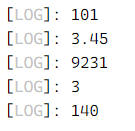
So here we have displayed all kinds of numerical data, octal, decimal literal, hexadecimal and floating numbers are all taking the data type as Number.
TypeScript number has some properties, listed below:
- MAX_VALUE: will return the largest possible value of the number in JavaScript, 1.797693134862317E+308
- MIN_VALUE: will return the smallest possible value of the number in JavaScript, 5E-324
- POSITIVE_INFINITY: will return a value that is greater than MAX_VALUE
- NEGATIVE_INFINITY: will return a value that is less than MIN_VALUE
- NaN: when some number calculation is not represented by the valid number, it will return NaN which is equal to a value that is not a number.
- EPSILON: will return value which is difference between 1 and the smallest value greater than 1
- prototype: used to assign newer properties and methods to Number type object
- parseInt: used to convert string to integer
- parseFloat: used to convert string to a floating-point integer.
Example #2
TypeScript Number properties
let empid = 0;
if (empid <= 0) {
console.log('Not a number', Number.NaN);
}
else {
console.log('number', empid);
}
console.log('Max value', Number.MAX_VALUE);
console.log('Min value', Number.MIN_VALUE);
console.log('Positive infinity value', Number.POSITIVE_INFINITY);
console.log('Negative infinity value', Number.NEGATIVE_INFINITY);
console.log('Epsilon value', Number.EPSILON);
console.log('prototype', Number.prototype);
Output:
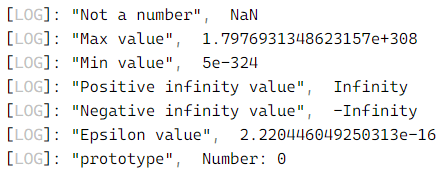
Here, we have looked for all the Number properties.
TypeScript Number Method:
toFixed(): returns the fixed point notation in string format
number.toFixed([digits])toExponential(): returns exponential notation in string format
number.toExponential([count of fraction digits])toString(): returns the string representation of the given number in specified base value
number.toString([radix/base])toPrecision(): returns string representation in fixed point or exponential in specified precision.
number.toPrecision([precision])toLocaleString(): converts number to a local specified representation of the number.
number.toLocaleString([locales, [, optionl]])valueOf(): returns primitive value of the number
number.valueOf()Example #3
TypeScript number method
let price: number = 120.457;
console.log(price.toFixed());
console.log(price.toFixed(1));
console.log(price.toFixed(2));
console.log(price.toFixed(3));
let exp: number = 454280;
console.log(exp.toExponential());
console.log(exp.toExponential(1));
console.log(exp.toExponential(2));
console.log(exp.toExponential(3));
let nameID: number = 368;
console.log(nameID.toString());
console.log(nameID.toString(2));
console.log(nameID.toString(4));
console.log(nameID.toString(8));
console.log(nameID.toString(16));
console.log(nameID.toString(36));
let precID: number = 12.432;
console.log(precID.toPrecision(1));
console.log(precID.toPrecision(2));
console.log(precID.toPrecision(3));
let localeId: number = 21778.435;
console.log(localeId.toLocaleString());
console.log(localeId.toLocaleString('de-DE'));
console.log(localeId.toLocaleString('ar-EG'));
let valId = new Number(563);
console.log(valId)
console.log(valId.valueOf())
console.log(typeof valId)
let valIdx = valId.valueOf()
console.log(valIdx)
console.log(typeof valIdx)
Output:
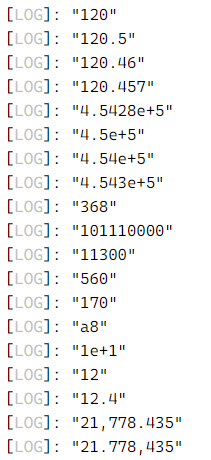
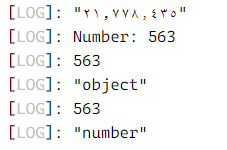
So here we have executed all the numerical methods.
Big Integers: it represents the whole numbers greater than 253 – 1. Big integer has n character at the end of an integer literal, as,
bigint = 90403900382042442342n;number vs Number:
The number is a primitive data type whereas the Number is a wrapper object around the number type. Users can assign a primitive number to the Number object, but not vice versa.
Conclusion
With this, we conclude the topic. We have seen what is a number data type and how is it used. Looked into the initialization of number identifiers or variables, and their methods and properties. We have also worked on some of the examples depicting the values of numerical methods and properties. All numbers are either big integers that take bigint type or floating-point numbers that take number data type. Do not use ‘Number’ in TypeScript as it is a non-primitive object. Thanks! Happy Learning!!
Recommended Articles
We hope that this EDUCBA information on “TypeScript number” was beneficial to you. You can view EDUCBA’s recommended articles for more information.

