

Updated February 28, 2023

Definition of MongoDB findAndModify
MongoDB findAndModify is used to modify the single document from the collections, by default document did not include any modification update method done this modification in MongoDB. Instead of updating if we have used the findAndModify method, then the first document is updated, and the updated document will display as a result. MongoDB findAndModify method is essential and useful to display the updated documents in one query. This method is used to modify and single document based upon selection criteria that we have used in a query, and the return result document will not show the updated document by default.
Syntax and Parameters
Below is the syntax of the findAndModify method in MongoDB.
Syntax:
collection_name.findAndModify (Document)
collection_name.findAndModify ({

Query:  <document>

Sort:  <document>

Remove:  <Boolean>

New:  <Boolean>

Upsert:  <Boolean>

Update: <aggregation pipeline or document>

Fields:  <document>

Collation: <document>

ArrayFilters:  [<filterdocument1>, …]
} );
Parameter:
Below is the parameter description of MongoDB findAndModify
- Collection name: Collection name is defined as modify documents from the collection by using the findAndModify method. The collection was automatically created using the findAndModify method when it was not present in the database.
- Document: Document is defined as data that we have to modify collection using the findAndModify method in MongoDB. We can modify single or multiple documents at one time.
- Write concern: This is an optional parameter of the findAndModify method.
- Query: Query defines as a selection criterion of a document for the modify operations in MongoDB. Using the query, we have to define select criteria of findAndModify method in MongoDB.
- Update: Update will specify the remove or update a field from a document by using the findAndModify method.
- Upsert: It is an optional parameter of the findAndModify method in MongoDB. It will create a new document when our updated query is not matched with the existing document.
- Collation: Collation is used to allow users to specify language-specific rules for the string comparison. It is an optional parameter of the findAndModify method in MongoDB.
- Array Filters: It is an optional parameter of the findAndModify method in MongoDB. It will filter an array that specifies which document elements to modify an update operation in the array field.
- FindAndModify: findAndModifyis used to modify the single document from the collections, by default document was not include any modification update method is done this modification in MongoDB.
- Fields: Fields is an optional parameter of the findAndModify method in MongoDB. It will specify that inclusion with 1 from the fields.
- New: When the return result of the findAndModify method is a modified document, or it was not original, then it will return true.
- Remove: The default value of removal in findAndModify method is false. It will remove the document which was specified in the query.
How findAndModify Command Works in MongoDB?
Below is the working of the findAndModify method.
- Using the findAndModify method, we can modify single or multiple statements as per the criteria defined in the query.
- It is used to modify the single document from the collections.
- In MongoDB by default document was not include any modification update method is done this modification in MongoDB.
- While using the Upsert infindAndModify method in MongoDB, it will insert the document when the document is not present in the collection. The collection is also automatically created at the time of document modifying using the findAndModify method in MongoDB.
- The below example shows the Upsert using findAndModify method will automatically insert the document when this is not present in the collection.
use db_test;

db.emp_test.findAndModify({query: {name: "ABC", emp_id: 1, emp_salary: 10000}, update: {$inc: {emp_phone: 1234567890}}, upsert: true})

show collections

db.emp_test.find()

- In the above example, emp_test collection was automatically created at the time of modification and insertion of the document using the findAndModify method in MongoDB.
- We have not used sort to return as the result’s null value, but the document is inserted in emp_test collection.
- Upsert is an optional parameter of the findAndModify method in MongoDB. It will create a new document when our updated query is not matched with an existing document.
- This method is essential and useful to display the updated documents in one query.
- This method is used to modify the single document based upon selection criteria that we have used in a query, and the return result document will not show the updated document by default.
- Instead of an update if we have used the findAndModify method, then the first document is updated, and the updated document will display as a result.
- Collation is used in findAndModify method to allow users to specify language-specific rules for the string comparison.
Examples of MongoDB findAndModify
Below is the example of the findAndModify method.
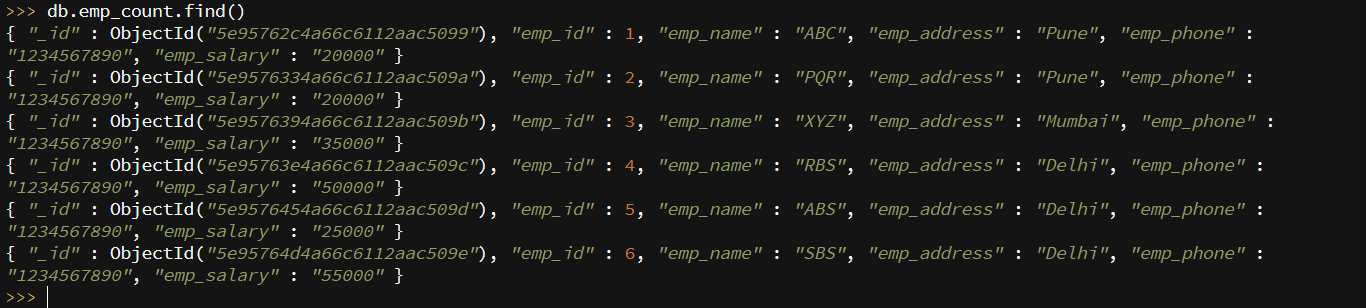
- We have taken the example of the emp_count table to describe how the findAndModify method in MongoDB is as follows. Below is the data description of the emp_count table are as follows.
db.emp_count.find ()
Upsert and update using the findAndModify method:
- Below example show upsert and update using the findAndModify method in MongoDB. We have inserted a new document by using upsert in emp_count table.
db.emp_count.findAndModify({query: { emp_name: "ABC", emp_address: "Pune", emp_phone: 1234567890, emp_salary: 20000 }, sort: { emp_id: 1 }, update: { $inc: { emp_id: 301 } }, upsert: true })

Sort and remove using the findAndModify method:
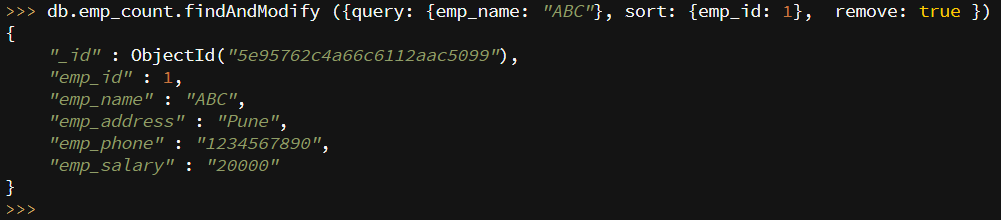
- The below example shows sort and removes using findAndModify method in MongoDB. We have deleted documents from emp_count table where emp_name is ABC.
db.emp_count.findAndModify ({query: {emp_name: "ABC"}, sort: {emp_id: 1}, remove: true })
Conclusion
It is used to modify the single document from the collections. By default document was not include any modification update method is done this modification in MongoDB. We can insert a new document using the findAndModify method if it’s not present in the collection. This method is important in MongoDB.
Recommended Articles
This is a guide to MongoDB findAndModify. Here we also discuss how findAndModify command works in MongoDB? Along with different examples and code implementation. You may also have a look at the following articles to learn more –

