

Updated May 3, 2023
Introduction to PostgreSQL Cross Join
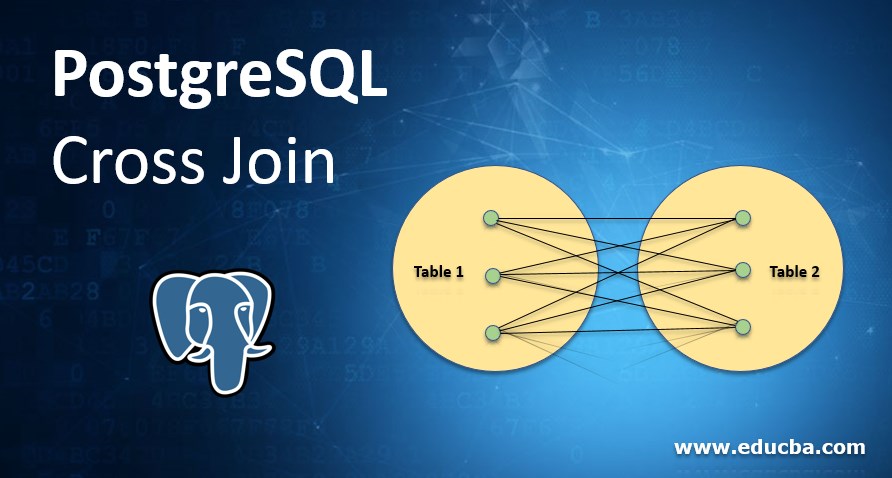
PostgreSQL cross join matches each row of the first table and each row of the second table. It will display all the columns of both tables. If Table 1 has a C column and Table 2 have D columns, then the join table’s result will have (C+D) columns. It will create a Cartesian product between two sets of data of two or multiple tables. It will not maintain any relationship between the sets of data. Instead of creating a relationship returns the result of the multiplication of two tables. It is used to join two or multiple tables.
Syntax:
- It will return each possible combination of rows between join sets.
- The result will display using the multiplication of rows from both tables.
Below is the syntax of the cross join as follows.
SELECT column1, column2, … FROM table1 CROSS JOIN table2Select (*) from table1 CROSS JOIN table2Description
Given below is the description of the above syntax:
- Columns: Name of the column that is used to display the result. We can use one or multiple columns to display the result in the result set.
- Tables: Tables is used to join one or more table in a single result set.
- From: From is used to display the result from the table, which we have used in the query to display results.
- Asterisk (*): Asterisk (*) is used to select all columns from selected tables.
Working of PostgreSQL Cross Join
- It will create a Cartesian product between two sets of data or two table sets of data.
- The data analyst did not keep the sets of data in any kind of relationship. When they multiply one table by another, they get the result.
- PostgreSQL also calls the multiplication of two tables through cross join a product because it creates a combination of rows between the two joined sets.
- It is beneficial to join two or multiple tables to retrieve a single set of data.
- It will match the first table of rows with the second table of rows. Each row from the first table is matched with the second table.
- If table1 has an ABC column and table2 has a PQR column, then our resultant table of using cross join is (ABC + PQR).
- To put the Cartesian product of two or more columns into practice.
- There won’t be any matching conditions in the join clause to join one or more tables. It will simply match one column of table1 with one column of table2 by applying the tables’ multiplication condition.
- Every row of table 1 will match every row of table 2 if we need to construct a cross join in PostgreSQL for table1 and table2.
- It consists of all columns from table1 as well as from table2. It will multiply rows from table1 and table2.
- Suppose we need to illustrate the true condition in the result set. Inner join is used.
- Below is an example of the evaluation of true condition using Inner Join in PostgreSQL cross Join.
- We cannot use PostgreSQL cross join if both tables have no rows that output we want. At this time, we need to stimulate output using full join.
- Users use it to return multiple combinations of rows from two or multiple tables.
- We use it when we wish to create a comparison of every row from two tables.
- PostgreSQL cross join is work the same as SQL operator to perform Cartesian product between two different tables.
- It is a Cartesian product, so it is not allowing any condition during the result set operation. We can only restrict where condition.
- To avoid this, we can use Inner join or full join in PostgreSQL.
- It is essential to implement the result of the Cartesian product.
- PostgreSQL uses inner join to evaluate the true condition result in cross join.
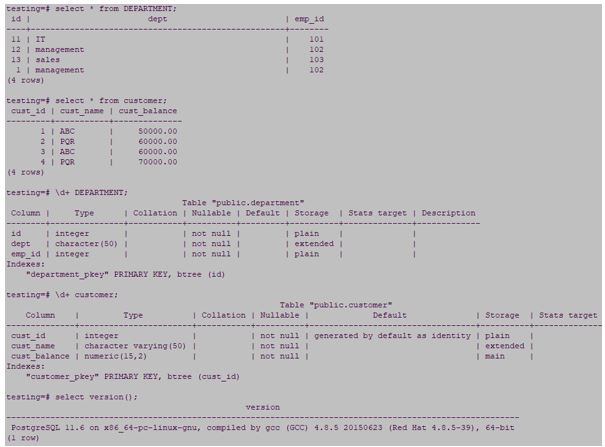
- We have used customer and department table, for example, to describe cross join.
Please find below Figure 1 for the same.
Example #1
true condition evaluation using Inner Join.
Syntax:
* from table1 inner join table2 ON TRUE;Select column1, column2, … table1 inner join table2 ON TRUE;Code:
select * from customer inner join department ON TRUE;select cust_id, cust_name from customer inner join department ON TRUE;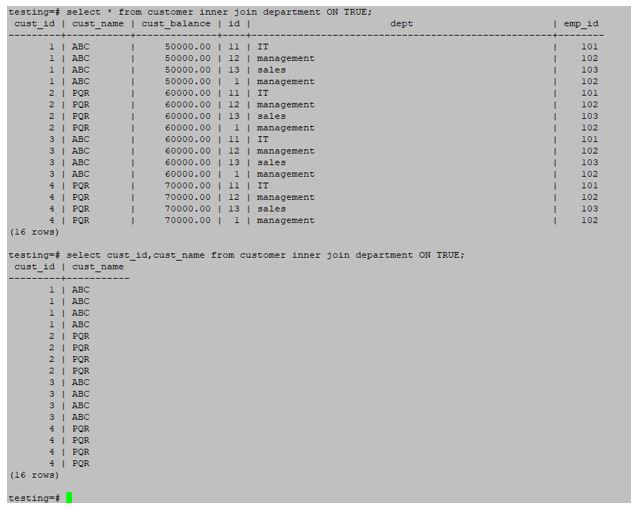
Example #2
We can use cross join and where condition to filter data in PostgreSQL.
Below query and syntax of where clause and cross join.
Syntax:
Select table1.column_name, table2.column_name, table1.column_name, table2.column_name from table1, table2 where table1.column_name = table2.column_name condition;Code:
select customer.cust_id, department.id, customer. cust_name, department.dept from customer, department where customer.cust_id = department.id and cust_id=1;
Figure 3: Example of cross join and where the condition
- In the above query, the PostgreSQL query planner realises that we are doing Inner join between the customer and department tables. But we are using cross join in the above query to fetch results between the customer and department tables.
- Cross join is implemented using both tables and has values; if one table is empty, then the result of two tables of join is also empty because it will multiply rows from the first table of rows with second tables of rows.
Example of PostgreSQL Cross Join
We can implement cross join using various conditions like (where clause).
Example
Below is an example of the cross join.
Code:
truncate table department;select * from customer cross join department;An example of a cross joins by using the second table has empty. In our condition, we have used the department tables that have no rows.
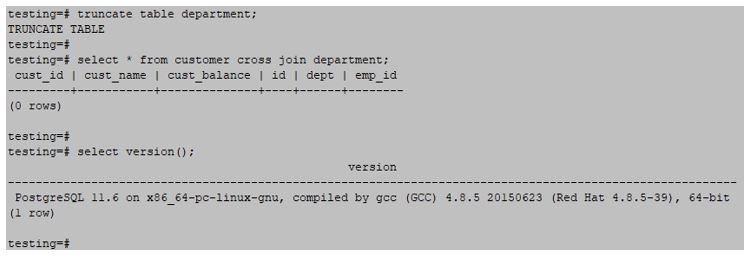
- In the above example, the customer table contains rows, but the department table is empty; it doesn’t contain any rows. Therefore, the empty result set is the result of the cross join.
Code:
select cust_id, cust_name from customer cross join department;select * from customer cross join department;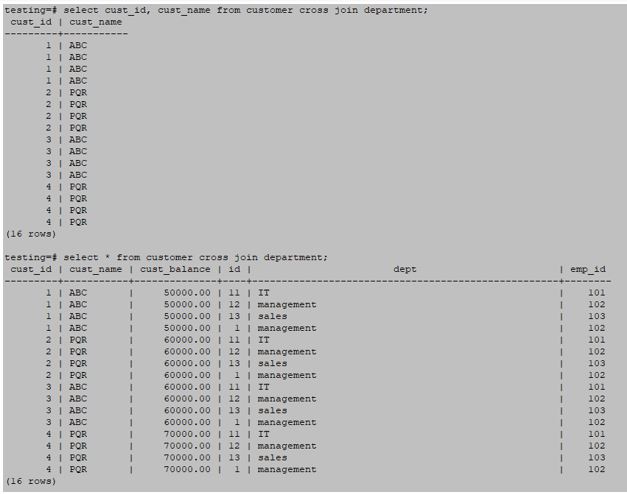

Conclusion
It generates the Cartesian product of the result for two sets of the table. It is essential to join one or more tables in a single result set. If we need multiple combination results for two tables, then we used cross join.
Recommended Articles
We hope that this EDUCBA information on “PostgreSQL Cross Join” was beneficial to you. You can view EDUCBA’s recommended articles for more information.

