

What is Computer Software?
Computer software is the invisible force that makes computers useful. From powering operating systems and mobile apps to running complex business systems and artificial intelligence, software controls how digital devices function and interact with users. Without software, even the most advanced hardware would be unable to perform meaningful tasks.
In the digital world, software plays a vital role in communication, automation, data management, security, and innovation. From web browsing to advanced technologies like cloud computing, blockchain, and machine learning, software powers modern life. As technology evolves, software security is essential for protecting applications, data, and users from cyber threats. Code signing certificates help verify software authenticity and integrity, ensuring applications come from trusted sources and have not been tampered with. Together, secure software and code signing create a safer and more reliable digital environment.
Significance of Software in Modern Computing
Computer software plays a pivotal role in modern computing for several significant reasons:
- Functionality: Software defines what a computer can do. It provides the tools, applications, and operating systems that enable users to perform a wide range of tasks, from word processing to complex data analysis.
- Flexibility: Software can be easily updated and adapted to changing needs. This flexibility allows computers to evolve without requiring constant hardware upgrades.
- Efficiency: Optimized software can significantly improve hardware performance. Efficient algorithms and well-designed software can make computing processes faster and more resource-efficient.
- Automation: Software automates repetitive tasks, boosts productivity, and minimizes human error. This is crucial in manufacturing, finance, and healthcare.
- Connectivity: Software facilitates communication and connectivity. From internet browsers to networking protocols, software enables global information exchange.
- Innovation: Software drives innovation by enabling the development of new applications, services, and technologies. It’s the foundation for emerging fields like artificial intelligence, virtual reality, and blockchain. Bootcamps like Metana Web3 Blockchain Bootcamp help learners to master these technologies hands-on, building the next generation of decentralized applications and systems.
- Security: Software is essential for cybersecurity. Antivirus programs, firewalls, and encryption software protect data and systems from threats and vulnerabilities.
- User Experience: Software defines the user interface and user experience, impacting how individuals interact with computers and devices. Intuitive and user-friendly software is crucial for adoption and satisfaction.
- Data Handling: Software manages data storage, retrieval, and processing. Databases, file systems, and data analysis tools are essential for businesses and research.
- Global Impact: Software has a global reach, influencing economies, industries, and societies. It powers critical infrastructure, healthcare systems, financial markets, etc.
Characteristics of Computer Software
Here are the key characteristics of computer software:
- Intangible: Software cannot be seen or touched. It exists as digital instructions rather than physical hardware.
- Developed, Not Manufactured: Software developers create software through programming and design, not in factories like hardware.
- Does Not Wear Out: Software does not physically wear out over time, but it may become outdated or need updates.
- Easy to Modify: Developers can update, improve, or fix software without replacing the entire system.
- Reusable: Once developed, software can be copied and used on multiple devices at low cost.
- Depends on Hardware: Software needs hardware to run. Without a computer or device, software cannot function.
- Prone to Errors (Bugs): Software may contain bugs due to coding mistakes, requiring testing and debugging.
- Customizable: Software adapts to meet specific user or business needs.
- Requires Maintenance: Regular updates are needed to fix issues, improve performance, and enhance security.
- Evolves Over Time: Software continuously improves to support new technologies and user demands.
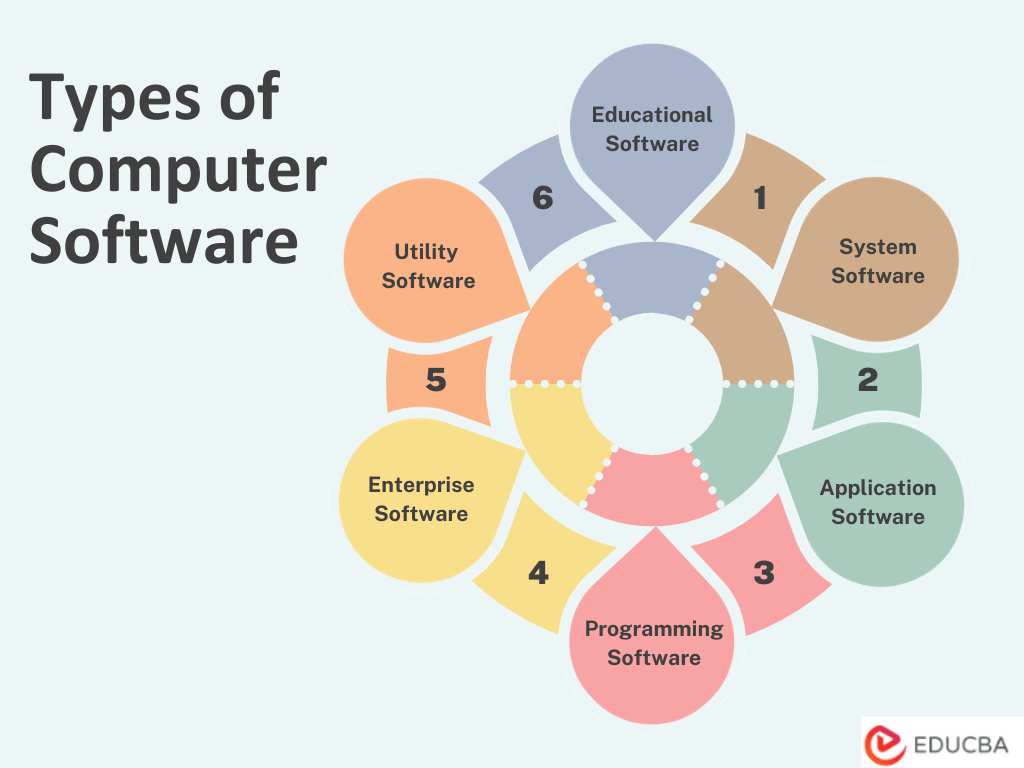
Types of Computer Software
Below are the types of Computer Software based on their functions and intended purposes. Here, we will explain each type of computer software:
1. System Software
System software is one of the major types of computer software that manages hardware resources and provides essential services to other applications.
- Operating Systems (OS): The core software that manages hardware resources, provides a user interface, and runs other software. Examples include Windows, macOS, Linux, and Unix.
- Device Drivers: Software that communicates with hardware devices like printers, graphics cards, and network adapters, allowing them to function correctly with the operating system.
- Utilities: Tools that perform various system-related tasks, such as disk management, system maintenance, and security. Examples include antivirus software, disk cleanup utilities, and system optimization tools.
2. Application Software
Application software includes programs designed to perform specific user tasks or functions.
- Word Processing Software: Used for creating, editing, and formatting text documents. Examples include Microsoft Word, Google Docs, and LibreOffice Writer.
- Spreadsheet Software: Designed for creating, analyzing, and managing numerical data in tables, these tools also allow you to convert PDF to Excel for easier data extraction and manipulation. Examples include Microsoft Excel, Google Sheets, and LibreOffice Calc.
- Presentation Software: Used to create multimedia presentations with slides, images, and animations. Examples include Microsoft PowerPoint, Google Slides, Apple Keynote, and MobiSlides.
- Database Software: Manages and organizes data, allowing users to store, retrieve, and manipulate information. Examples include Microsoft Access, MySQL, and Oracle Database.
- Graphics and Design Software: Used for creating visual content, including images, illustrations, and animations. Examples include Adobe Photoshop, Adobe Illustrator, and Blender.
- Web Browsers: Software for accessing and browsing websites on the internet. Examples include Google Chrome, Mozilla Firefox, and Microsoft Edge.
- Email Clients: Applications for sending, receiving, and managing emails. Examples include Microsoft Outlook, Mozilla Thunderbird, and Apple Mail.
- Media Players: There are various media players, including Windows Media Player, VLC Media Player, and iTunes, that can play audio and video files.
3. Programming Software
Developers use this type of computer software to write, test, and debug applications.
- Text Editors: Simple tools for writing and editing code, such as Notepad, Visual Studio Code, and Sublime Text.
- Integrated Development Environments (IDEs): Comprehensive environments that provide code editors, debuggers, and build tools. Examples include Visual Studio, Eclipse, and PyCharm.
- Compilers and Interpreters: Software that translates high-level programming languages into machine code. Examples include the GCC (GNU Compiler Collection), the Python interpreter, and the Java Virtual Machine (JVM).
4. Enterprise Software
Enterprise software helps businesses manage their operations.
- Enterprise Resource Planning (ERP) Software: Integrates and manages various business processes, including finance, HR, and inventory management. Examples include SAP, Oracle ERP, and Microsoft Dynamics 365 CRM Services.
- Customer Relationship Management (CRM) Software: Platforms developed through CRM software development help businesses manage customer interactions and relationships. Examples of these platforms include Zendesk or alternatives such as Kommo, Salesforce, HubSpot, and Zoho CRM. Tools like client portal software can also be vital in streamlining client communications and managing workflows effectively.
- Business Intelligence (BI) Software: Provides tools for analyzing and visualizing business data to make informed decisions. Examples include Tableau, Power BI, and QlikView.
5. Utility Software
Utility software includes programs that perform specific, often low-level, tasks to maintain or enhance system performance and functionality.
- File Compression Tools: Reduce the size of files and folders to save storage space. Examples include WinZip, 7-Zip, and WinRAR.
- Backup and Recovery Software: Create data backups and restore them in case of loss. Examples include Acronis True Image, EaseUS Todo Backup, and Windows Backup.
- Security Software: This package protects against malware, viruses, and other security threats. It includes antivirus software, anti-malware tools, and firewalls. Some software examples in this package are Norton Antivirus, McAfee, and Avast.
6. Educational Software
Educational institutions commonly use software designed for teaching and learning, known as educational software.
- Educational Games: Interactive games that teach various subjects or skills while entertaining. Examples include “Math Blaster” and “Carmen Sandiego.”
- E-learning Platforms: Online platforms that offer courses, lectures, and tutorials. Examples include Coursera, edX, and Moodle.
These categories encompass various software types, each serving specific purposes and catering to diverse user needs. The software industry is continually evolving, with new applications and tools emerging to meet the demands of users in various domains.
Real-World Examples of Software in Daily Life
Here are some real-world examples of different types of computer software used in daily life:
| Category | Examples & Usage |
| Banking & Finance | Mobile banking apps, UPI apps, online payment systems – transfer money, pay bills, manage accounts easily. |
| Communication | Messaging apps, email clients, and video-conferencing software enable instant communication globally. |
| Education | E-learning platforms, virtual classrooms, and educational apps support online learning, exams, and skill development. |
| Healthcare | Hospital management systems, telemedicine apps, diagnostic software – manage patient records, improve healthcare services. |
| E-Commerce | Online shopping platforms – browse products, place orders, make payments, track deliveries. |
| Transportation | Ride-hailing apps, navigation software, and traffic management systems make travel faster and more efficient. |
| Entertainment | Streaming platforms, gaming software, music apps – provide digital entertainment anytime, anywhere. |
| Work & Productivity | Office tools, project management software, and collaboration platforms – help individuals and teams work efficiently. |
| Social Media | Social networking apps – connect, share content, engage with communities worldwide. |
| Smart Devices | Software in smart TVs, home automation systems, and wearable devices enhances convenience and lifestyle management. |
Software Licensing Types
Software licensing defines the rules for using, sharing, modifying, and distributing software. Choosing the right license helps individuals, developers, and businesses avoid legal problems and manage costs better.
1. Proprietary License
A proprietary license gives full ownership to the developer or company. Users may use the software only in accordance with the license terms and may not modify or redistribute it.
Key Characteristics:
- Source code remains private
- Strict terms limit usage
- Usually requires payment
- Updates and support are provided by the vendor.
Advantages:
- Professional support and regular updates
- High reliability and security
- Well-documented features.
Limitations:
- No customization allowed
- Expensive for long-term or enterprise use.
Examples: Microsoft Windows, Adobe Photoshop, AutoCAD, MS Office.
2. Open-Source License
Open-source licenses allow users to view, modify, and distribute the source code. These licenses promote innovation and collaboration.
Key Characteristics:
- Source code is publicly available
- Free or low-cost usage
- Community-driven development.
Common Open-Source Licenses:
- GNU General Public License (GPL)
- MIT License
- Apache License.
Advantages:
- High flexibility and customization
- Strong community support
- No vendor lock-in.
Limitations:
- Limited official support
- Requires technical knowledge.
Examples: Linux, WordPress, MySQL, Mozilla Firefox.
3. Freeware
Freeware lets users download and use the software for free, but the developer still owns it.
Key Characteristics:
- No payment required
- Limited user rights
- Source code not available.
Advantages:
- Cost-effective for personal use
- Easy installation and access.
Limitations:
- Limited features compared to paid versions
- No customization allowed
- Ads may be included.
Examples: Skype, Google Chrome, VLC Media Player.
4. Shareware
Shareware allows users to try software before buying it. It often comes with limited features or restricted usage time.
Key Characteristics:
- Free trial version
- Payment required for full access
- Feature or time restrictions.
Advantages:
- Helps users evaluate software
- Low-risk trial.
Limitations:
- Frequent reminders to upgrade
- Limited functionality.
Examples: WinRAR, Internet Download Manager, WinZip.
5. Trialware
Trialware provides full or partial features for a fixed trial period. Once the trial ends, the software stops working unless you purchase it.
Key Characteristics:
- Time-bound access
- Automatic expiration
- Full version requires payment.
Advantages:
- Complete product testing
- Helps users make informed decisions.
Limitations:
- Short trial period
- Data access may be restricted after expiry.
Examples: Antivirus software trials, premium app demos.
6. Public Domain Software
Public domain software is free of copyright restrictions. Anyone can use, modify, or distribute it freely.
Key Characteristics:
- No ownership or license terms
- Fully open for reuse.
Advantages:
- Complete freedom
- Ideal for learning and experimentation.
Limitations:
- No official support
- May be outdated or insecure.
Examples: Old utility tools, abandoned software released publicly.
7. Commercial License
Commercial licenses support business and enterprise use. These licenses often include customer support, security updates, and compliance features.
Key Characteristics:
- Paid license
- Legal for commercial usage
- Vendor support included.
Advantages:
- Reliable performance
- Legal compliance for organizations
- Dedicated technical support.
Limitations:
- High cost
- Limited customization.
Examples: SAP, Oracle Database, Salesforce, IBM Software.
8. Subscription-Based License
Subscription-based licensing allows users to pay monthly or yearly instead of a one-time fee.
Key Characteristics:
- Recurring payments
- Continuous updates
- Access ends when the subscription stops.
Advantages:
- Lower upfront cost
- Always up to date
- Cloud access.
Limitations:
- Long-term cost can be high
- Requires constant internet access.
Examples: Microsoft 365, Adobe Creative Cloud, Canva Pro.
Future of Computer Software
The future of computer software holds exciting possibilities driven by emerging technologies:
- Artificial Intelligence (AI): AI-powered software is advancing rapidly, enabling greater automation, personalization, and smart decision-making across fields such as healthcare and autonomous vehicles.
- Quantum Computing: Quantum software will transform industries by solving complex problems at speeds beyond classical computers, revolutionizing cryptography, materials science, and optimization.
- Blockchain: Blockchain-based software will reshape finance, supply chains, and data security, offering transparency, trust, and decentralized applications (DApps).
- Cloud-Native Development: The shift towards cloud-native software will accelerate, enabling scalable, flexible, containerized applications and enhancing development efficiency.
- Edge Computing: Software at the edge of networks will grow, enabling real-time processing and reducing latency for applications like IoT, autonomous devices, and augmented reality.
- Cybersecurity Solutions: Advanced security software will combat evolving cyber threats with AI-driven threat detection, decentralized identity management, and secure-by-design practices.
- Human-Machine Interaction: Natural language processing, virtual reality, and augmented reality software will enable more immersive and intuitive interactions between humans and machines.
- Sustainable Software: Environmentally conscious software development focuses on reducing energy consumption and carbon emissions to contribute to a more sustainable future.
- 5G and Beyond: Software will harness the capabilities of 5G and future generations of connectivity for faster data transfer, low latency, and IoT proliferation.
- Privacy and Data Ethics: Privacy-centric software solutions will address data protection concerns, emphasizing user control and ethical data practices.
Final Thoughts
Computer software is the invisible engine that powers the digital world. From simple apps and office tools to complex enterprise systems, artificial intelligence, and cloud platforms, software drives how we work, communicate, learn, and entertain ourselves. It transforms hardware into useful tools, streamlines daily tasks, enhances productivity, and enables innovation across industries.
As technology advances, software will stay at the heart of digital progress, powering smarter devices, businesses, and communities. Understanding the types of computer software is key to seeing how technology evolves and drives smarter devices, businesses, and societies.
Frequently Asked Questions (FAQs)
Q1. How does software impact our daily lives?
Answer: Software runs almost every device we use, smartphones, computers, and smart home gadgets, making everyday tasks quicker, easier, and safer.
Q2. Can I create software without programming knowledge?
Answer: Yes! No-code and low-code platforms let anyone build apps or simple software without writing complex code.
Q3. How do software updates improve devices?
Answer: Updates fix bugs, enhance security, improve performance, and add new features, keeping devices safe and efficient.
Q4. What is open-source software, and why is it important?
Answer: Open-source software is freely available for anyone to use, modify, and share. It encourages collaboration, innovation, and cost-effective solutions.
Q5. What are the risks of using outdated software?
Answer: Outdated software can have security vulnerabilities, performance issues, and incompatibility with new applications, putting data and devices at risk.
Recommended Articles
We hope that this EDUCBA information on “Types of Computer Software” was beneficial to you. You can view EDUCBA’s recommended articles for more information.


