
Updated April 10, 2023
Introduction to XSLT substring-before
Substring – before is defined as part of Substring also named as a case-sensitive comparison that returns the section of the given input String that is done before the first occurrence of the string which is been given to the next argument. This function has occurred in the XPATH string function list. If the respective argument is not a type of a string then it is first converted into a string() function later the result is evaluated. The substring-before function is case–sensitive. In this topic, we are going to learn about XSLT substring-before.
Syntax
fn:substring-before(string1,string2, string n)
The above function returns the start of the first string before the second String occurs.
How substring-before function works in XSLT?
XSLT has a more in-built function and the specific namespace for any function is given to be fn (a default prefix). XSLT has additional features to process the elements. The substring-before function takes input as two strings where the first string is to be searched and the second string is to search for the first string. XSLT lacks in using replace function while determining the start and end function. Though we have many functions for string manipulation sub-string before lending themselves to recursive the string process. Xpath string functions make use of XSLT for manipulation with data and attributes. XSLT uses fundamental XSL: variable to use variables. So let’s see a few demonstrations with the simple document.
The following function with date returns a corresponding result.
substring-before("2000/03/01","/")

-          This function returns an empty string.

Example: substring -before (‘14/9’, ‘/’) - This statement returns the result as ‘14’.
Few more representation
substring-before('14-March-1992', '-') = '14'

substring-before(''14March1992', ' ') = '14'

substring-before(''14March1992', ' ') = '14'

substring-before(''14March1992', '-') = ''

substring-before('ee-bb','-') = ee

substring-before('ee-bb','e') = (empty string)

substring-before('ee-bb','b') = ee-

substring-before('ee-bb','d') = (empty string)

Substring-before(‘aa’,’ bb’)

Example:

Substring-before(‘pebble - ball’,’-‘) // this returns a value pebble that is before ‘hypen’.
The function returns an empty string while in the case of the absence of a second-string contained in the first string. In the case of XPATH, an empty sequence has resulted in any of the operands of the first two operands are empty.
Example:
fn:substring-before('here is an aquarium', '')

the above statement gives : ''.
So here an empty string is returned. So over here the input string starts with the comparison string. As mentioned earlier, XSL has a lot of contributions tremendously to Web Developers. XSL 2.0 with XPATH is undoubtedly used in powerful languages.
For more recurse:
<xsl:element name="Refern">        // Here we have build an first element

<xsl:value-of

select="substring-before($ooo,' ')"/>

</xsl:element>

<xsl:call-template name="book">   // here it’s a recurse function

<xsl:with-param name="ooo"   select="substring-after($ooo,' ')"/></xsl:call-template>
This type of case is used in many scenarios to combine into a single template.
Well, we have discussed how it works with the string format, Next, we shall see the implementation.
Examples
Here we will be demonstrating a string-before function with different scenarios to display the sub-string as a result. To demonstrate in real use case concept, we have created an XML document and rules with XSL and the transformation is shown in HTML Output.
Example #1
Using Simple Transformation with XPATH expression on Sub-string Before
std.xml
<?xml version="1.0" encoding="UTF-8"?>

<College name="Texas higher">

<Faculty>

<firstname>Jaculine Trndas</firstname>

<lastname>Angelicta joy</lastname>

<address>4/890 Main St, Hovard</address>

</Faculty>

</College>
Here is the stylesheet does it to the XML file.
std.xsl
<?xml version="1.0" encoding="UTF-8"?>

<xsl:stylesheet version="1.0" xmlns:xsl="http://www.w3.org/1999/XSL/Transform">

<xsl:template match="firstname">

<first>

<xsl:value-of select="substring-before(.,' ')" />

</first>

</xsl:template>

<xsl:template match="lastname">

<last>

<xsl:value-of select="substring-before(.,' '-)" />

</last>

</xsl:template>

<xsl:template match="@* | node()">

<xsl:copy>

<xsl:apply-templates select="@* | node()" />

</xsl:copy>

</xsl:template>

</xsl:stylesheet>
Explanation
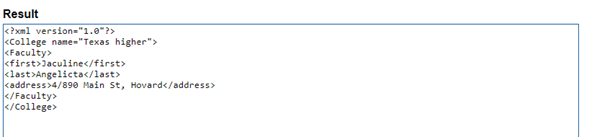
The stylesheet demonstrates the substring() function that takes the element content with the node(). This new stylesheet creates a result as :
Output:
Example #2
ss.xml
<?xml version="1.0"?>

<Hameley>

<branch id="15">

<product>Racing car</product>

<brand>Fun School</brand>

<price>50.50</price>

</branch>

<branch id="18">

<product>Car Race</product>

<brand>Dugatti school</brand>

<price>150.50</price>

</branch>

<branch id="11">

<product>Toy Gun</product>

<brand>Schewwaxxg</brand>

<price>40.40</price>

</branch>

</Hameley>
ss.xsl
<?xml version='1.0'?>

<xsl:stylesheet version="1.0" xmlns:xsl="http://www.w3.org/1999/XSL/Transform">

<xsl:output method="html"/>

<xsl:template match="/">

<xsl:for-each select="//branch">

<xsl:value-of select="substring-before(product, 'car')" />

</xsl:for-each>

<xsl:for-each select="//branch">

<xsl:value-of select="substring-before(brand, 'school')" />

</xsl:for-each>

</xsl:template>

</xsl:stylesheet>
Explanation
The above code is a substring-before function assigned with elements. Here we had created two select statements with the elements car and school which displays a string before the first string. And the Output string is shown below.
Output:

Example #3
<index>

<page>2568/specification=center</page>

<page>middle</page>

</index>
.xsl
<xsl:stylesheet xmlns:xsl="http://www.w3.org/1999/XSL/Transform" version="1.0">

<xsl:output method="xml" indent="yes"/>

<xsl:template match="index">

<newindex>

<xsl:apply-templates select="*"/>

</newindex>

</xsl:template>

<xsl:template match="page">

<newpage>

<xsl:call-template name="select"/>

</newpage>

</xsl:template>

<xsl:template name="select">

<xsl:choose>

<xsl:when test="contains(.,'/specification')">

<xsl:value-of select="substring-before(.,'/specification')"/>

</xsl:when>

<xsl:otherwise>

<xsl:value-of select="."/>

</xsl:otherwise>

</xsl:choose>

</xsl:template>

<xsl:template match="*"/>

</xsl:stylesheet>
Explanation
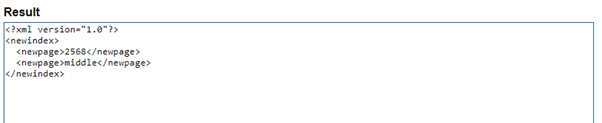
The above code takes HTML as an output mode and then the template name is assigned for the value-of select in which the substring part of the string is truncated by the ‘before’ keyword. Here the element specification is searched for the index root by which the value ‘specification’ with the element NewPage is divided by the before-option. Therefore we will have the result as
Output:
Example #4
A Simple implementation of line breaks- Normalizing all the line breaks
XML file
<?xml version="1.0"?>

<blog>

<article>Data

Mining</article>

<article>Data

Warehouse</article>

</blog>
XSL file
<xsl:stylesheet version="1.0"

xmlns:xsl="http://www.w3.org/1999/XSL/Transform">

<xsl:output method="html"/>

<xsl:variable name="wee" select="' '"/>

<xsl:template match="/">

<xsl:apply-templates select="blog/article"/>

</xsl:template>

<xsl:template match="article">

<xsl:variable name="edu" select="." />

<xsl:if test="contains($edu, $wee)">

article1: <xsl:value-of select="substring-before($edu, $wee)"/>

article2: <xsl:value-of select="substring-after($edu, $wee)"/>

</xsl:if>

</xsl:template>

</xsl:stylesheet>
Explanation
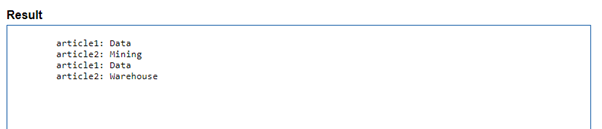
Here is the code for a carriage-return this application takes a character sequence and the characters here are parsed by the XML Processor that sees the text over here is split at line breaks. Assume that I have assigned the value from <article> element to a variable name “wee”. To get the correct value before the carriage return a variable is assigned and the result is shown below:
Output:
Conclusion
Therefore we have learned and used various substring functions here and addressed the XPath node on the XSLT for sub-string before function. This clean article, very useful to develop string-based programs.Though we have other sub-types of Substring this article subject is very important and very useful in taking any string replacements. Also that they meet advanced XSLT challenges in their use cases.
Recommended Articles
This is a guide to XSLT substring-before. Here we discuss the various substring functions here and addressed the XPath node on the XSLT for sub-string before function. You may also have a look at the following articles to learn more –

