
Updated April 3, 2023

Introduction to XSLT new line
A new line break is needed to control line breaks. Other Programming languages like Java or C++ have the facilities to assign and put line breaks immediately wherever it is necessary. In Stylesheet, we are supposed to have character entities (#xA), a Hexa value for the next line and (#x9) a decimal representation. In this topic, we are going to learn about XSLT new line. In this topic, we are going to learn about XSLT new line.
Syntax
The general definition syntax is implemented as
<xsl:text> character entities </xsl:text>How new line function work in XSLT?
Though it is a common practice to use a new line in the source code. XSLT uses it is a text element to get the result at the end of the last line. The next line would not appear like the user requirement when there is no proper Newline structure. Let’s take a scenario like where we need to send a text file attachment with multiple lines; my needy is to insert a new line break in between all the row lines. There are few ways to insert a new line to the output of XSLT. Different indentation aspects look weird in the case of character reference. So, the newline could be done in three multiple ways. And most importantly, it is typically placed inside <xsl: text> tags, and it works well.
<xsl:text>*#xA;</xsl:text>The second is using a variable name
<xsl:variable name="UC13" select="'#13'"/> // This code doesn’t create unnecessary fragmentThe third one is with the new line
<xsl:value-of select="$newline"/>To start a new line with
<xsl:output method="text"/>
<xsl:template match="/">
<xsl:text>
Hello
Welcome &#xA; </xsl:text>
</xsl:template>There is quite a difference between using newlines and <#xA> in the case of the working environment. For example, a new line fails while executing a code in a .NET environment. To represent the ASCII, character #10 is used to recognize a new line in XSLT.
- #xd; gives carriage return
- #xa; gives a line feed
To display a string in a database actually works by adding carriage return and line feed as given here.
<xsl:text>#xD;#xA; </xsl:text>Next, let us embed a text node inside a variable name which is a great solution to go with
<xsl:variable name="newdemo">
<xsl:text> </xsl:text>
</xsl:variable>
<xsl:value select="concat(electronics, $newline)" />
This may work in some cases. But a good tip to XSLT is to take the ‘select’ attribute as mentioned in the third way above. On the other way <xsl:param> make it better to pass the value of a character(newline)during execution.
<xsl:param name="newline" select="'#13;#10;'"/>Therefore, this forces the output of an XSLT to include a new line in every case after each element. Meanwhile, the line which is not ending in a new line character is not taken as an actual line. And to have a proper indent when doing newline, it is mandatory to check the top statement in the code: changing functional part indent=” yes”.
<xsl:output method="xml" encoding="utf-8" indent="yes" />It is necessary to preserve the new line characters when the validation process occurs. Again, and fairly, the indent attribute solves the problem.
Examples of XSLT new line
Given below are the examples of XSLT new line:
Example #1
Simple example with number listing
XML
<?xml version="1.0" encoding="UTF-8"?>
<body>
<h1>A new line concept</h1>
<p>This article demonstrates on Line Activities:</p>
<ul>
<li> German Course</li>
<li> French</li>
</ul>
</body>
XSL
<?xml version="1.0" encoding="utf-8"?>
<xsl:stylesheet xmlns:xsl="http://www.w3.org/1999/XSL/Transform"
version="2.0">
<xsl:output method="text"/>
<xsl:template match="/">
<xsl:text>;#xA;Numbers segregated with newlines:#xA;#xA;</xsl:text>
<xsl:value-of select="10 to 20" separator="#xA;"/>
<xsl:text>#xA;#xA;Numbers segregated with newlines:#xA;#xA;</xsl:text>
<xsl:value-of select="10 to 15" separator="#x9;"/>
<xsl:text>#xA;#xA;Numbers segregated with newlines:#xA;#xA;</xsl:text>
<xsl:value-of select="50 to 60" separator="#x20;"/>
</xsl:template>
</xsl:stylesheet>
Explanation
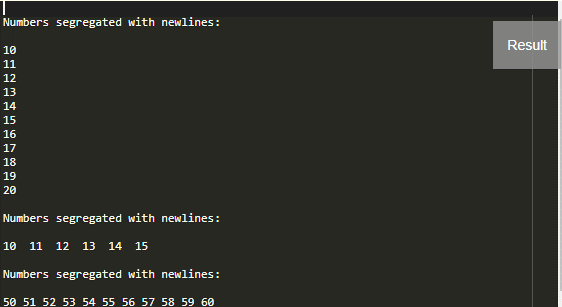
The above stylesheet prints the numbers with three different separators by using newline entities, and the output obtained is given below.
Output:
Example #2
And as a previous example, this code also demonstrates displaying a selected number in a new line. The XML and XSL code is given as
XML
<?xml version="1.0" encoding="utf-8"?>
<Function>
<Math>
<fname>Exponential</fname>
<Usage>Scientific</Usage>
</Math>
</Function>
XSL
<?xml version="1.0" encoding="UTF-8"?>
<xsl:stylesheet xmlns:xsl="http://www.w3.org/1999/XSL/Transform"
version="2.0">
<xsl:output method="text"/>
<xsl:template match="/">
<xsl:for-each select="50 to 60">
<xsl:value-of select="."/>
<xsl:text>#x09;</xsl:text>
<xsl:text>#xA;</xsl:text>
</xsl:for-each>
</xsl:template>
</xsl:stylesheet>
Explanation
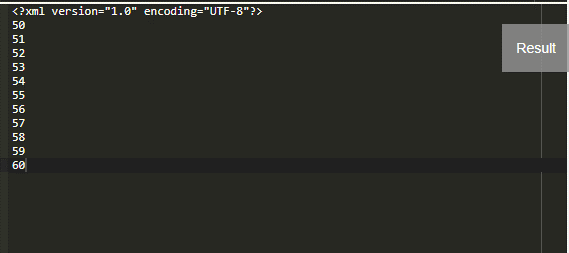
The above simple code simply displays a number from 50 to 60 in a newline by using <xsl:text> statement.
Output:
Example #3
XML
<?xml version="1.0" encoding="utf-8"?>
<YoutubeList>
<Subscriber>
<sname>Subhatra</sname>
<email>[email protected]</email>
</Subscriber>
<Subscriber>
<sname>Blppiki</sname>
<email>[email protected]</email>
</Subscriber>
<Subscriber>
<sname>matrimony</sname>
<email>[email protected]</email>
</Subscriber>
</YoutubeList>
XSL
<xsl:stylesheet version="1.0" xmlns:xsl="http://www.w3.org/1999/XSL/Transform">
<xsl:output method="text" indent="yes" encoding="US-ASCII"/>
<xsl:template match="/">
<xsl:for-each select="YoutubeList/Subscriber">
<xsl:value-of select="concat(email,';','#xA;')"/>
</xsl:for-each>
</xsl:template>
</xsl:stylesheet>
Explanation
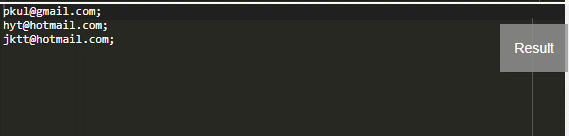
The stylesheet concatenates the elements and displays the email id in the result.
Output:
Example #4
XML
<?xml version="1.0" encoding="UTF-8"?>
<Shipping-address>Livia Amaral Bela Vista</Shipping-address>
XSL
<xsl:stylesheet
xmlns:xsl="http://www.w3.org/1999/XSL/Transform"
version="1.0">
<xsl:output method="xml" indent="no" />
<xsl:template name="replace">
<xsl:param name="input"/>
<xsl:param name="text"/>
<xsl:param name="by"/>
<xsl:choose>
<xsl:when test="not(contains($input, $text))">
<xsl:value-of select="$input"/>
</xsl:when>
<xsl:otherwise>
<xsl:value-of select="substring-before($input, $text)"/>
<xsl:copy-of select="$by"/>
<xsl:call-template name="replace">
<xsl:with-param name="input" select="substring-after($input, $text)"/>
<xsl:with-param name="text" select="$text"/>
<xsl:with-param name="by">
<xsl:copy-of select="$by"/>
</xsl:with-param>
</xsl:call-template>
</xsl:otherwise>
</xsl:choose>
</xsl:template>
<xsl:template match="Shipping-addres">
<div>
<xsl:call-template name="replace">
<xsl:with-param name="input" select="."/>
<xsl:with-param name="text" select="' '"/>
<xsl:with-param name="by"><br/></xsl:with-param>
</xsl:call-template>
</div>
</xsl:template>
</xsl:stylesheet>
Explanation
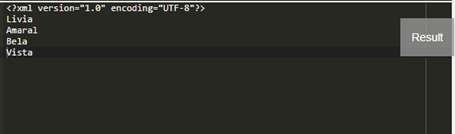
The predicted output of the code above would be like this.
Output:
Example #5
XML
<?xml version="1.0" encoding="UTF-8"?>
<root>
<SongTrack>99 Song</SongTrack>
<SongTrack1>Maroon5</SongTrack1>
<SongTrack2>Rasputin</SongTrack2>
</root>
XSL
<xsl:stylesheet version="1.0" xmlns:xsl="http://www.w3.org/1999/XSL/Transform"
xmlns:fm="http://www.filemaker.com/fmpdsoresult" exclude-result-prefixes="fm">
<xsl:output method="xml" indent="no"/>
<xsl:param name="newline" select="'#13;;#10;'"/>
<xsl:template match="/">
<xsl:value-of select="concat('SongTrack1', $newline, 'SongTrack2')"/>
</xsl:template>
</xsl:stylesheet>
Explanation
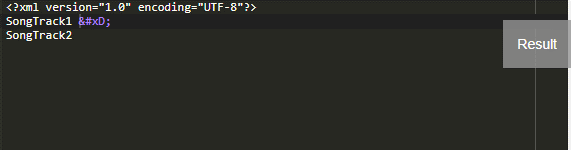
The stylesheet displays a Singtracks with the decimal entity to the next line.
Output:
Example #6
XML
<?xml version="1.0" encoding="UTF-8"?>
<SolarSystem>
<Planets>Earth</Planets>
<Planets>Mars</Planets>
<Planets>Venus</Planets>
</SolarSystem>
XSL
<xsl:stylesheet version="1.0" xmlns:xsl="http://www.w3.org/1999/XSL/Transform"
xmlns:fm="http://www.filemaker.com/fmpdsoresult" exclude-result-prefixes="fm">
<xsl:output method="xml" indent="no"/>
<xsl:template name="multilinesample">
<xsl:param name="text"/>
<xsl:choose>
<xsl:when test="contains($text, '#10;')">
<xsl:variable name="bb1">
<xsl:value-of select="substring-before($text, '#10;')" />
</xsl:variable>
<xsl:variable name="bff1">
<xsl:value-of select="substring-after($text, '#10;')" />
</xsl:variable>
<xsl:if test="not($bb1 = '')">
<xsl:value-of select="$bb1" /><br />
</xsl:if>
<xsl:if test="not($bff1 = '')">
<xsl:call-template name="multilinesample">
<xsl:with-param name="text" select="$bff1" />
</xsl:call-template>
</xsl:if>
</xsl:when>
<xsl:otherwise>
<xsl:value-of select="$text" /><br />
</xsl:otherwise>
</xsl:choose>
</xsl:template>
</xsl:stylesheet>
Explanation
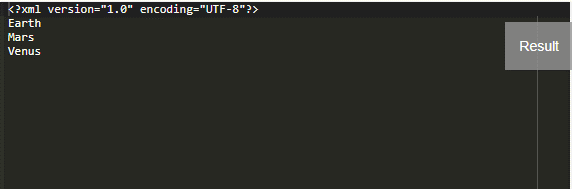
Let’s say we need the multiline text content for a sentence; this can be formatted by using a select attribute which in turn embedded inside a <choose> statement. So the template code shown above is a recursive template that searches for #10. And the result is displayed as
Output:
Conclusion
As a result, a new line is a confusing stuff to serve the requirements in XSLT. For example, we can make a text to come to the next line with just a representation while sending a file in an e-mail. I hope we have gained a few profitable syntax and code to lead the text content to the next line wherever needed.
Recommended Articles
This is a guide to XSLT new line. Here we discuss How the new line function works in XSLT, along with the examples and outputs. You may also have a look at the following articles to learn more –

