

Updated June 22, 2023

Introduction to XML with CSS
Extensible Mark-Up language is a dynamic, general-purpose mark-up language to define structured data. Embedding CSS style sheets with XML, we can newly create an XML document to display clearly and precisely on a web page. You can display it in two ways using CSS and XSLT. Unlike HTML, where CSS styles are included by default, CSS styles are not automatically applied in XML. Instead, it would be best to define each element’s properties. CSS style sheets contain specific style instructions that are used before the start of the root element.
Meanwhile, we use CSS in scenarios where we need to define the size of an element, add content to the document, and apply color and background images on the web. Using CSS, we can also apply style rules to the tree data in the document. In Layman’s terms, It doesn’t change the XML Structure when using Styles.
How does XML work with CSS?
XML is structured in such a way to store and transport the data which is readable by the users. And now, moving forward to display the XML document with CSS, it is necessary to know CSS Style, and by preferring CSS, it is easier to have text-centric contents in the File. You should apply style rules to the XML document, such as styling font-size, color, margin, and Font-weight. CSS follows these rules, even if it makes the titles bolder. However, it is important to note that while CSS allows for beautifying these documents, it does not facilitate sorting or collating the document’s structure. The rules are stated below in the following:
- Defining the properties of text elements like font size and color.
- Defining the element using display attributes for an inline-block.
- Making the heading and titles bigger by fine-tuning.
Syntax
The basic Syntax is as follows:
<?xml-stylesheet type="text/css" href="css Filename.css"?>Placing the above syntax on top of any XML file helps avoid errors.
The general Syntax is as follows:
Selector {property Declaration }Here Selector implies the tag to which a style is applied, followed by style rules in the declaration. Similarly, we can have multiple Selectors. And the values given under this could be a string or integer, absolute.
Steps:
- Once you link the CSS file to the XML file, the file appends the style sheet in the XML document and displays the result in a styled format, depending on the properties implemented in the CSS file.
- The tags of CSS should be the same as XML tag names.
Examples of implementing CSS in XML
To understand the concept, an example scenario plays an important role in simplifying things.
Example #1
employee.xml
<?xml version="1.0"?>
<?xml-stylesheet type="text/css" href="emp.css"?>
<!DOCTYPE globe>
<globe>
<Country>
<name>United States of America</name>
<areawidth>50,000</areawidth>
<capital>Washington,D.C</capital>
</Country>
<Country>
<name>Canada</name>
<areawidth>1,00000</areawidth>
<capital>Ottawa</capital>
</Country>
<Country>
<name>Norway</name>
<areawidth>60,000</areawidth>
<capital>Oslo</capital>
</Country>
<Country>
<name>Singapore</name>
<areawidth>65,000</areawidth>
<capital>Singapore</capital>
</Country>
<Country>
<name>England</name>
<areawidth>15,000</areawidth>
<capital>London</capital>
</Country>
</globe>
emp.css
globe:before {
display: semi-block;
width: 9em;
font-weight: bold;
font-size: 170%;
content: "Country";
margin: -.85em 0px .35em -.35em;
padding: .2em .20em;
background-color: #FF0000;
}
globe {
display: block;
margin: 2em 1em;
border: 4px solid #B22222;
padding: 0px 1em;
background-color:  #cdf;
}
Country {
display: block;
margin-bottom: 1.5em;
}
name {
display: block;
font-weight: bold;
font-size: 140%;
}
areawidth {
display: block;
}
areawidth:before {
content: "Area width: ";
}
area:after {
content: " million km\B2";
}
depth {
display: block;
}
depth:before {
content: "Mean depth: ";
}
depth:after {
content: " m";
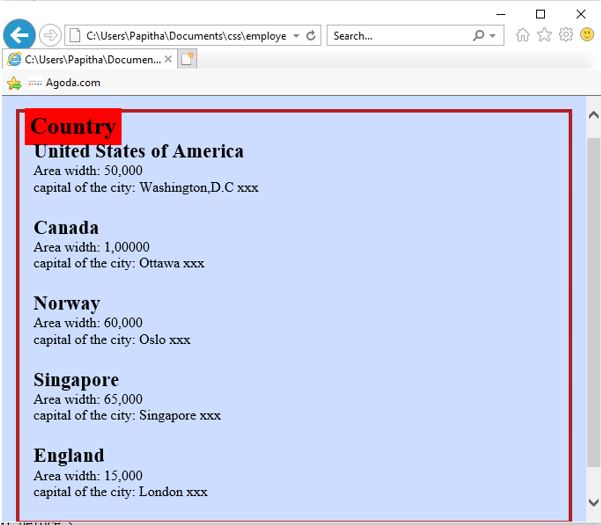
Output:
Example #2
employee.xml
<?xml version="1.0" encoding="UTF-8"?>
<?xml-stylesheet type="text/css" href="emp.css"?>
<Topstore2020>
<Shops>Welcome To big groceries world</Shops>
<heading>Save Money and live better</heading>
<grocery>
<titlename>Spencers</titlename>
<opinion>wide varieties</opinion>
<country>India</country>
</grocery>
<grocery>
<titlename>Amazon Fresh</titlename>
<opinion>Tie up with good companies</opinion>
<country>USA , LONDON ,TOKYO</country>
</grocery>
<grocery>
<titlename>Walmart Grocery- online pick up & delivery</titlename>
<opinion>Delivery from local shops</opinion>
<country>UNited States</country>
</grocery>
<grocery>
<titlename>Insta Carts</titlename>
<opinion>Good Filtering options</opinion>
<country>Australia ,Canada</country>
</grocery>
<grocery>
<titlename>Fresh Direct- Specializes organic Food</titlename>
<opinion>chef meals with reasonable price</opinion>
<country>United Kingdom</country>
</grocery>
<grocery>
<titlename>Local Harvest</titlename>
<opinion>provides locally garden foods</opinion>
<country>Saint Louis</country>
</grocery>
<grocery>
<titlename>Safe Way- Neighborhood shopping</titlename>
<opinion>One day delivery</opinion>
<country>California</country>
</grocery>
<grocery>
<titlename>My SuperMArket</titlename>
<opinion>Very Professional</opinion>
<country>United Kingdom</country>
</grocery>
</Topstore2020>
emp.css
Topstore2020, Shops {
color: #daff00;
background-color:#5490fe;
width: 100%;
}
heading {
color: #888888;
background-color: #ffa500;
font-size: 41px;
font-weight: bold;
}
Shops {
color:#6a0241;
font-size: 33px;
font-weight: bold;
}
heading, grocery title name, opinion, country {
font-family: sans-serif,Arial;
display: block;
}
titlename {
font-size: 16px;
font-weight: bold;
}
Example #3
clock.css
Clock {font-size:30pt; text-align: centre}
Clock: before {content: "The current time is: "}
timehour {font-family: sans-serif; color: blue}
timehour: after {content: ":"; color: rose}
timeminute {font-family: sans-serif; color: yellow}
timeminute:after {content: ":"; color: gray}
timesecond {font-family: sans-serif; color: gray}
timesecond:after {content: " "; color: lightblue}
timemeridian {font-variant: small-caps}
employee.xml
<?xml version="1.0" encoding="UTF-8"?>
<?xml-stylesheet href="clock.css" type="text/css"?>
<Clock timezone="GMT">
<timehour>12</timehour>
<timeminute>55</timeminute>
<timesecond>45</timesecond>
<timemeridian>a.m.</timemeridian>
</Clock>
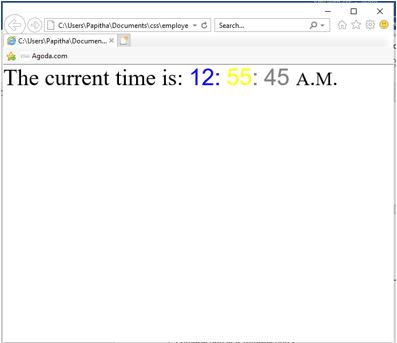
Output:
Advantages
- XML with CSS or HTML to display the web pages colorful.
- The web page has an interactive interface, making it easily understandable by the web user. It specifies manipulating spacing, font size, positioning, colors, etc.
- It helps visually distinguish between ancestor and descendants’ elements in the XML document. Like in HTML, CSS benefits in styling each tag in XML. It helps reduce the complexity and avoids repetition of the content document as it enables multiple pages to share their formats; due to this, their page.
Conclusion
Therefore, here we have learnt how to use XML with CSS files to display data in a good format. It is the best choice when we don’t seek any programming approach for the XML file. In the case of a complex structure, an XSLT style sheet is used. Also, we understood how to design a page with personal requirements. Therefore, we have styled it in a semantically way using CSS.
Recommended Article
We hope that this EDUCBA information on “XML with CSS” was beneficial to you. You can view EDUCBA’s recommended articles for more information.

