


Updated May 31, 2023
Difference Between WordPress vs WebFlow
This comparison between Webflow and WordPress will discuss both content management systems in detail so that you can determine which platform is for you, how simple it is to use, what functionality they provide, and their advantages and disadvantages. Webflow is a cloud-based website builder that enables someone with no coding experience or expertise to create a lovely website. As for the web flow, it is very strong and personalize-something you can only get through HTML, CSS & JavaScript-unlike other “website builders” platforms like Square Space and Wix.
What is WordPress?
WordPress is a Content Management System (CMS) that is free and open source. It is written in PHP and is related to MariaDB or MySQL. It has mainly been developed as a blogging tool but now has become a versatile CMS. The website, blog, and smartphone apps can be used. WordPress plugins are often used to build an online shop. WordPress is one of the most common solutions for content management (CMSs). Over 60 million websites, 34% of the top 10 million up to 2019, are used.
What is WebFlow?
This Webflow is an American company that offers website-building and hosting software as a service (SaaS). Its “visual publishers” online platform allows users to design, create, launch, and launch websites. In 2013 Vlad Magdalin, Sergie Magdalin, and Bryant Chou created it. Webflow has become popular with web designers because it can be personalized. Still, it is perfect for anyone wanting to quickly create a completely personalized website without hiring designers or developers or playing with your code.
Head to Head Comparison between WordPress vs WebFlow (Infographics)
Below are the top 7 differences between WordPress vs Webflow:
Key Differences between WordPress vs WebFlow
Following are the key differences between WordPress vs WebFlow:
- Webflow allows maximum design flexibility, while WordPress is subject to templates or scratch coding. The large need for plug-ins can damage wordPress code; while Webflow is clean and consistent, web flow is pricey, depending on the package you choose, while wordpress is free, and you only have to pay for your accommodation. Webflow has a drag & drop page builder, while you need a plugin to allow this with wordpress
- Webflow also has a built-in ecommerce engine allowing users to create high-performance shops. The framework brings the user in charge of the web creation process by following all steps from the outset to the last publication of the web store. While the CMS does not have an integrated eCommerce engine, its growth potential is realized using niche-specific plugins.
- WordPress provides more efficient and flexible choices when it comes to blogging. This is a product of the system’s comprehensive integration options. Webflow is still catching up to the CMS and its blogging possibilities.
- WordPress is a more economical solution, and using the platform can lead to higher project costs, particularly if you need a unique and powerful online website.
WordPress vs WebFlow Comparison Table
Let us look at the comparison table of WordPress vs WebFlow.
|
WordPress |
WebFlow |
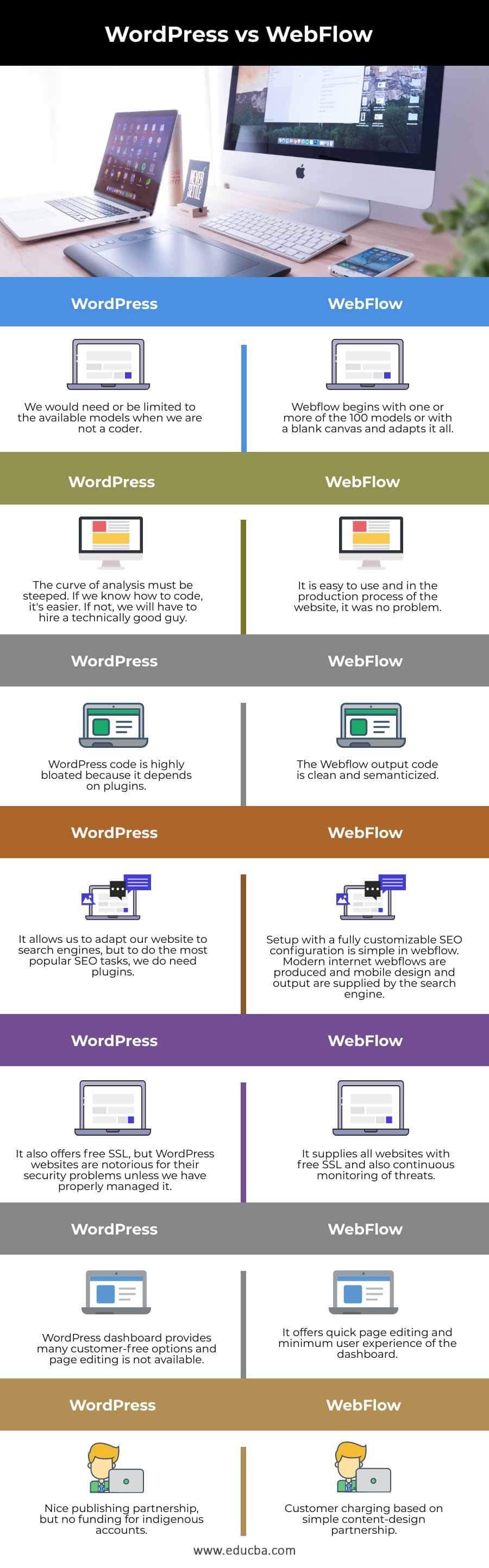
| We would need or be limited to the available models when we are not a coder. | Webflow begins with one or more of the 100 models or with a blank canvas and adapts it all. |
| The curve of analysis must be steeped. If we know how to code, it’s easier. If not, we will have to hire a technically good guy. | It is easy to use, and in the production process of the website, it was no problem. |
| WordPress code is highly bloated because it depends on plugins. | The Webflow output code is clean and semanticized. |
| It allows us to adapt our website to search engines but to do the most popular SEO tasks; we do need plugins. | Setup with a fully customizable SEO configuration is simple in webflow. Modern internet webflows are produced, and the search engine supplies mobile design and output. |
| It also offers free SSL, but WordPress websites are notorious for their security problems unless we have properly managed it. | It supplies all websites with free SSL and also continuous monitoring of threats. |
| WordPress dashboard provides many customer-free options, and page editing is not available. | It offers quick page editing and a minimum user experience of the dashboard. |
| Nice publishing partnership, but no funding for indigenous accounts. | Customer charging is based on a simple content-design partnership. |
Conclusion
After comparing Webflow and WordPress side by side, it is obvious that these two platforms are a great choice for anyone who builds a website. So you can choose any of them based on your requirements. We hope you will find this article helpful.
Recommended Articles
This is a guide to WordPress vs WebFlow. Here we also discuss the wordpress vs webflow key differences with infographics and comparison tables. You may also have a look at the following articles to learn more –

