
What is Web Scraping?
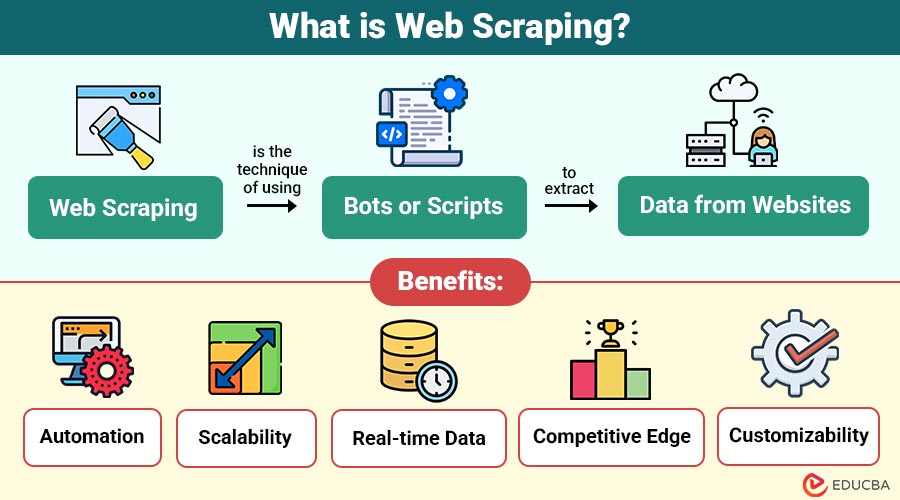
Web scraping is the technique of using bots or scripts to extract data from websites. The scraped data can be stored in a local database, spreadsheet, or any other structured format. It allows users to gather large-scale information quickly and efficiently without manual copying.
Web scraping is commonly used in various fields such as e-commerce, digital marketing, real estate, academic research, and more, where public data needs to be analyzed or utilized for decision-making.
Table of Contents:
- Meaning
- Working
- Key Concepts
- Tools and Libraries
- Benefits
- Use Cases
- Legal and Ethical Considerations
- Challenges and Limitations
- Real World Examples
- Future
Key Takeaways:
- Web scraping enables efficient, automated access to online data for timely and informed decision-making.
- Adapting scrapers to evolving site structures is essential for maintaining a continuous data extraction flow.
- Respecting legal boundaries ensures ethical scraping and avoids penalties or access restrictions from websites.
- AI-driven tools enhance scraper intelligence, enabling smarter interaction with dynamic and complex web environments.
How Does Web Scraping Work?
The process of web scraping involves the following steps:
1. Sending a Request
A web scraping script sends an HTTP GET or POST request to a webpage’s server to access and retrieve its publicly available content.
2. Receiving the Response
The server responds with the webpage’s HTML content, which includes text, tags, images, scripts, and embedded data needed for extraction and analysis.
3. Parsing the HTML
Tools like BeautifulSoup, lxml, or HTMLParser parse the HTML content to navigate and understand the page’s structure for data extraction.
4. Extracting Data
You can extract specific data using CSS selectors, XPath, or tag attributes based on the parsed HTML structure, accurately targeting relevant content.
5. Storing Data
The extracted information is cleaned and saved in structured formats like CSV, Excel, or databases for easy access, analysis, and future reference or reporting.
Key Concepts in Web Scraping
Understanding the following concepts is essential when working with web scraping:
1. Static vs Dynamic Content
Static content appears directly in the HTML source, while dynamic content is rendered through JavaScript after page load, requiring tools like Selenium or Puppeteer to extract it.
2. HTML Tags and DOM
Understanding the Document Object Model (DOM) and HTML tags, classes, and IDs is crucial for identifying and accurately locating the elements containing the target data.
3. XPath and CSS Selectors
XPath and CSS selectors allow navigation through HTML structures, enabling precise selection of web elements for scraping based on their attributes, positions, or hierarchical relationships.
4. Pagination and Navigation
Websites often divide data across pages. Scraping scripts must detect and follow pagination links or buttons to access and extract all data across multiple pages successfully.
Tools and Libraries for Web Scraping
Developers can perform web scraping using various programming languages and specialized tools. Some of the most commonly used tools are:
| Tool/Library | Description |
| BeautifulSoup (Python) | A well-known Python package for XML and HTML document parsing. Easy to use and ideal for beginners. |
| Scrapy (Python) | A powerful and scalable web scraping framework for crawling and extracting structured data. |
| Selenium (Python/Java) | Primarily used for automated testing, but also useful for scraping dynamic content rendered by JavaScript. |
| Puppeteer (Node.js) | A Node.js library providing a high-level API to control Chrome or Chromium for scraping modern, JavaScript-heavy websites. |
| Requests (Python) | A simple HTTP library used to send requests to a server and fetch the HTML content of a page. |
| Cheerio (JavaScript) | An implementation of core jQuery that is lean, versatile, and quick for server-side scraping. |
Benefits of Web Scraping
Here are the key benefits that make web scraping a powerful tool for data-driven tasks:
1. Automation
Web scraping greatly reduces human labor, saves time, and optimizes resource allocation by doing away with the necessity for manual data collecting.
2. Scalability
Scraping tools can collect massive volumes of data quickly, making it easy to scale operations without additional manual input.
3. Real-time Data
It allows access to the most current data available on public websites, ensuring insights are timely and relevant.
4. Competitive Edge
Businesses may make wise judgments and keep a competitive edge by keeping an eye on rivals and developments in the market.
5. Customizability
Developers tailor web scraping solutions to specific data requirements, allowing them complete flexibility in what data they extract and how they extract it.
Common Use Cases of Web Scraping
Web scraping finds applications across various industries:
1. Price Monitoring
E-commerce companies regularly scrape competitor websites to monitor pricing changes, identify trends, and optimize their pricing strategies in real time, thereby enhancing competitiveness and profitability.
2. Market Research
Marketers scrape data from product listings, social media, and review platforms to analyze customer preferences, monitor trends, and gather insights for informed marketing strategies and consumer behavior analysis.
3. Job Aggregation
Web scraping enables job boards to gather listings from company websites, portals, and job boards, providing users with centralized access to various employment opportunities across industries.
4. News Aggregation
News aggregators use web scraping to collect headlines and article summaries from multiple sources, providing users with consolidated, real-time updates from a wide range of media outlets.
5. Real Estate Listings
Real estate platforms scrape listings to collect property details like location, price, size, and amenities, helping users compare options across regions for better decision-making.
6. Academic and Scientific Research
Researchers scrape data from online publications, forums, databases, and surveys to support academic studies, data-driven experiments, and evidence-based research and hypothesis validation.
Legal and Ethical Considerations
Web scraping falls into a legal grey area and may violate the terms of service (ToS) of some websites. Here are key considerations:
1. Robots.txt
This file guides bots on allowed access. Scraping should respect robots.txt rules to avoid accessing restricted or sensitive areas of a website.
2. Terms of Service
Always review a website’s ToS. Scraping websites that prohibit it may cause legal trouble or result in permanent access bans.
3. Copyright and Data Ownership
Content scraped from websites may be copyrighted. Republishing or redistributing such data without permission could violate intellectual property laws or usage rights.
4. Server Load and Rate Limiting
Scraping too quickly can overload servers. Use throttling, time delays, or proxy rotation to reduce request frequency and avoid being blocked.
5. Ethical Use
Scraping must be used responsibly. Avoid collecting personal data, spreading disinformation, or using scraped data unethically for financial, political, or malicious purposes.
Challenges and Limitations
Here are some common challenges and limitations to consider when implementing web scraping:
1. Website Blocking
Websites often detect scraping behavior and may block IP addresses or enforce CAPTCHA challenges to prevent unauthorized access to their content.
2. Changing Structures
Any change in a website’s HTML structure or layout can break the scraper, requiring regular maintenance and updates to ensure consistent data extraction.
3. Legal Risks
Scraping can potentially violate website terms of service or copyright laws, especially when collecting or redistributing protected content without permission.
4. Performance Overhead
Large-scale scraping operations may demand significant computing resources, efficient code, and robust infrastructure to manage data flow, processing, and storage.
5. Dynamic Content
Scraping websites with JavaScript-rendered content is more complex and often requires advanced tools like Selenium or Puppeteer, which consume more resources and time.
Real World Examples
Here are some practical examples that highlight how web scraping is used across different industries:
1. Amazon Price Tracker
Developers create scripts to monitor product prices and availability over time, sending alerts to users when prices drop or restock happens.
2. Travel Aggregators
Websites like Skyscanner and Kayak scrape flight, hotel, and rental data to present the best deals and options in one convenient interface.
3. SEO Tools
Platforms such as SEMrush and Ahrefs scrape search engine results pages (SERPs) to track keyword rankings, analyze backlinks, and evaluate SEO performance.
4. Social Media Monitoring
Brands and agencies use web scrapers to collect public data from platforms—like posts, hashtags, and mentions—for sentiment analysis and brand monitoring.
Future of Web Scraping
Here are emerging trends shaping the future of web scraping:
1. AI-Powered Scraping
Web scrapers are evolving with artificial intelligence and machine learning, enabling them to understand page structure better, adapt dynamically, and simulate human-like browsing behavior.
2. Handling Complex Websites
Modern scrapers can now interact with JavaScript-heavy websites, navigate dynamic content, and manage actions like scrolling or clicking through tools such as Puppeteer and Selenium.
3. Automated Adaptability
Advanced bots are capable of detecting and adjusting to changes in a site’s HTML structure without requiring manual code updates, reducing maintenance efforts.
4. Legal and Ethical Barriers
The future includes stricter legal oversight. More websites are implementing protective measures like APIs, authentication, and CAPTCHA to control access and restrict unauthorized scraping.
Final Thoughts
Web scraping is a strong tool that opens the vast amount of publicly available data on the internet. Whether you are a developer, analyst, marketer, or researcher, web scraping can provide critical insights and competitive advantages. However, it is essential to balance the benefits with ethical and legal responsibilities. By following best practices and respecting web boundaries, one can safely leverage web scraping for innovation and informed decision-making.
Frequently Asked Questions (FAQs)
Q1. Is web scraping legal?
Answer: It depends on the website’s terms of service and the use case. Scraping public data for personal use is usually acceptable, but republishing or violating copyright laws can be problematic.
Q2. Can I scrape any website?
Answer: Technically yes, but ethically and legally, no. Always check the site’s robots.txt and terms.
Q3. What is the difference between web scraping and APIs?
Answer: Web scraping extracts data from web pages, while APIs provide structured access to data directly. APIs are more stable and legally safer.
Q4. Which language is best for web scraping?
Answer: Python is the most popular due to its rich ecosystem of scraping libraries like BeautifulSoup, Scrapy, and Selenium.
Recommended Articles
We hope that this EDUCBA information on “Web Scraping” was beneficial to you. You can view EDUCBA’s recommended articles for more information.

