
Updated February 23, 2023

Introduction to UiPath Insights
The UiPath insights are defined as Robotics Process Automation (RPA) analytics in which it can supply the quantifiable metrics that can substantiate the operational possibilities of RPA. In addition, the UiPath insight can help trace, estimate, and control the execution of our complete automation program to calibrate the automation journey to the next level. Cloud Insights is a web application that can be set as a program for data. It can store data in different SQL columnar databases as it is an on-premise product, so the data can remain on the premise only.
UiPath insights overviews
The UiPath is the automation tool that can be used in the process of robotics which can be used in the huge calibration of end-to-end automation. In regards to advanced business change, it can give the solution for businesses to automate their daily office activities. The UiPath insights have been used for transforming the unexciting piece of work into automation processes. The user of the UiPath can implement the ocular process steps by dragging and dropping the correlated tasks into the graphical workspace and after that. Using the properties of the interface can convert those processes into the workflow so that users can use the recorder wizard in the UiPath tool for constructing the workflow of the application.
UiPath insights analyze the performance.
The performance of the UiPath insight depends on our business and its processes, which may need a unique KPI to describe its success. By using the insights, we can use calculate the objective. Concerning our business, it can also give awareness about the situation which may occur at the critical time of analyzing the performance of the process. The data can also be used for future purposes; with its help, we can get the data new in our present data; this is the performance of the UiPath insight.
UiPath insights future
The UiPath technology is very demanding as this is developing day by day. The basic screen scrapping of it was developed in the 1990s. The RPA has been used to modify the simple management of its workflow. This can convert the companies worldwide from the perspective of the activities that are going on in the organization. So the currency of the RPA has been increasing, and mechanization provides a large amount of implementation in most companies. The full benefits it will provide cannot be recognizable at present, but that will depend on the aggressive benefits in various congested industries; in this way, it is more beneficial.
Setting up insights
Let us see how to set up the UiPath insights,
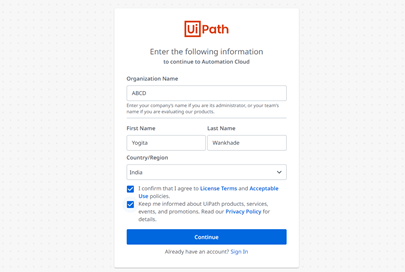
- First, we have to open any browser and enter uipath.com, and then we will get results that have options; we can choose UiPath free trial also it will provide the Signup window; we can either sign up with Google, Microsoft, or LinkedIn account, and we can also log in with email, we have to fill the login details.
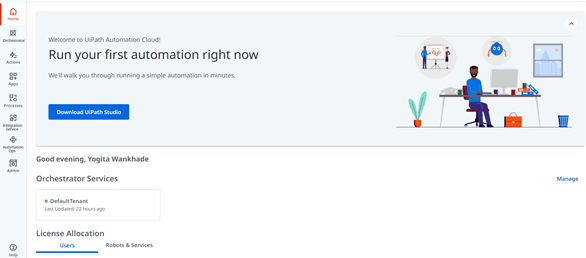
- Then we will get the window with a blue button of ‘Download UiPath Studio’; we have to download it, and by double-clicking on the downloaded file, we can install the set-up.
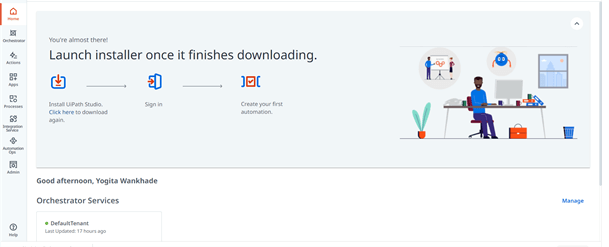
- When we try to install the UiPath, it will take some time, and we will get the window given below, which shows that we have downloaded the file and downloading has been finished.
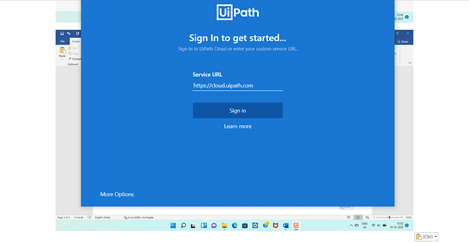
- And we have to sign up, and when we have done the sign up then, we will get the dialog that has the ‘Open UiPath’ button; we have to click on it, then also we have to sign up,
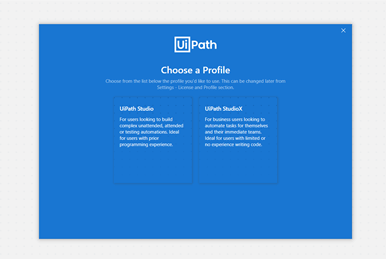
- After getting sign-in, we will get the window with two tabs; we can choose UiPath between the given, which may be either UiPath studio or UiPath StudioX, as shown below snapshot.

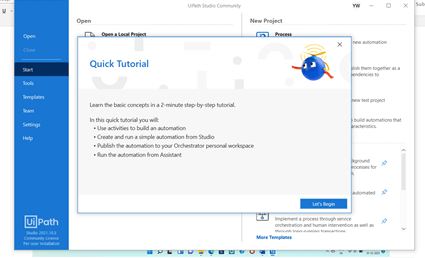
- Then we will get the quick tutorial we can go through it,
- We will get the window in which we can create the business-related project, and we also need to install the Orchestration; in the below window, we can create the project.
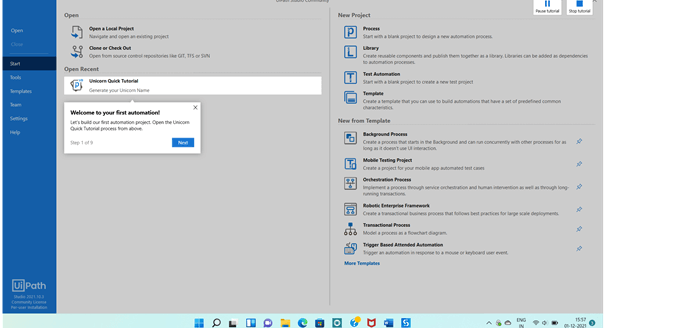
In this way, we can follow the process for the installation of the UiPath insight, and also, we can create the project by using the above window.
UiPath insights business benefits
Let’s see the installation process of UiPath insights; as per the business perspective, the UiPath insights have been beneficial in regards to decreasing error, enlarging the use of it, and it may upgrade the planning of our robots. by using the RPA analytics solution that may measure the performance of the program automatically which may be beneficial. It can be beneficial to trace the robot, which we can use to trace the robots, queues, and processes from our customizable library of dashboard templates; we can also allocate the dashboard over the organization. It can also monitor performance, which may be a key performance indicator. The UiPath is also beneficial because it is fast. It is in-expensive, well organized, and easy to use, so it is produced in large-scale and small-scale businesses because it helps reduce the workload and rapidly finish their tasks. They also overcome human work because it can manage the workload. It also manages the input processing; we can say that the UiPath insights can manage the workloads during input processing.
Conclusion
We conclude that the UiPath insights are a tool that we can be used to analyze the business process automatically, which can also help us to trace and control the processes; we have also discussed the overview, performance, and business-related benefits, so this article will help to understand the topic in details.
Recommended Articles
This is a guide to UiPath Insights. Here we discuss the UiPath insights are a tool that we can be used to analyze the business process automatically. You may also have a look at the following articles to learn more –

