


Updated October 23, 2025
Introduction
Do you want your YouTube videos to reach a global audience? Many creators have amazing content but struggle to share it beyond their native language. The key lies in learning how to translate YouTube videos quickly and affordably.
Thanks to AI translation tools, creators can now bridge language gaps and connect with viewers worldwide. In this article, we will explore how BlipCut helps you translate YouTube videos into any language easily and effectively.
The Global Challenge of YouTube Content
YouTube connects billions of people every day. But language remains a big challenge for creators. Many creators upload amazing videos that viewers around the world cannot understand because they are not in a familiar language. This barrier stops great ideas from reaching the audience they deserve.
For example, a Japanese cooking tutorial might inspire people everywhere. But only Japanese speakers can enjoy it. Many want to go global but do not have the time, money, or tools to translate every video they make.
Why Language Barriers Limit Growth
Language limits not only reach but also engagement. Viewers feel disconnected when they can not understand the message clearly. Comments, shares, and watch time drop because of this gap. Even high-quality videos can not perform well in new markets without translation.
The issue is even more serious for businesses and educators. Tutorials, online lessons, and product demos lose impact when only part of the world can understand them. The content stays local when it has the potential to reach millions worldwide.
How Technology is Changing the Scene
Technology helps people to overcome language barriers. Artificial Intelligence translates videos fast and more accurately. The work can be done in minutes that took hours of manual work in the past.
AI tools generate the subtitles, translate speech, and add the voice-overs in different languages. This makes your content more accessible, inclusive, and appealing.
Creators do not need big budgets or expert teams to translate their videos into other languages. Viewers do not have to miss great content just because of language differences.
BlipCut: Professional AI Solution for Translating Videos
Many creators want to reach global audiences but struggle to translate their videos. Traditional translation takes time, money, and effort. BlipCut, an AI-powered video translation tool, changes the game. It helps creators translate videos easily, accurately, and at no cost.
BlipCut works for YouTube, marketing, training, and social media videos. Users can simply upload or paste a video link and begin translating within minutes.
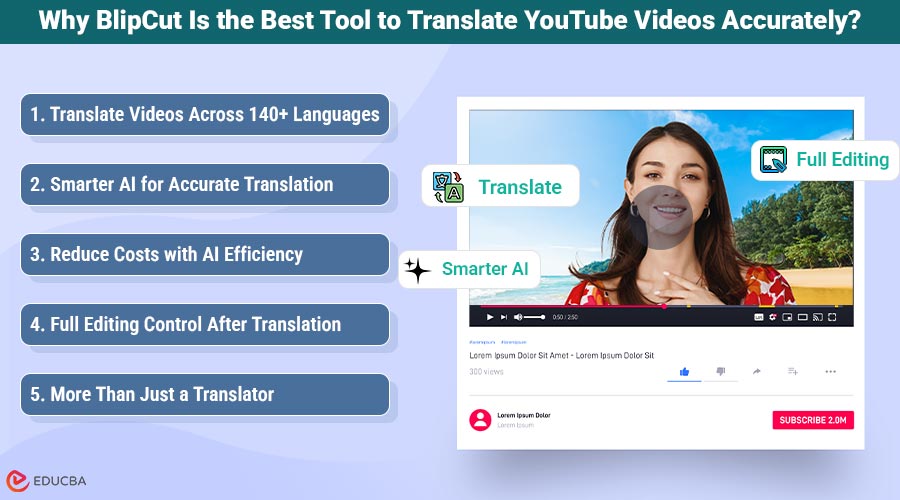
Why BlipCut Is the Best Tool to Translate YouTube Videos Accurately?
BlipCut stands out as an all-in-one AI solution that helps creators translate YouTube videos effortlessly, accurately, and affordably.
1. Translate Videos Across 140+ Languages
BlipCut supports over 140 languages. The users can expand their reach to audiences worldwide. The tool translates videos into English, Spanish, Hindi, Arabic, Chinese, French, and many more.
The batch video translation allows creators to translate multiple videos at once. This saves your time and effort if you have to manage large content libraries. BlipCut helps creators to adapt their videos for different regions and audiences without manual editing.
2. Smarter AI for Accurate Translation
BlipCut’s AI understands the video context, which ensures translations match the original meaning. The tool recognizes multiple speakers in a video and adjusts the translation accordingly. The system also detects the source language automatically if users do not understand that language.
Creators enjoy high accuracy through AI lip syncing, voice cloning, and multi-speaker recognition. These features make translated videos more natural and professional.
3. Reduce Costs with AI Efficiency
You do not need to hire voice actors or professional translators. The tool offers over 300 free AI voices, allowing creators to localize their videos at almost no cost. The tool also uses ChatGPT and DeepSeek to rewrite scripts. This is useful for clarity and fluency, saving both money and time.
BlipCut delivers faster results at a fraction of the price. It allows creators to scale content globally while keeping budgets low.
4. Full Editing Control After Translation
Unlike most tools, BlipCut gives users full editing control after translation. Creators can adjust transcripts, merge subtitles, or modify translations for better accuracy. They can preview results before downloading the final version.
Creators can change subtitle fonts, colors, and positions to match their brand style. You can also adjust the voice speed and clip positions for smooth pacing. Creators can fine-tune every video according to their preferences.
5. More Than Just a Translator
BlipCut offers many additional tools that go beyond translation. It includes an AI subtitle generator, voice changer, audio translator, and even a clip maker that turns long videos into short viral clips.
Other features include AI video dubbing, a YouTube transcript generator, and an extensive voice library for personalized dubbing. Together, these tools make BlipCut a complete solution for global content creation.
How to Translate YouTube Videos with BlipCut: Step-by-Step Guide
BlipCut makes video translation simple for everyone. Whether someone is a creator, teacher, or marketer, the process takes only a few steps. Here is how to translate a YouTube video quickly and accurately using BlipCut.
Step 1: Upload Video

Upload the video that you want to translate. You can upload directly from their computer or paste a video link. BlipCut supports links from hundreds of popular sites, including YouTube. BlipCut analyzes automatically and prepares it for translation. You do not need extra tools or downloads.
Step 2: Choose Target Language
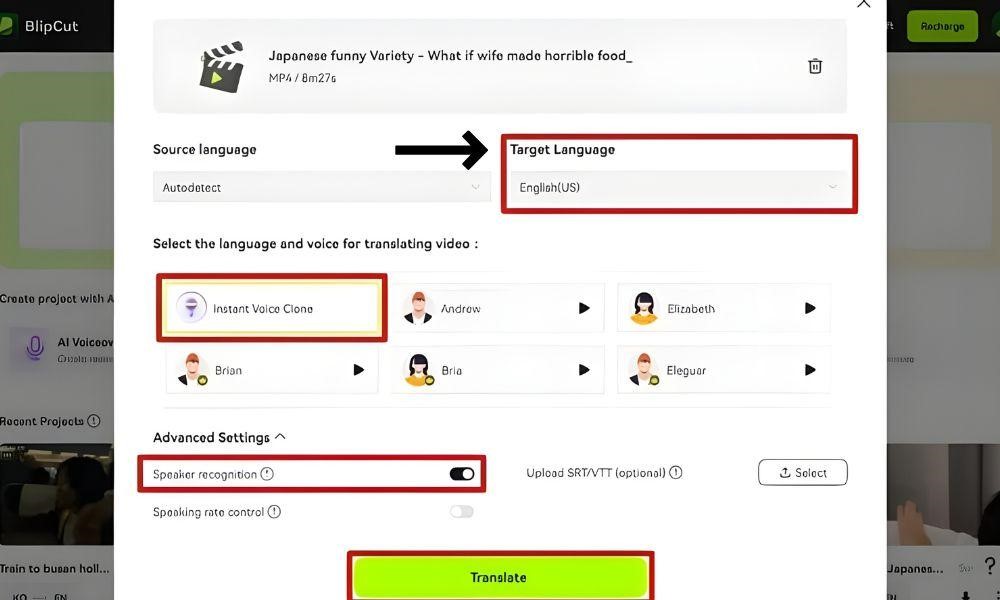
Choose the language to which you want to translate your videos. BlipCut can detect the source language automatically. But you can also choose it manually. Creators can easily reach global audiences. You can enter a language name or scroll through a list for easy selection. This flexibility ensures accurate translation for both major and regional languages.
Step 3: Pick the Voice Option

BlipCut gives two options for translated audio. You can clone your own voice, or you can also choose from the AI voice library.
Step 4: Start Translation
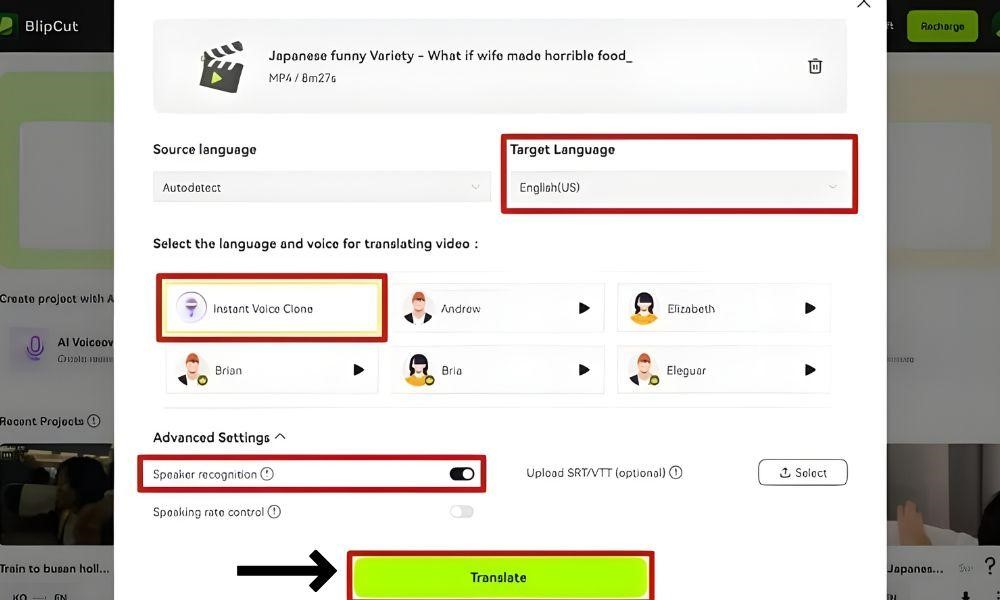
After completing all settings, click the “Translate” button. BlipCut’s AI converts the video into the chosen language. The process takes only a few minutes. You can preview and edit subtitles or voice tracks. You can easily download the completed video and share it directly on YouTube or any other platform.
Conclusion
BlipCut makes the process of translating YouTube videos simple and effective. Creators reach global viewers without any editing skills. Anyone can share content across languages easily. BlipCut turns local videos into global stories by breaking language barriers. The tool is useful for creators, teachers, and businesses. BlipCut is the smart way to make every voice understood.
Recommended Articles
We hope this guide on how to translate YouTube videos helps you reach a global audience. Explore more articles for creators and video growth tips.


