


Updated October 17, 2025
Overview
The journey of lyric video creation has transformed dramatically over the past decade. What once demanded hours of manual syncing, text animation, and visual composition can now be accomplished in minutes with intuitive AI Lyric Video Maker tools like Filmora.
Now, if you are exploring how to use the lyric video maker, then you have come to the right place. In this article, we will cover all the necessary information about AI magic with Wondershare Filmora by providing a detailed guide.
The Old Way: Manual Lyric Video Maker Methods
Before the rise of AI-powered software, creating lyric videos was a labor-intensive process that required manual effort and technical expertise. Creators typically used programs like Adobe After Effects, Premiere Pro, or even Windows Movie Maker to do manual editing, so let us explore how it used to be done:
- Type and Sync Lyrics: In manual editing, creators had to manually insert each line of lyrics, positioning them at exact moments in the song carefully to avoid lengthy revisions.
- Adjust Timing Manually: Without automation, syncing required close listening and countless playback checks to ensure every word appeared exactly when sung.
- Add Transitions and Effects: Visual transitions like fade-in and out were created manually from scratch, demanding creativity and repeated trial-and-error.
- Export Heavy Files: Rendering these manually edited videos, which are large in size, often takes hours to export, depending on the complexity and, specifically, your computer speed.
However, these traditional lyric video creators were very slow and required high technical skills to use. This was an issue especially for beginners or small creators who do not have enough resources to hire a technical expert.
The New Era: AI Lyric Video Maker Tools
With the advancement of technology, the process of lyric video creation has entered a new era. AI Lyric Video Maker tools have revolutionized how artists visualize their music. Here are some of the major benefits:
- Automatic Detection of Beats: The newest technology can beat-match a song by automatically analyzing a track and rhythm in a few seconds and removing the trial-and-error of synchronization.
- Auto-Generate Lyric Captions: AI can be used to automatically sync words with the vocals and set each word correctly, allowing creators to focus more on visual design.
- Pre-made Templates: These applications offer customizable templates for different genres, such as pop and rock, helping users achieve professional quality.
- Translate Lyric Instantly: The built-in translation enables creators to easily translate lyrics to different languages, allowing artists to reach their global fan bases with ease.
Why Filmora Lyric Video Maker Stands Out
Unlike traditional tools, which require extensive technical skills, Wondershare Filmora AI lyrics video maker simplifies every step from transcribing lyrics to syncing them perfectly with music. This tool, powered by AI technology, is an ideal option for beginners who only know the basics. Users can even apply different transitions, effects, and motion effects to give it a more appealing look.
It also provides advanced features like green screen, multi-clipping, and real-time beat to enhance the song’s creative level. Plus, you can transcribe the song’s lyrics within this process to cater to a broader audience. To save extra time, it allows editing various visuals and audio simultaneously to efficiently merge them at the end.
Key Features
- AI Speech-to-Text for Lyric Sync: It automatically detects and transcribes the lyrics with precise timing through its advanced feature.
- Customizable Templates by Genre: This specific tool offers a vast library of pre-designed lyric video templates inspired by different music styles to cater to everyone.
- AI Music Generator: With its built-in AI tool, it allows users to generate unique background music to make your creations appealing.
- Cross-Platform Convenience: Wondershare Filmora is available on both desktop and mobile, providing a seamless workflow from anywhere.
- Massive Text Templates: This tool offers a wide variety of built-in text templates, and you can adjust their font size to make the lyrics video look phenomenal.
Step-by-Step Process of Making Lyric Videos with Filmora’s AI Lyric Video Maker
Now, let us have a quick overview of its stepwise guide to use the lyric video maker to generate auto-sync lyrics:
Step 1. Launch Filmora and Create a New Project: Open Filmora and click on “New Project” to begin. Import your desired song or video file.

Step 2. Click on the Import Button: Upon entering the editing interface, tap on the “Import” button to get the desired song video inserted into Filmora.

Step 3. Choose Speech-to-Text Feature: Navigate into the “Speech to Text” section from the “Titles” section. There, define the parameters, including the language properties and other settings, before hitting “Generate.” This will automatically transcribe the video and add it to the corresponding video to include lyrics within it.

Bonus Feature: AI Silence Detection
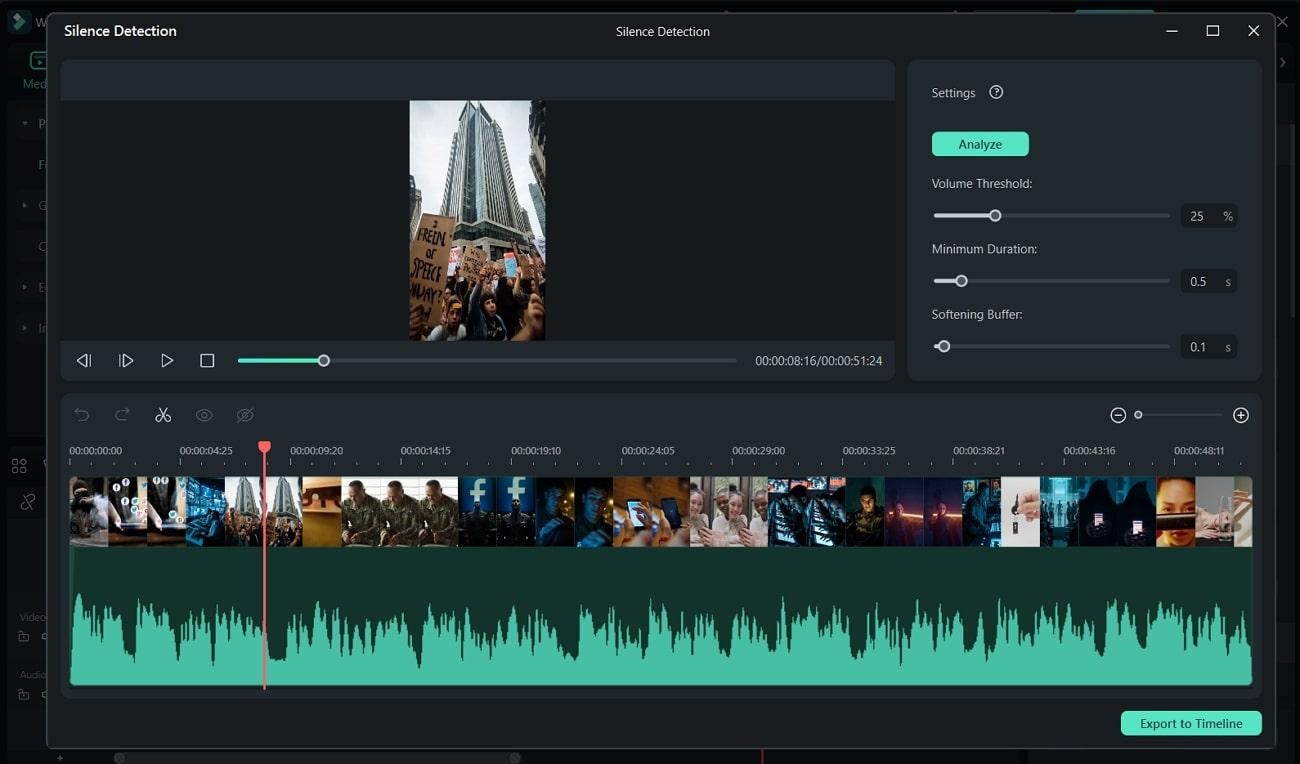
While using its Speech-to-text mode, this tool also provides an advanced AI Silence Detection tool. Without requiring manual editing, this tool automatically scans for the silent part to save extra manual effort. This feature can also be accessed through its batch processing, which is an ideal option for those who edit lengthy podcasts.
Conclusion
Summing up, in this article, we have provided a detailed overview of the instant shift from manual editing to an AI lyric video maker. We have also provided a detailed guide on using Wondershare Filmora’s efficient features to instantly create a lyric video. This will surely help you save time in creating shareable music videos for your social media platforms.
Recommended Articles
We hope this guide on using the AI Lyric Video Maker helps you create stunning videos. Check out these recommended articles for more AI video editing tips!


