


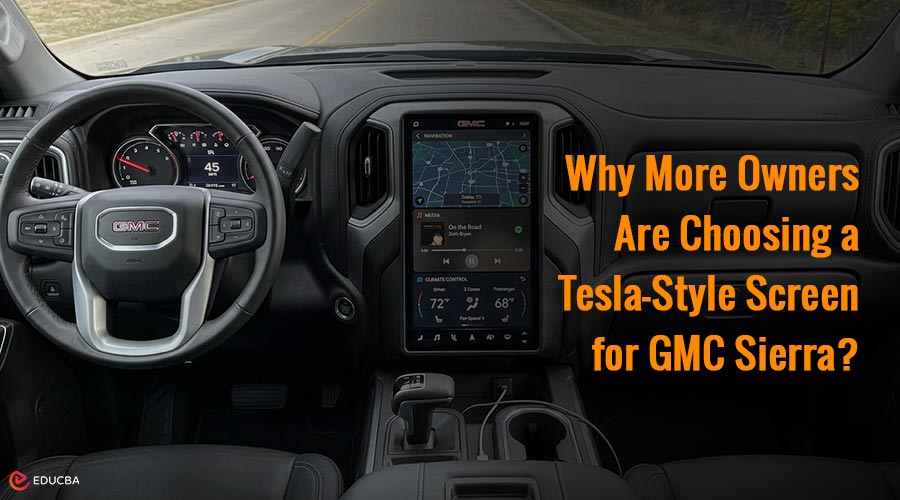
Tesla-Style Screen for GMC Sierra: Overview
If you have spent enough time behind the wheel of a GMC Sierra, you already know one thing—it is built like a tank. Strong, reliable, and ready for just about anything. But let us be honest, the factory infotainment system does not always keep up with the rest of the truck. That is exactly why more owners are upgrading to a Tesla-style screen for GMC Sierra—and it is not just about aesthetics. It is about completely transforming the driving experience. So, what is this upgrade, why is it trending, and is it actually worth your money? Let us break it down.
The Problem With Stock GMC Sierra Infotainment Systems
Most stock GMC Sierra infotainment systems come with:
- Smaller displays
- Limited customization
- Slower response times
- Basic interface design
And while features like Apple CarPlay and Android Auto help bridge the gap, they still rely on a system that falls short of modern expectations. Ever tried navigating menus while driving and felt like you were scrolling through something from 2012? You are not alone. The issue is not that GMC did a bad job—it is just that tech moves fast, and truck interiors do not always keep up.
What Exactly Is a Tesla-Style Screen?
Think of it like giving your Sierra the brain of a modern luxury vehicle. A Tesla-style screen is a large vertical touchscreen that replaces your factory display and integrates multiple functions into one sleek interface. We are talking navigation, media, climate control, Bluetooth, apps—all centralized in one place.
Instead of scattered buttons and menus, everything becomes intuitive and easy to access. It is not just an upgrade. It is a complete transformation of how you interact with your truck.
Why More Owners Are Choosing a Tesla-Style Screen for GMC Sierra?
Here is where things get real. This trend is not just about aesthetics—it is about usability.
1. Bigger Screen, Better Visibility
A larger vertical display means:
- Easier navigation viewing
- Less distraction while driving
- Clearer access to controls
You are no longer squinting or tapping tiny icons. Everything is front and center.
2. Faster, Smoother Performance
Modern Tesla-style units use better processors and run updated software. That means:
- Faster loading times
- Smoother transitions
- No more lag when switching apps
It feels like upgrading from an old phone to a brand-new one.
3. Modern Interior Feel
Let us be real—this is a big reason people upgrade. A Tesla-style screen instantly transforms your interior from basic to premium. It gives your truck a high-tech, luxury feel that rivals newer vehicles.
4. More Features Than Stock
With the right setup, you get:
- Built-in navigation systems
- Wireless Apple CarPlay & Android Auto
- Video playback (when parked)
- Advanced audio controls
- Split-screen functionality
You are turning your dashboard into a smart hub.
Real-World Driving Experience: What Changes?
This is the part most people care about—how does it actually feel day-to-day? Once installed, the biggest difference is convenience. Instead of juggling between buttons, knobs, and menus, everything becomes streamlined. You tap, swipe, and go. Adjusting music, checking maps, or switching settings feels natural—almost like using a tablet. Long drives become more enjoyable because:
- Navigation is clearer
- Media control is easier
- The cabin feels more high-tech
And if you spend a lot of time in your truck (work, travel, daily driving), that upgrade starts to matter more than you might expect.
Installation: Is It Complicated?
Most Tesla-style screen kits offer plug-and-play installation. That means:
- No major cutting or modifications
- Compatibility with factory wiring
- Retains essential vehicle functions (like steering wheel controls)
Installation difficulty depends on your experience. Some owners prefer DIY, while others go to a professional installer. Either way, it is far from the nightmare some people imagine.
Choosing the Right Tesla-Style Screen for GMC Sierra
Not all Tesla-style screens are created equal. This is actually where many buyers get tripped up when choosing an upgrade.
Some cheaper units might:
- Lag or freeze
- Have poor screen resolution
- Lacks proper vehicle integration
That is why it is important to go with a trusted provider that specializes in vehicle compatibility and performance. If you are considering a serious upgrade, the Tesla screen for gmc sierra from Merge Screens is one of the best or most refined options you can get out there. It is built with Sierra owners in mind, which means better fitment, smoother integration, and a more reliable experience overall.
Why Brand Reputation Actually Matters?
When you are upgrading something as central as your infotainment system, you want:
- Clear installation guidance
- Responsive customer support
- Reliable product updates
That is where established brands stand out. If you explore Mergescreens, you will notice they specialize in Tesla-style upgrades across multiple vehicles—not just Sierra trucks. That kind of focus usually translates to better quality control and more polished products.
Is It Worth the Investment?
A Tesla-style screen upgrade is not the cheapest modification you can make—but it is one of the most impactful. Here is why:
| Factor | Stock System | Tesla-Style Upgrade |
| Screen Size | Small to Medium | Large Vertical Display |
| Speed | Moderate | Fast & Responsive |
| Features | Basic | Advanced & Expandable |
| Interior Look | Standard | Premium Modern |
| User Experience | Functional | Intuitive & Smooth |
If you care about:
- Daily driving comfort
- Interior aesthetics
- Tech functionality
Then upgrading to a Tesla-style screen for GMC Sierra is absolutely worth considering.
Who Should (and Should Not) Upgrade?
Upgrade If:
- You spend a lot of time driving your Sierra
- You enjoy modern tech and clean interfaces
- You want your interior to feel updated without buying a new truck
You Might Skip It If:
- You are happy with basic functionality
- You rarely use infotainment features
- You prefer a completely stock setup
Final Thoughts
A Tesla-style screen for GMC Sierra is not just a visual upgrade—it changes how you interact with your truck every day. From smoother controls to a cleaner interface and a more premium feel, it is one of the most impactful upgrades you can make. And once you get used to it, going back to the stock system feels outdated.
Frequently Asked Questions (FAQs)
Q1. Does a Tesla-style screen affect my truck’s original functions?
Answer: No, most high-quality units retain factory features such as steering wheel controls, a backup camera, and climate settings.
Q2. Can I install it myself?
Answer: Yes, many kits offer plug-and-play installation, but you should seek professional installation if you are not comfortable with wiring.
Q3. Will it work with Apple CarPlay and Android Auto?
Answer: Most modern Tesla-style screens support both, often with wireless connectivity.
Q4. Is it safe to use when driving?
Answer: Yes, as long as you use it responsibly. Larger screens can actually reduce distraction by making controls easier to access.
Q5. How long does the upgrade last?
Answer: With a quality unit and proper installation, it can last for years without issues—just like any modern infotainment system.
Recommended Articles
We hope this guide on the Tesla-style screen for GMC Sierra helps you upgrade your driving experience. Check out these recommended articles for more tips and insights on enhancing your vehicle’s technology and performance.

