
Updated March 8, 2023
Introduction to SQL Declare Variable
The following article provides an outline for SQL declare variable. We can use the local variables by declaring initializing and further manipulating its values in a single batch execution or inside the stored procedures in SQL. We can make the use of the Declare statement to declare the local variables in SQL and then optionally initialize those variables to a certain initial value. Further, we can declare the name and data type of the variable that we want to use in the batch or stored procedure. The values of those variables can be changed and reassigned using various ways, such as using the SET statement or using the SELECT query statement.
Syntax of SQL Declare Variable
The syntax for the variable in SQL:
DECLARE { @Name_Of_Variable Data_Type [ = Initial_Value ] }Where Name_Of_Variable is the variable name that we wish to assign, note that according to the syntax of the variable declaration and usage in SQL. A variable name should always begin with @ symbol. Further, the declared variables are referred to as the local variables. The lifetime of the local variables begins once they are declared and ends with either the end of the stored procedure if those variables are used in the stored procedure or at the end of the batch in case if they are used in the batch execution.
The variable’s data type can be specified while declaring it in the place where Data_Type is mentioned. Further, we can assign the initial value to the declared variable that is as specified with Initial_Value. Specifying the initial value to the variable is the optional thing. Note that when we do not specify the initial value to the variable, the variable’s value is by default assigned to NULL.
Example of SQL Declare Variable
Let us consider one example of declaring the variables in SQL. We will declare one variable named @demoEducba, declare the data type of that variable to the varchar, initialize the variable with a certain value, say “Happy Learning!” and then fetch the variable’s value using the select statement as shown below.
Code:
DECLARE @demoEducba AS VARCHAR(100)='Happy Learning!'
SELECT @demoEducba
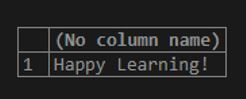
The execution of the above batch statements gives the following output giving out the value of the variable demoEducba as “Happy Learning!” because we had initialized that variable to that value.
Output:
Assigning Values to the Variables
We can assign the values to the variables declared in SQL with the help of two methods that are given below:
1. Using the SET statement
We can make the use of the SET statement in SQL to assign the values to the variable irrespective of whether the variable has an initial value or previous value assigned to it; the value that is specified in the SET statement overrides the value of the variable that it had previously.
We can assign the values to the variables using the SET statement with the help of the following syntax.
Syntax:
SET @Variable_Name = ValueWhere the Variable_Name is the name of the variable to which we have to assign the value, and Value is the string, integer, or any other value of the data type of the variable which we have to assign to that variable.
Consider one example where we will declare one variable named @wishes that won’t have any initial value and will have a varchar data type. We will assign the value string ‘Hey! Good Morning My Friend! Learn SQL on EDUCBA with payal.’ to the @wishes variable using the SET statement in SQL with the help of the following statements and then fetch the value of the @wishes variable and observe the output.
Code:
DECLARE @wishes varchar(100)
SET @wishes = 'Hey! Good Morning My Friend! Learn SQL on EDUCBA with payal.'
SELECT @wishes AS 'Good Wishes'
Output:

2. Using the SELECT Statement
The SELECT statement can be used to assign the values to the variables in SQL as well as retrieving the value of those variables.
Let us see one example of how we can use the SELECT statement to assign and retrieve the values of the variables that are declared in SQL. Let us consider the same example as above, and instead of using the SET @wishes = ‘Hey! Good Morning My Friend! Learn SQL on EDUCBA with payal.’ we will use SELECT @wishes = ‘Hey! Good Morning My Friend! Learn SQL on EDUCBA with payal.’ as shown below.
Code:
DECLARE @wishes varchar(100)
SELECT @wishes = 'Hey! Good Morning My Friend! Learn SQL on EDUCBA with payal.'
SELECT @wishes AS 'Good Wishes'
Output:

We can declare multiple local variables and use them in SQL by declaring each of them individually using DECLARE statement for each of them or using a single DECLARE statement and declaring all the variables in the same statement by separating the declaration of each variable with a comma.
Example:
Code:
DECLARE @demoEducba1 AS VARCHAR(100)='Happy Learning!',@demoEducba2 AS VARCHAR(100)=' Enjoy Your Journey to Knowledge on EDUCBA with Payal.'
SELECT concat(@demoEducba1,@demoEducba2)
Output:

Conclusion
We can declare as many local variables that we require in SQL and specify their datatypes and initialize and assign values to those variables using DECLARE, SET, and SELECT statements as demonstrated in the above examples. In this article, we have seen about declaring the variables in SQL that are referred to as the local variables and how we can set the initial value with its data type. Also, how the local variables can be reassigned to the values and manipulated further according to requirements along with the syntax and implementation with the help of certain examples.
Recommended Articles
We hope that this EDUCBA information on “SQL Declare Variable” was beneficial to you. You can view EDUCBA’s recommended articles for more information.

