

Updated March 10, 2023

Introduction to SQL ALL
ALL operator in standard query language(SQL) is used to select all the rows or records of a SELECT statement. It can further be used as a comparison operator to compare values of a column to all the values obtained in the result set of a subquery in WHERE or HAVING clause of a SQL query. The ALL operator must be preceded by comparison operators such as >,<,=, etc. It returns TRUE if all the values obtained from the subquery meet the comparison condition.
Syntax and Parameters
The basic syntax for using ALL operator with SELECT statement is as follows :
SELECT ALL column_name
FROM table_name
WHERE condition(s);
The basic syntax for using ALL operator in WHERE clause is as follows :
SELECT column_name1, column_name2
FROM table_name
WHERE column_name comparison_operator ALL
(SELECT column_name
FROM table_name
WHERE condition_expression );
Parameters
The parameters used in the above-mentioned syntaxes is as follows :
column_name1, column_name2, … : fields or columns that have to be fetched in the final result set.
table_name: Name of the database table from which the said columns will be fetched.
column_name: column which has to be used as a part of WHERE condition for comparison.
comparison_operator: comparison operators are a set of operators used to check conditions. We can choose from Equal to (=), not equal to(<>), less than(<), greater than(>), less than or equal to (<=), greater than or equal to (>=).
(SELECT column_name FROM table_name WHERE condition_expression ): The values obtained from the result set of this subquery will be compared with the column_name.
The syntax for using ALL operator with a HAVING clause is similar to the WHERE clause. The only difference is HAVING is generally used with GROUP BY clauses.
Examples of SQL ALL
In order to illustrate the functionality of ALL operator in SQL, what could be better than trying a few examples on a dummy table. Ergo, let us create two database tables called “employee” and “departments” respectively.
We can use the following CREATE table statements to create these tables.
CREATE TABLE employee
(
employee_id integer,
employee_name character varying(255),
department_id character varying(255),
salary numeric,
highest_qualification character varying(255)
)
CREATE TABLE departments
(
department_id character varying(255),
department_name character varying(255),
location character varying(255),
manager_id integer
)
We have successfully created both the tables, namely “employee” and “departments”. Now with the help of the given INSERT queries given below, let us insert a few records in both the tables to work with.
(i) INSERT statement for inserting records in the employee table.
INSERT INTO public.employee(
employee_id, employee_name, department_id, salary, highest_qualification)
VALUES (101,'Roy Bernard','D01',5000,'B.Sc'),
(102,'Gina Messenger','D01',6200,'M.Sc'),
(105,'Jim Perkins','D03',5000,'B.A'),
(106,'Erica Silverman','D03',7000,'MBA'),
(107,'Priyanka M','D01',5000,'B.Tech');
(ii) INSERT statement for inserting records in departments table.
INSERT INTO public.departments(
department_id, department_name, location, manager_id)
VALUES ('D01','Research','Singapore',102),
('D02','Human Resource','Santa Monica',104),
('D003','Sales','New York',106);
Now we are all set to try a few examples based on these tables.
Example #1 – ALL operator with SELECT statement
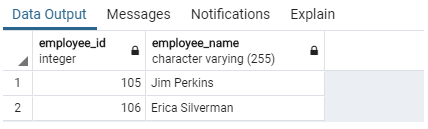
Show the list of all the employees depicting their employee_id and names.
Code:
SELECT ALL employee_id, employee_name
FROM employee
WHERE department_id = 'D003';
Output:
Example #2 – ALL operator with WHERE clause
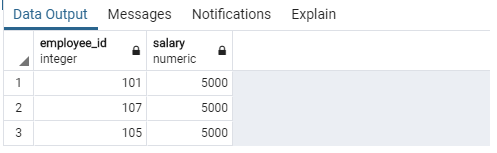
Find the employee_ids and salaries of employees who earn less than or equal to all the employees in the ‘D003’ department.
Code:
SELECT employee_id, salary
FROM employee
WHERE salary <= ALL(SELECT salary
FROM employee
WHERE department_id = 'D003');
Output:
Example #3
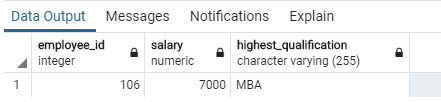
Find the employee_id, salary, and highest qualification of employees who earn equal to all the managers in the company’s New York office.
SELECT employee_id, salary, highest_qualification
FROM employee
WHERE employee_id = ALL(SELECT manager_id
FROM departments
WHERE location = 'New York');
Output:
Example #4 – ALL operator with HAVING clause
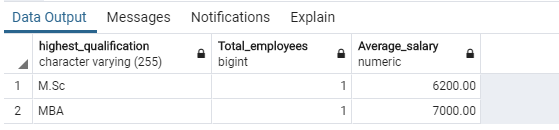
Prepare a summary table consisting of total employees and average salaries grouped together by highest qualification, provided that salaries of these employees is more than the average salary of all the departments.
Code:
SELECT highest_qualification,
count(employee_id) as "Total_employees",
ROUND(AVG(salary),2) as "Average_salary"
FROM employee
GROUP BY highest_qualification
HAVING AVG(salary) > ALL( SELECT AVG(salary)
FROM departments as d
JOIN employee as e
ON d.department_id = e.department_id
);
Output:
Example #5 – ALL operator with the UPDATE statement
Suppose the company has decided to raise the salaries of employees who have been earning a minimum salary until now to $5100. Write an update query to perform this task.
Code:
UPDATE employee
SET salary = 5100
WHERE salary <= ALL(SELECT MIN(salary)
FROM employee
);
Output:
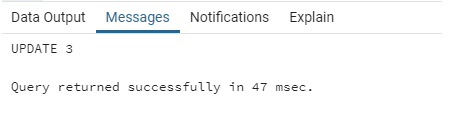
The query returned successfully. Let us check using the following SELECT query if the desired changes have been made.
SELECT * FROM employee;Output:
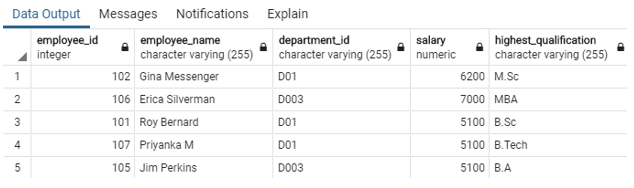
It can be observed from the image that the salaries of employees who have been earning $5000 have been updated to $5100.
ALL operator with the DELETE statement
DELETE FROM employee
WHERE employee_id = ALL( SELECT manager_id
FROM departments
WHERE department_id = 'D01');
Output:
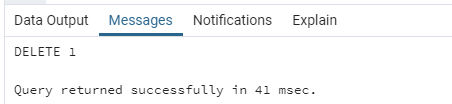
Use the following SELECT query to check if the desired rows have been deleted.
SELECT * FROM employee;Output:
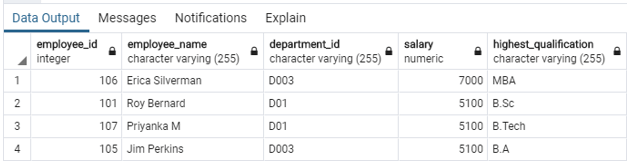
The query returned successfully and has deleted the details of department D01’s manager.
Conclusion
ALL is a comparison operator that returns TRUE if all the values in the result set obtained from a subquery meet the specified condition. The operator can be used along with a SELECT statement, WHERE, and HAVING clause.
Recommended Articles
We hope that this EDUCBA information on “SQL ALL” was beneficial to you. You can view EDUCBA’s recommended articles for more information.

