

Updated February 28, 2023

Introduction to PowerShell If-Not
The following article provides an outline on PowerShell If-Not. In most of the scripts, it is necessary to make some comparison and take some decisions based on the outcome of comparison. This is known as conditional making and this is achieved in PowerShell with the help of conditional operators. Conditional Operators are used to compare two or more values or conditions and based on those condition appropriate action is performed. If condition is one type of conditional operator. The if operator has a statement or value that needs to be evaluated and based on the result and the corresponding action is executed.
The if statement generally has one or multiple else statements followed by it. If the evaluation of condition is true, the code inside if block is executed else the code in the else part is executed. In case of If-Not it is nothing but negating the If block. This means if the condition is not met then if part is executed and if the condition if is met else part if is executed. This is also known as reversal of if operator. Here we will see various if conditional operator and If-Not operator.
Syntax of If-Not Operator
The -Not operator is used to change an expression result from false to true or true to false. The alias of -not is!.
The syntax is as follows:
If(-not(statement)){}
Or
If(!(statement)){}
Or
If(-not($test)){}
Or
If(!($test)){}
Example:
Code:
Write-Host "IF-Not example"

if( -not(1 -lt 2))

{

Write-Host "If condition is executed"

}

else

{

Write-Host "else condition is executed"

}
Output:
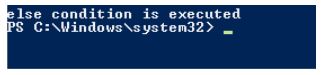
- In the above example, the if condition checks first if 1 is lesser than 2. It is true.
- Then the not operator makes it false.
- So, the control is shifted to else statement and that block is executed.
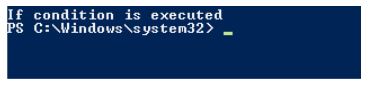
- In the above if the condition if changed as 3 from 1 then, the if condition will become false and after not it will become true.
Then if statement will be executed as below.
Code:
Write-Host "IF-Not example"

if( -not(3 -lt 2))

{

Write-Host "If condition is executed"

}

else

{

Write-Host "else condition is executed"

}
Output:
Examples of PowerShell If-Not
Given below are the examples:
Example #1
Code:
Write-Host "Welcome to demo of IF-Not Operator"

Write-Host "This is will ask the user for his age and weight and let him know his bmi status"

$age=Read-Host "Enter your age"

$weight= Read-Host "Enter your weight"

if(-not($age -gt 40 -and $AGE -LT 50) -and $weight -le 50)

{

Write-Host "Your BMI Level is normal"

Write-Host "You are safe"

}

ElseIf(-not($age -gt 40 -and $AGE -LT 50) -and ($weight -Gt 50 -and $weight -le 60))

{

Write-Host "Your BMI Level is CLOSE TO normal"

Write-Host "You are safe, but please take care"

}

ElseIf(($age -gt 40 -and $AGE -LT 50) -and ($weight -Gt 60 -and $weight -le 70))

{

Write-Host "Your BMI Level is NOT normal"

Write-Host "You need to exercise"

}

Elseif(($age -gt 50 -and $AGE -LT 60) -and $weight -le 50)

{

Write-Host "Your BMI Level is normal"

Write-Host "You are safe"

}

ElseIf(($age -gt 50 -and $AGE -LT 60) -and ($weight -Gt 50 -and $weight -le 60))

{

Write-Host "Your BMI Level is CLOSE TO normal"

Write-Host "You are safe, but need to monitor"

}

ElseIf(($age -gt 50 -and $AGE -LT 60) -and ($weight -Gt 60 -and $weight -le 70))

{

Write-Host "Your BMI Level is absolutely normal"

Write-Host "You are safe, please keep up the good work"

}

Elseif(($age -gt 60 -and $AGE -LT 70) -and $weight -le 50)

{

Write-Host "Your BMI Level is not normal"

Write-Host "You are not safe. Please consult doctor"

}

ElseIf(($age -gt 60 -and $AGE -LT 70) -and ($weight -Gt 50 -and $weight -le 60))

{

Write-Host "Your BMI Level is perfect"

Write-Host "Keep up the good work"

}

ElseIf(-not($age -gt 60 -and $AGE -LT 70) -and ($weight -Gt 60 -and $weight -le 70))

{

Write-Host "Your BMI Level is too much"

Write-Host "You need to exercise"

}

else

{

Write-Host "Please enter appropriarte age and weight"

}
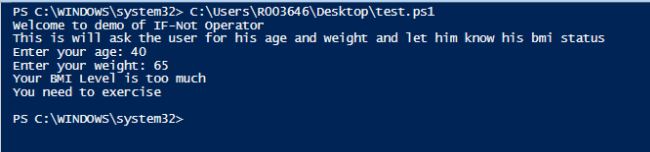
Output:
Example #2
Code:
Write-Host "Welcome to demo of various if operations with different operators"

Write-Host "Simple if statement"

$no1=Read-Host "Enter First number"

$no2= Read-Host "Enter second number"

if($no1 -gt $no2)

{

Write-Host "Number entered first" $no1 "is greater"

}

else

{

Write-Host "Number entered second" $no2 "is greater"

}

$number=Read-Host "Enter a three digit number"

if(($number -ge 100) -and ($number -lt 300) -and ($number.Length -lt 4))

{

Write-Host "Entered number is in the range 100 to 299"

}

elseif(($number -ge 300) -and ($number -lt 700) -and ($number.Length -lt 4))

{

Write-Host "Entered number is in the range 300 to 700"

}

elseif(($number -ge 700) -and ($number -lt 999) -and ($number.Length -lt 4))

{

if($number.Length -eq 3)

{

Write-Host "Entered number is in the range 700 to 999"

}

else

{

Write-Host "Not a three digit number"

}

}

else

{

Write-Host "Not a three digit number"

}

Write-Host "If not demo using !"

$username= Read-Host "Enter a user name"

if(!$username)

{

Write-Host "username is empty"

}

else

{

Write-Host "Entered user name is" $username

}
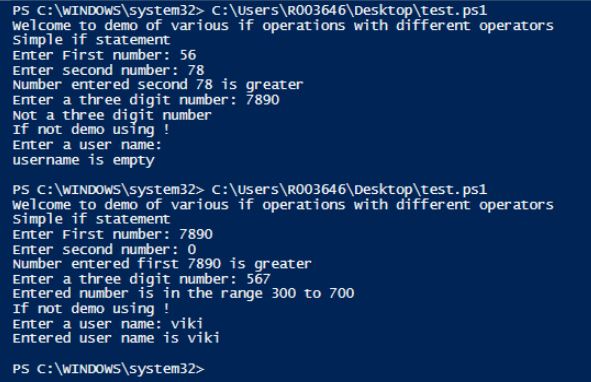
Output:
Example #3
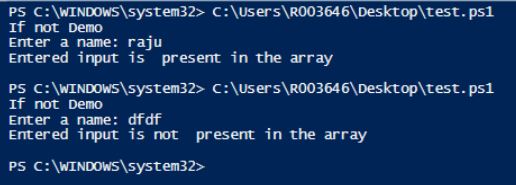
Code:
Write-Host "If not Demo"

$array=@("viki","ravi","raju")

$input=Read-Host "Enter a name"

if(-not($array -contains $input))

{

Write-Host "Entered input is not  present in the array"

}

else

{

Write-Host "Entered input is  present in the array"

}
Output:
Conclusion
Thus, the article covered in detail about the If-Not conditional operator in PowerShell. It showed various examples on how to use the if conditional operator with various comparison checks. The article also covered how various scenarios can be checked using the if loop and multiple if else statements. To learn more about the if statement and various comparison operators with if statement it would be advisable to write sample scripts and practice them.
Recommended Articles
This is a guide to PowerShell If-Not. Here we discuss the introduction to PowerShell If-Not along with respective examples for easy and better understanding. You may also have a look at the following articles to learn more –

