


Updated May 6, 2023

Introduction to PostgreSQL FETCH
The PostgreSQL FETCH clause retrieves the portion of rows returned by a statement from a cursor. The FETCH clause is SQL-standard which has been introduced in SQL:2008. The PostgreSQL FETCH clause uses the previous cursor to limit the number of rows from the result set fetched from a statement.
Syntax:
OFFSET start { ROW | ROWS }
FETCH
{ FIRST | NEXT }
[ count ]
{ ROW | ROWS }
ONLY
Explanation:
- FIRST or NEXT / ROW or ROWS: FIRST and ROWS are similar terms with NEXT and ROWS, respectively.
- Start: It is an integer value that should be zero or positive. If the OFFSET clause is defined, then the default value of the Start is zero. The query returns nothing if the value of the Start is greater than the result set.
- Count: The value of the count is one or higher. Suppose the count is defined, then its value defaulter to one.
How does the FETCH clause work in PostgreSQL?
- The PostgreSQL FETCH clause helps us to fetch the specified number of rows using a cursor.
- While using a cursor user needs to be in a transaction; as a result, it is not independent of other users within the same system.
- We can specify the row count as negative or positive. The positive row count will retrieve as per the direction parameter defined. The default direction will be FORWARD if we have not specified anything.
- To make sure the order of the SQL statement is consistent, you need to use the ORDER BY clause while using the FETCH clause.
Examples
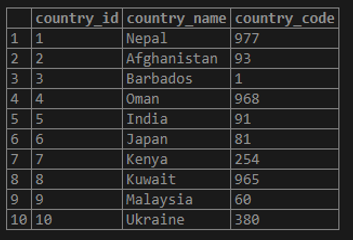
Let’s create a table named ’COUNTRIES’ to understand the examples.
Example #1
The following CREATE TABLE statements will create the COUNTRIES table.
Code:
CREATE table COUNTRIES
(
country_id serial PRIMARY KEY,
country_name VARCHAR (256) NOT null,
country_code numeric NOT NULL
);
Now insert some data into the COUNTRIES table using the INSERT statement as follows:
Code:
INSERT INTO COUNTRIES (country_name,country_code)
VALUES
('Nepal', 977),
('Afghanistan', 93),
('Barbados', 1),
('Oman', 968),
('India', 91),
('Japan', 81),
('Kenya', 254),
('Kuwait', 965),
('Malaysia', 60),
('Ukraine', 380);
Code:
select * from COUNTRIES;Output:
Example #2
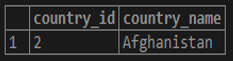
The following statement will return us to the first row of the ‘countries’ sorted by country_name:
Code1:
SELECT

country_id,

country_name

FROM

countries

ORDER BY

country_name

FETCH FIRST ROW ONLY;
Output:
Code2:
SELECT
country_id,
country_name
FROM
countries
ORDER BY
country_name
FETCH FIRST 1 ROW ONLY;
Output:
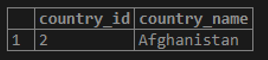
The above statement is similar to the following one: both statements will return the same result.
Example #3
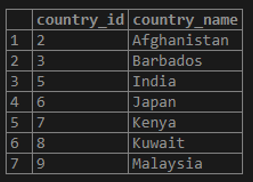
The following statement will return us to the first seven rows of the countries sorted by country_name:
Code:
SELECT
country_id,
country_name
FROM
countries
ORDER BY
country_name
FETCH FIRST 7 ROW ONLY;
Output:
Example #4
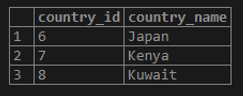
The following statement will return us to the next three rows of the countries after the first three rows of the countries sorted by country_name:
Code:
SELECT
country_id,
country_name
FROM
countries
ORDER BY
country_name
OFFSET 3 ROWS
FETCH FIRST 3 ROW ONLY;
Output:
Advantages of using FETCH in PostgreSQL
- We can use the LIMIT clause to limit the number of rows a statement returns. But the LIMIT clause is not a SQL-standard. So we should prefer The PostgreSQL FETCH clause, which is as per the standard SQL introduced in SQL:2008.
- The PostgreSQL FETCH clause uses a previously created cursor for fetching the rows.
Conclusion
From the above article, we hope you have learned about the PostgreSQL FETCH clause and how the PostgreSQL FETCH works. Also, we have added some examples to demonstrate to you how to use the FETCH clause.
Recommended Articles
We hope that this EDUCBA information on “PostgreSQL FETCH” was beneficial to you. You can view EDUCBA’s recommended articles for more information.

