

Updated May 16, 2023

Introduction to PostgreSQL DELETE
PostgreSQL, a delete statement, is used to delete specific rows or multiple rows from a table in PostgreSQL. Delete statement in PostgreSQL is used to delete and existing records from the table, we can use a where clause to delete selected rows from the table. If we have not used the where clause with the delete statement, all rows from the table will be deleted. Delete statements also check the reference condition from one or more columns by using another table.
Syntax of PostgreSQL DELETE
Below is the syntax of the delete statement:
Delete from table_name (Table name which we have used with delete statement) where [ Condition ]OR
Delete from table_name (Table on which we have deleting the rows.)OR
Delete from table_name [ USING using-list ] where [ Condition ]Parameters
Below is the parameter description syntax of the delete statement:
- Delete: This statement is used in PostgreSQL to delete existing rows from the table. We can delete single, multiple, or all rows at one time using the delete statements.
- Table name: This is defined as the table name from which we have deleting rows using the delete statement in PostgreSQL. The table name is a very important parameter in the delete statement.
- Where: Where clause is used with delete statement in PostgreSQL to specify the condition with delete statement.
- Condition: We can define conditions using the where clause in the delete statement. We can use any condition to delete rows from a table using delete statements.
- Using list: We can use exist clauses with delete statements in PostgreSQL. Using a list is an optional parameter in the delete statement. We can use the existing clause to check the condition of one or more columns.
Use of DELETE statement
Use of DELETE statement with various queries :
1. Delete the statement with one condition
We can delete single rows in PostgreSQL. We have deleting a single row from the table using the where clause. In the below example, we have deleted a single row from the student table are as follows.
Code:
select * from student;
delete from student where stud_id = 12;
select * from student;
Output:
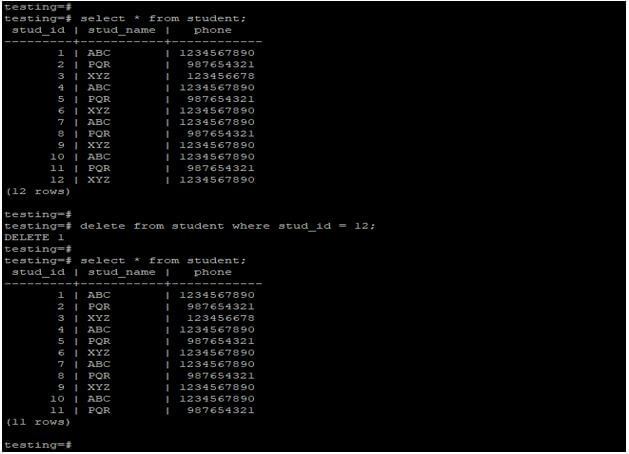
Explanation: In the above example, we have a deleted row that has stud id is 12 from the student table. After deleting the row, stud id 12 was deleted from the table.
2. Delete statement with two condition
We can delete rows from the table in PostgreSQL by using two conditions. Using AND, where clause, we have deleting two rows from the table. In the below example, we have deleted the rows using two conditions from the student table.
Code:
select * from student;
delete from student where stud_id = 11 AND stud_name = PQR;
select * from student;
Output:
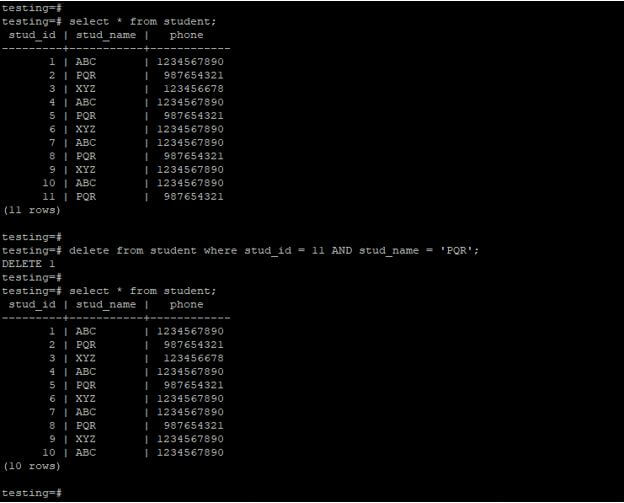
Explanation: In the above example, we have a delete row that has a stud id is 11and a stud name is PQR from the student table. After deleting the row, stud id 11 is deleted from the table.
3. Delete statement with exists condition
We can delete the record from one table, which is based record from another table in PostgreSQL.
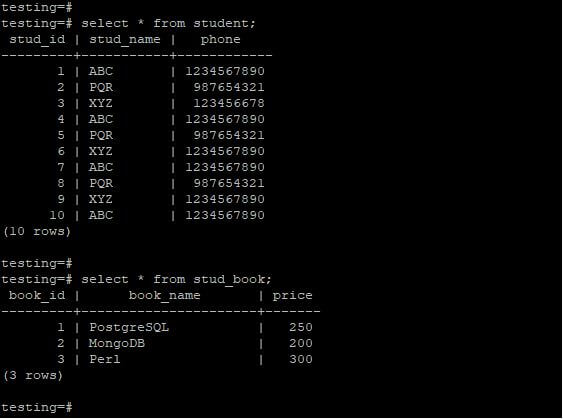
We can delete this record using exists conditions. Basically from, a clause in PostgreSQL is not allow to delete the record from more than one table in PostgreSQL. The example below shows that delete the record using existing PostgreSQL conditions. We have used the student and stud_book table to describe the example of a delete statement using existing conditions are as follows.
Code:
select * from student;
select * from stud_book;
Output:
Code:
DELETE FROM student WHERE EXISTS (SELECT 1 FROM stud_book WHERE student.stud_id = stud_book.book_id AND price < 250 );
select * from student;
select * from stud_book;
Output:
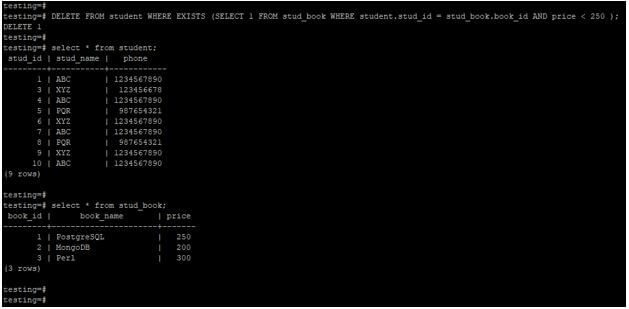
Explanation: In the above example, we have deleted the rows from the table by checking the condition from the student and the stud_book table. We have deleted the row in which stud_id is 2 from the student table with checking the condition from the stud_book table.
4. Delete multiple rows using the where condition
We can delete multiple rows in PostgreSQL by using the delete statement. We can delete the rows by using the where clause. The below example shows that delete multiple rows by using the where condition.
Code:
select * from student;
delete from student where stud_name = 'ABC';
select * from student;
Output:
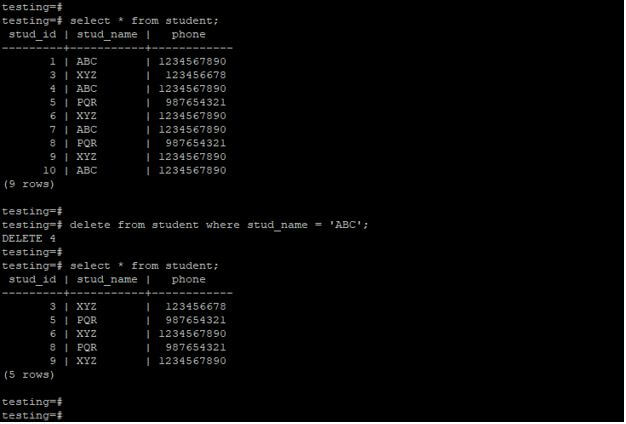
Explanation: In the above example, we must delete four rows using the where clause. We have using condition on stud_name rows that delete the rows which contain the student name as ABC. All the names containing the student name as ABC will be deleted by using the delete statement.
5. Delete all rows from a table using the delete statement
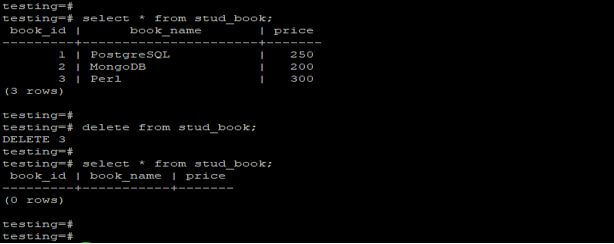
We can delete all rows from the table by using delete statements in PostgreSQL. To delete all rows from the table, there is no need to use a where clause with a delete statement. There is no need to use the where clause and condition while deleting all rows from the table. The below example shows that delete statements to delete all the rows from the stud_book table using delete statement in PostgreSQL.
Code:
select * from stud_book;
delete from stud_book;
select * from stud_book;
Output:
6. Delete rows after matching condition using the delete statement
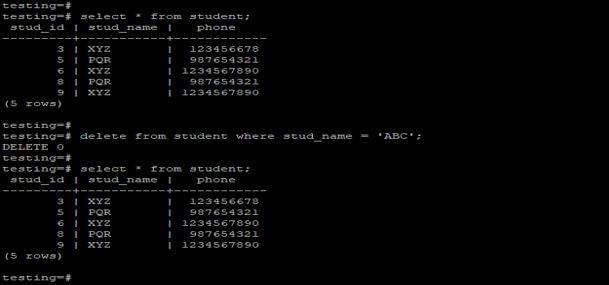
If our condition is not matched with a condition that we have provided with a delete statement, it will return a false condition as a result. The example below shows that if the condition fails, the delete statement will return the false results as output.
Code:
select * from student;
delete from student where stud_name = 'ABC';
select * from student;
Output:
Recommended Articles
We hope that this EDUCBA information on “PostgreSQL DELETE” was beneficial to you. You can view EDUCBA’s recommended articles for more information.

