
Updated March 30, 2023

Introduction to PL/SQL varray
PL/SQL provides a different kind of functionality to the user, in which varray is one of the functionalities provided by the PL/SQL. Basically, PL/SQL provides the data structure functionality that we call varray. In varray we can store the collection of elements with fixed size and same data type in a sequential manner. Normally varray is used to store the sequential collection of data like array data structure. In varray memory, location is in a contiguous manner, meaning minimum location value corresponds to the first element in varray and maximum location value corresponds to the last element in the varray. On the other hand, we can also call it a single-dimensional collection of elements.
Syntax of PL/SQL varray
Given below is the syntax mentioned:
create[ or replace] type specified type_name IS varray(n) of specified element_type [not null constraint];Explanation:
In the above syntax, we used different parameters as follows:
- specified type_name: It is the type of varray.
- n: It is used to define the maximum element size of a varray.
- specified element_type: It is used to define the type of element in that variable.
- not null constraint: It is used to specify the element of varray.
How varray works in PL/SQL?
Given below shows how varray works in PL/SQL:
Normally varray is a collection technique in which that varray size is fixed; we can increase the size of varray than the fixed size.
The following are the features of varrays:
- First, the size of the upper limit is set.
- We can’t remove any array elements since this collection type is always dense. varray can be removed in its whole or truncated at the end.
- The varray always starts with 1.
- It has very little flexibility because it is usually thick in nature.
- When the array size is known, and comparable actions can be performed on all of the array members, it is more suitable to utilize.
- Before utilizing them in applications, they must be initialized. Any action on an uninitialized collection will result in an error (excluding the EXISTS operation).
- In varray sequence is always stable as well as the count of the collection is the same.
- It may be generated either as a database object that is visible throughout the database or as a subprogram object that can only be utilized within that subprogram.
First, we see the syntax of varray; now, let’s see how we can declare and initialize the variables of varray as follows:
After the creation of the varray type, we need to declare the varray instance for that created varray type by using the following syntax.
Syntax:
specified varray_name type_name :=type_name(…);Explanation:
In the above syntax, we use different parameters as follows:
- specified varray_name: It is the name of the varray that we already created.
- type_name: It is the type of varray.
- type_name(…): It is used to define the constructor of varray type, and it is accepted as the comma-separated list of elements. Basically, the name of the constructor is the same as the varray type. One important point here is that before use of varray variables, we must initialize them; otherwise, it shows the error message like a reference to an uninitialized collection.
For initialization of varray type, we need to follow the following syntax:
Syntax:
specified varray_name type_name :=type_name();Explanation:
- Using the above syntax, we define the empty collection that means zero elements. Then, when we want to provide the element, we can use the following syntax when we want to specify the element.
Syntax:
specified varray_name type_name :=type_name(varray_element1, varray_element2,…..);Now let’s see how we can access the varray element as follows:
Code:
specified varray_name(n);Here n is used for the index of varray element, which starts with 1 and ends with the max size of the element.
Examples of PL/SQL varray
Given below are the examples of PL/SQL varray:
Example #1
Now let’s see the different examples of varray in PL/SQL.
Code:
DECLARE
type studarray IS VARRAY(6) OF VARCHAR2(15);
type studmarks IS VARRAY(6) OF INTEGER;
sname studarray;
smark studmarks;
stotal integer;
BEGIN
sname := studarray('Sammer', 'Jenny', 'Pooja', 'Rohit', 'Sachin', 'Rahul');
smark := studmarks(55, 70, 50, 39, 80, 87);
stotal := sname.count;
dbms_output.put_line('Total Number of ' || stotal || ' Students');
FOR I in 1..stotal LOOP
dbms_output.put_line('Students ' || sname(i) || ' Marks of Student ' || smark(i));
END LOOP;
END;
/
Explanation:
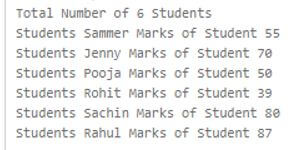
- In the above example, first, we need to declare the varray; in this example, we declared two varray that are studarray and studmarks with six different elements, as shown in the above example. After that, we declare varray variables and initialize varray that we already created with six elements.
- After that, we use the count method to count the number element that is students and initialize it to a total, and here we use the procedure to display the element from studarray. In the next line, we use a for loop to print the all students and marks of students, and its store in a variable. Finally, we display by using the output procedure as shown in the above example. The final result of the above statement we show below screenshot as follows.
Output:
Example #2
Now let’s see another example of varray as follows.
Code:
DECLARE
TYPE sample_type IS VARRAY(4)
OF VARCHAR2(20) NOT NULL;
s_names sample_type := sample_type('Sameer','Jenny','Pooja','Rohit');
s_namess sample_type := sample_type();
BEGIN
-- display empty array
dbms_output.put_line('Elements from t_namess ' || s_namess.COUNT);
-- display elements from varray
dbms_output.put_line('Elements from s_names '|| s_names.COUNT);
END;
/
Explanation:
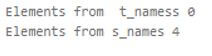
- In the above example, we try to implement the varray with two different options. In this example, we declare varray name as sample_type as shown. After that, we initialize the two varray, one for an empty element and the second for elements.
- Inside the execution section, we write code to display both varray by using the dbms_output.put_line procedure, and we end the procedure. The final result of the above statement we show below screenshot as follows.
Output:
Conclusion
From the above article, we have seen the basic syntax of varray, and we also saw different examples of the varray. From this article, we saw how and when we use PL/SQL varray.
Recommended Articles
We hope that this EDUCBA information on “PL/SQL varray” was beneficial to you. You can view EDUCBA’s recommended articles for more information.

