

Updated April 6, 2023
Difference Between Perforce vs Git
Here we discuss the difference between Perforce vs Git.
Git: Git is a source control management tool, which is a free and open-source code version control tool that is meant to manage the codes in small or huge projects based on performance and flexibility. Git helps to work with company standards, which is an important need in a team’s functional development. Git is simpler to learn, and it is easy to merge the code that is built in the repo. Git has the capability to clone and share the code among the team easily.
Features of Git:
- Performance: Git has many advantageous features to commit the source code, merge the code in the repo, and compare it to the existing version of the code to optimize its performance.
- Security: The SHA1 algorithm is used to secure the code. It also secures the files, versions, and commits of the code that has been pushed to Git. It also traces and malicious or accidental changes in the change history.
- Flexibility: Git supports different kinds of nonlinear workflows, also efficient in both small and large development firms, and compatible with current systems.
- Open source: Git is a free and open-source code version control tool meant to manage the codes in small or huge projects based on performance and flexibility.
Perforce: Perforce is an enterprise version management tool where users are connected to a centralized file repository where the source codes are used to be shared between the centralized repository and users’ local workspace. The main repo is located on a centralized server where the source code you build will be on your local workspace on your system. Developers can place few or entire files in your workspace in the source control space. When you try to do versioning tasks, the code remains in your local, and Perforce will read or write as required by the system.
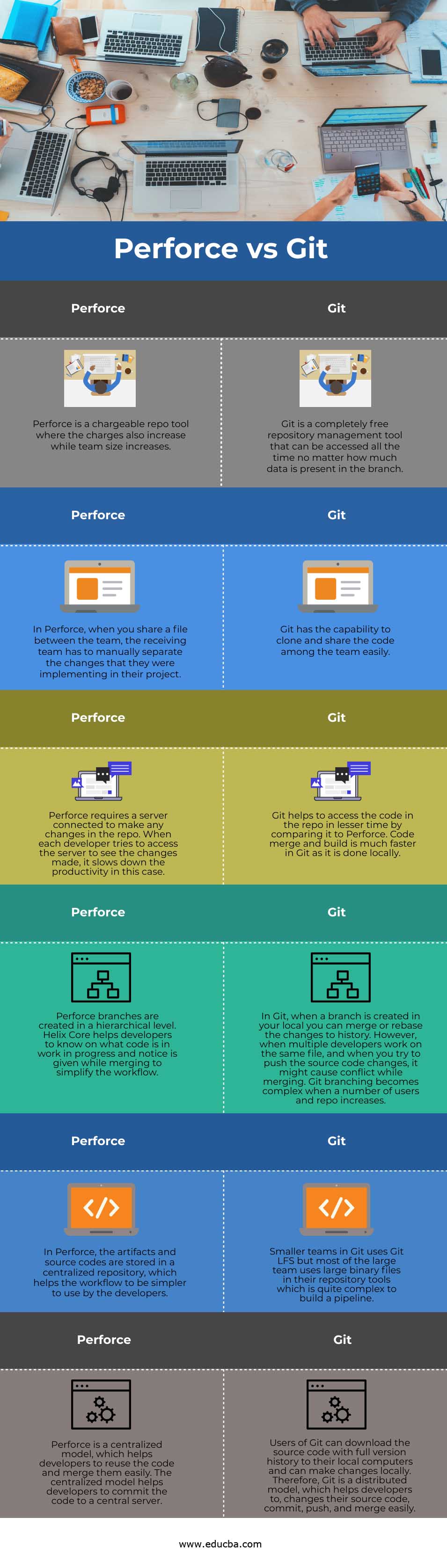
Head to Head Comparison between Perforce vs Git (Infographics)
Below are the top 6 differences between Perforce vs Git:
Key Differences between Perforce vs Git
Following are the key differences between Perforce vs Git:
- Centralized vs Distributed: Users of Git can download the source code with full version history to their local computers and can make changes locally. Therefore, Git is a distributed model that helps developers change their source code, commit, push, and merge easily. Perforce is a centralized model, which helps developers to reuse the code and merge them easily. The centralized model helps developers to commit the code to a central server.
- Performance: In Git, local commits and merges are faster than Perforce but pulling and pushing of source codes are slower in Git and faster in perforce. This concludes that performance and productivity in Git are more than Perforce.
- Managing files: Smaller teams in Git use Git LFS, but most large teams use large binary files in their repository tools, which are quite complex to build a pipeline. In Perforce, the artifacts and source codes are stored in a centralized repository, which helps the workflow to be simpler to use by the developers.
- Branching: In Git, when a branch is created in your local, you can merge or rebase history changes. However, when multiple developers work on the same file, and when you try to push the source code changes, it might cause conflict while merging. Git branching becomes complex when the number of users and repo increases. Perforce branches are created at a hierarchical level. Helix Core helps developers know what code is in progress, and notice is given while merging to simplify the workflow.
- Speed: Perforce requires a server connected to make any changes in the repo. When each developer tries to access the server to see the changes made, it slows down productivity. Git helps to access the code in the repo in lesser time by comparing it to Perforce. Code merge and build is much faster in Git as it is done locally.
- Collaboration: as a repository tool, both Git and Perforce need to collaborate. In Perforce, when you share a file between the team, the receiving team must manually separate the changes that they were implementing in their project. In Git, it has the capability to clone and share the code among the team easily.
- Cost: Git is a completely free repository management tool that can be accessed all the time no matter how much data is present in the branch. Whereas Perforce is a chargeable repo tool where the charges also increase while team size increases.
Perforce vs Git Comparison Table
Let us discuss the top comparison between Perforce vs Git:
| Perforce | Git |
| Perforce is a chargeable repo tool where the charges also increase while team size increases. | Git is a completely free repository management tool that can be accessed all the time, no matter how much data is present in the branch. |
| In Perforce, when you share a file between the team, the receiving team must manually separate the changes that they were implementing in their project. | Git has the capability to clone and share the code among the team easily. |
| Perforce requires a server connected to make any changes in the repo. When each developer tries to access the server to see the changes made, it slows down productivity. | Git helps to access the code in the repo in lesser time by comparing it to Perforce. Code merge and build is much faster in Git as it is done locally. |
| Perforce branches are created at a hierarchical level. Helix Core helps developers know what code is in work in progress, and notice is given while merging to simplify the workflow. | In Git, when a branch is created in your local, you can merge or rebase history changes. However, when multiple developers work on the same file, and when you try to push the source code changes, it might cause conflict while merging. Git branching becomes complex when the number of users and repo increases. |
| In Perforce, the artifacts and source codes are stored in a centralized repository, which helps the workflow to be simpler to use by the developers. | Smaller teams in Git use Git LFS, but most large teams use large binary files in their repository tools, which is quite complex to build a pipeline. |
| Perforce is a centralized model, which helps developers to reuse the code and merge them easily. The centralized model helps developers to commit the code to a central server. | Users of Git can download the source code with full version history to their local computers and can make changes locally. Therefore, Git is a distributed model that helps developers change their source code, commit, push, and merge easily. |
Conclusion
In this era of new technologies, several companies are coming up in the market with larger teams to grow their market. As Git is not chargeable and can store huge data, Git has taken up a gear from Perforce. In some cases, when the team size is small, and the code is not depending on the other team, Perforce is used. So depending on the requirement bases, Git is more preferable and flexible to be used by large firms.
Recommended Articles
This is a guide to Perforce vs Git. Here we also discuss the Perforce vs Git key differences with infographics and comparison table. You may also have a look at the following articles to learn more –

