
Updated April 3, 2023

Difference between Pandas loc vs iloc
Pandas loc vs iloc strategies for information cutting. Information Slicing, by and large, alludes to examine your informational indexes. These two techniques have a place with the record determination strategy that is utilized to set an identifier for each line of the informational collection. The ordering can take explicit names, and these names can either be a number or some other worth determined by the client.
Head to Head Comparison Between Pandas loc vs iloc (Infographics)
Below are the top differences between Pandas loc and iloc
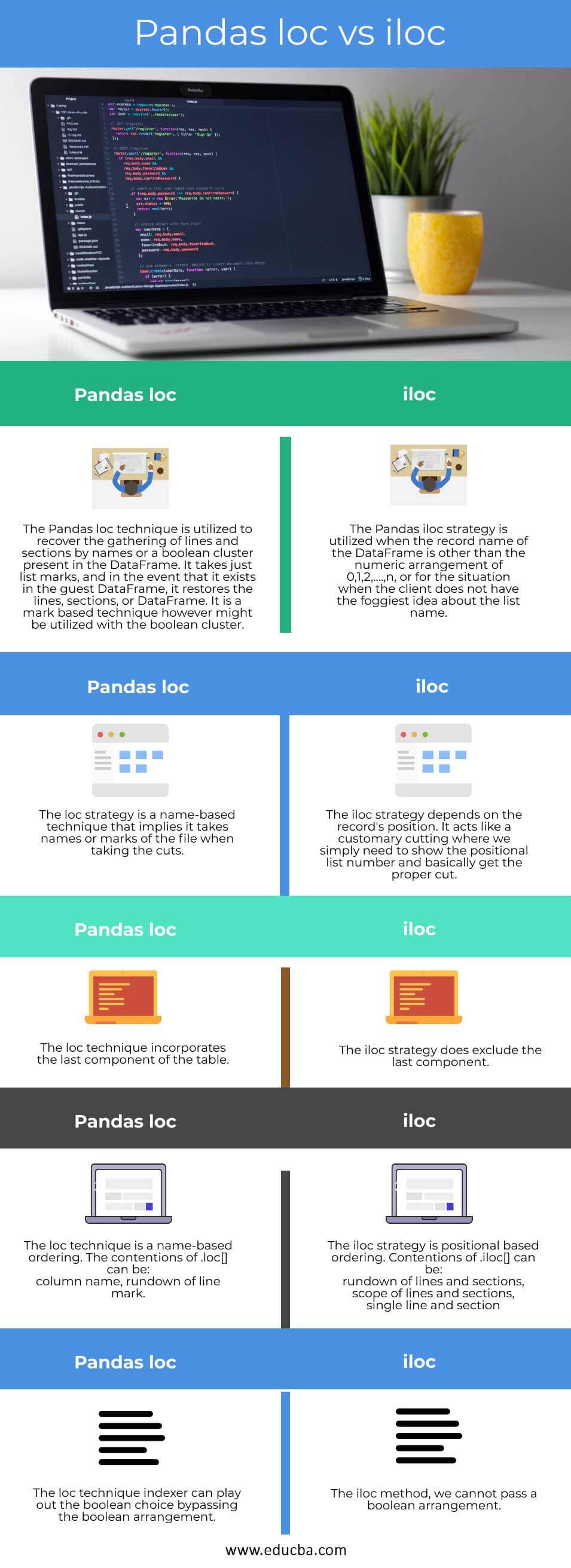
Key differences between Pandas loc and iloc
Now we look into various key differences through different examples given below:
Example #1
Using the loc function in Pandas
import pandas as pd

info = pd.DataFrame({'Company' : ['Honda', 'Maruthi', 'Mercedes', 'Audi', 'BMW', 'Porsche', 'Hyundai', 'Tesla', 'Tata'],  'Year' : [2001, 2002, 2003, 2004, 2005, 2006, 2007, 2008, 2009], 'Drive' : [25000, 26000, 27000, 28000, 29000, 31000, 33000, 34000, 36000], 'City' : ['Bangalore', 'Chennai', 'Hyderabad', 'Trivandrum', 'Mysore', 'Coimbatore', 'Shimoga','Hampi',  'Hassan'], 'Miles' :  [11, 12, 13, 14, 15, 16, 17, 18, 19]})

print(info.loc[(info.Company == 'BMW') & (info.Miles > 13)])
Output:

In the above program, we first import the panda’s library as pd and then define the dataframe and assign all the values in the dataframe. After defining the dataframe, we use the loc function here to identify the row of the specific company BMW and then identify its miles which should be greater than 13. Thus, the program is implemented, and the output is as shown in the above snapshot.
Loc is mark based information choosing strategy which implies that we need to pass the name of the line or segment which we need to choose. This strategy incorporates the last component of the range that went in it, dissimilar to iloc. loc can acknowledge the boolean information dissimilar to iloc. Numerous activities can be performed utilizing the loc strategy.
Example #2
Using iloc function in Pandas
import pandas as pd

info = pd.DataFrame({'Company' : ['Honda', 'Maruthi', 'Mercedes', 'Audi', 'BMW', 'Porsche', 'Hyundai', 'Tesla', 'Tata'],  'Year' : [2001, 2002, 2003, 2004, 2005, 2006, 2007, 2008, 2009], 'Drive' : [25000, 26000, 27000, 28000, 29000, 31000, 33000, 34000, 36000], 'City' : ['Bangalore', 'Chennai', 'Hyderabad', 'Trivandrum', 'Mysore', 'Coimbatore', 'Shimoga','Hampi',  'Hassan'], 'Miles' :  [11, 12, 13, 14, 15, 16, 17, 18, 19]})

print((info.iloc[[1, 3, 5, 7]]))
Output:
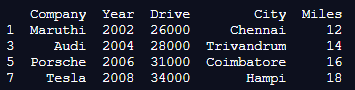
In the above program, we first import the panda’s library as pd and then define the dataframe. After defining the dataframe, we use the iloc function to display multiple rows and columns, and thus the program is implemented, and the output is as shown in the above snapshot.
iloc is a recorded-based choosing strategy that implies that we need to pass the whole number file to choose an explicit line or segment. This strategy does exclude the last component of the range that went in it dissimilar to loc. iloc does not acknowledge the boolean information dissimilar to loc.
Comparison Table of Pandas loc vs iloc
Following is the comparison table between pandas loc vs iloc
| Pandas loc | Pandas iloc |
| The Pandas loc technique is utilized to recover the gathering of lines and sections by names or a boolean cluster present in the DataFrame. It takes just list marks, and in the event that it exists in the guest DataFrame, it restores the lines, sections, or DataFrame. It is a mark based technique however might be utilized with the boolean cluster. | The Pandas iloc strategy is utilized when the record name of the DataFrame is other than the numeric arrangement of 0,1,2,….,n, or for the situation when the client does not have the foggiest idea about the list name. |
| The loc strategy is a name-based technique that implies it takes names or marks of the file when taking the cuts. | The iloc strategy depends on the record’s position. It acts like a customary cutting where we simply need to show the positional list number and basically get the proper cut. |
| The loc technique incorporates the last component of the table. | The iloc strategy does exclude the last component. |
| The loc technique is name-based ordering. The contentions of .loc[] can be:
column name, rundown of line mark. |
The iloc strategy is positional based ordering. Contentions of .iloc[] can be:
|
| The loc technique indexer can play out the boolean choice bypassing the boolean arrangement. | In the iloc method, we cannot pass a boolean arrangement. |
Conclusion
Hence, I would like to conclude by stating that the Pandas library of python is valuable for the control of numerical information and is broadly utilized in the field of AI. It contains numerous strategies for its appropriate working. loc and iloc are one of those strategies. These are utilized in cutting of information from the Pandas DataFrame. They help in the advantageous determination of information from the DataFrame. They are utilized in separating the information as per a few conditions. The working of both of these strategies is clarified in the example dataset of vehicles.
Recommended Articles
This is a guide to Pandas loc vs iloc. Here we discuss the Pandas loc vs iloc key differences with infographics and comparison table. You may also have a look at the following articles to learn more –

