

Updated February 27, 2023

Introduction to Oracle TIMESTAMP
Oracle TIMESTAMP is a data type which stores in the format of century, Year, Month, Date, Hour, Minute, Second. TIMESTAMP is an extension of DATE data type. TIMESTAMP data type is an enhancement of DATE data type and provides more intelligence.
Points of Concentration:
- Oracle introduced TIMESTAMP data type in 9i version.
- It allows to store date time with fraction of seconds.
- By default format of TIMESTAMP is ‘YYYY-MM-DD HH24:MI:SS.FF’.
- By default format of TIMESTAMP WITH TIME ZONE is ‘YYYY-MM-DD HH24: MI: SS.FF TZH: TZM’. Here TZH is Time Zone Hour and TZM is Time Zone Minute.
- The digits / length of Fraction of Seconds can be specified from 0 – 9 digits. The default length is 6 digit.
- Also Oracle introduced TIMESTAMP WITH TIME ZONE and TIMESTAMP WITH LOCAL TIME ZONE which allows us to store date / time with time zone.
Syntax:
1. Without Time Zone
TIMESTAMP[{Fractional – Seconds - Precision}]
2. With Time Zone
TIMESTAMP [{Fractional – Seconds - Precision}] WITH TIME ZONE
3. With Local Time Zone
TIMESTAMP [{Fractional – Seconds - Precision}] WITH LOCAL TIME ZONE
Description:
- Fractional – Seconds – Precision: It optionally specifies the number of digits in the fractional part of the Seconds to be considered in date time field.
- Default precision length is 6 digit.
- WITH TIME ZONE: It allows column to store Time Zone. Time Zone cane be entered manually, by default it takes system time zone.
- WITH LOCAL TIME ZONE: This also allows to store time zone. It stores data in database is normalized to the database time zone but the time zone offset is not stored as part of the column data. Oracle returns that data in the users’ local session time zone.
How TIMESTAMP Data Type works in Oracle?
As Oracle provides DATE data type to represent date and time values. This data type has ability to store the day, month, year, century, hour, minute and seconds. Oracle introduced a new data type TIMESTAMP which is an extension of DATE data type. TIMESTAMP data type stores the day, month, year, century, hour, minute, seconds and fraction of seconds. It has ability to store Date and time with Time zone.
Example #1
For Date data type.
Code:
SELECT DOJ, TO_CHAR(DOJ,'DD-MM-YY HH: MI: SS’) "Date/Time" FROM Employee;
Output:
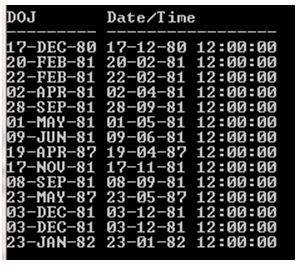
As in Employee table DOJ column is DATE data type which stores Date/time date. The above output clearly shows that DOJ column consists DATE and Time value but does not consists fraction of seconds and also Time Zone.
But in the real world many events happen with in a second of each other. DATE data type does not provide that ability to store that information. So Oracle introduced TIMESTAMP data type to solve this real time problem.
Example #2
For TIMESTAMP data type.
Code:
desc error;
Output:

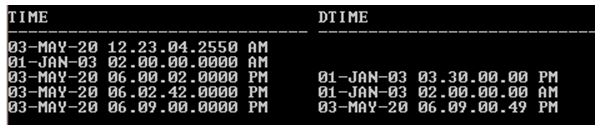
The above image showing the description of Error table where TIME column is TIMESTAMP data type and DTIME column is TIMESTAMP WITH LOCAL TIME ZONE data type.
Code:
SELECT Time FROM Error;
Output:
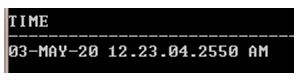
In the above example using TIME column from Error table which is TIMESTAMP data type. The Time column stores date time details with fraction of seconds with four precision digit (Because it specified during table creation). But there is no time zone indication because Time column specified only TIMESTAMP data type. So it stores date time without time zone.
Output:
Example #3
For TIMESTAMP data type WITH TIME ZONE.
Code:
desc msg;
Output:

Above image is the description of Msg table. In the table DTIME column Declared TIMESTAMP data type WITH TIME ZONE. It means this column stores date time with time zone information. By default it stores system time zone but it accepts manually as well.
Code:
SELECT * FROM Msg;
Output:

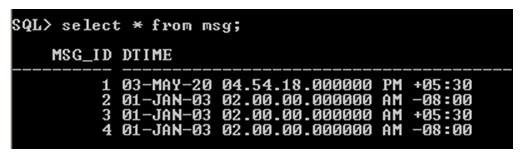
In the above output +05:00 & -08:00 denoting respective time zones. So if we don’t specify Time Zone it takes system time zone else it stores specified Time zone.
Code:
insert into Msg values(3,TIMESTAMP ‘2003-01-01 2:00:00’);
Output:

In the above insert statement Time zone is not specified.
Code:
insert into Msg values(4,TIMESTAMP ‘2003-01-01 2:00:00 -08:00’);
Output:

In the above insert statement Time zone is specified -08:00. So DTIME column stores system time zone if Time zone is not specified.
Code:
select * from msg;
Output:
Tips
1. Oracle EXTRACT function is used to extract components of TIMESTAMP.
Syntax:
EXTRACT (Component From timestamp_column)
Components are year, month, day, hour, minute, and second, timezone_hour.
Example:
Code:
SELECT Dtime, EXTRACT(month from dtime) Month,

EXTRACT(day from dtime) day,

EXTRACT(year from dtime) year

FROM Msg
Output:

2. TIMESTAMP default format can be changed using NLS_TIMESTAMP_TZ_FORMAT but the change will reflect only for the current session.
Syntax:
ALTER SESSION SET NLS_TIMESTAMP_TZ_FORMAT=’Format';
3. Time Zone can also be altered in Oracle Database.
Syntax:
For Database Level:
ALTER DATABASE SET time_zone = ‘Format';
For Session level:
ALTER SESSION SET time_zone = ‘Format’
4. FROM_TZ is used to convert TIMESTAMP to a different Time Zone.
Example:
SELECT FROM_TZ (TIMESTAMP, '2010-01-10 09:10:00', '4:00') FROM dual;
5. CURRENT_TIMESTAMP, it returns the current date time with the session time zone.
Conclusion
Oracle TIMESTAMP data type was introduced to solve real time problems especially when events happen more than once with in a second. In that scenario fraction of second plays a vital role to track those events. Time zone can be tracked of the event using TIMESTAMP. TIME STAMP data type can be a more useful if events happen more frequent.
Recommended Articles
This is a guide to Oracle TIMESTAMP. Here we discuss the introduction to Oracle TIMESTAMP with the working of data type and examples respectively. You may also have a look at the following articles to learn more –

