
Updated March 28, 2023

Definition of Nginx Port
Nginx port is changed from the default port to another port that was opened in our server. To change the port of nginx it is recommended that the same has not been used by any service. To change the port first, we need to open the same to flow the network traffic through that port. The server acts as the load balancer and the reverse proxy for the web server.
What is nginx port?
By default, the http server will listen to the incoming connections from port no as 80, it is representing the web port which was standard. The configuration of TLS is not enabled by default for nginx which will listen from the port as 443. In order to make the server is listening from web connections that were incoming to another port that was non-standard, we need to edit the configuration file which was main and need to change the port.
The below example shows the default server port from which the server is listening is 80. In the below example, we can see that the default port of the server is showing as 80.

By default, the server will listen from the inbound connections and connect to port no as 80. Basically, the TLS configuration is not supported in the server by default, it will listen from port 443 for connection securing. We need to look into the single directory for adjusting the default port number of unlike apache which is the default virtual host directory of nginx, in that location, we can find the file of virtual configuration which was the default.
If suppose sometimes we need to run the web server on a different port due to the reason of security we can change the port of default to another port that was not used by any other service. Before changing the port number of the nginx server we need to check on which port our server is currently running. We can check the same by opening the configuration file. After changing the port we can monitor the changed port’s incoming connections by using reporting software which was used to monitor the server.
How to change nginx port number?
Configure the nginx and nginx plus is the web server that was used to support the multi-tenancy virtual server, error handling, response rewriting, and variables. Our file contains the server directive in that directive we are changing the port of the server. The server directive is also used to define the server which is virtual. At the time nginx will process the request it will first select the virtual server which is serving the request.
Virtual server is defined by using the directive of the server in the context of http. The below example shows that the port number of the server is defined in the server directive as follows.

The below steps show how to change the port number as follows. To change the port number we are editing the configuration file of the server. To change the port number first we need to install the nginx server in our system.
- In this step, we are installing the server on the ubuntu system. We are installing the nginx server by using apt-get command as follows.
apt-get install nginx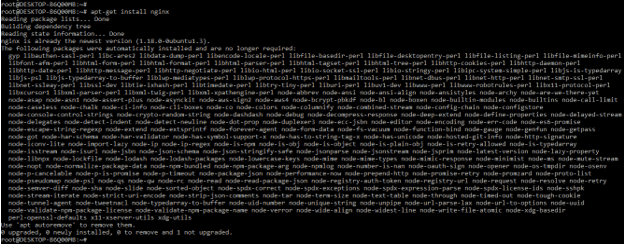
2. After installing the server we are checking the nginx installed version by using the following command as follows. We can check the nginx version as well as the running status of the server.
nginx –V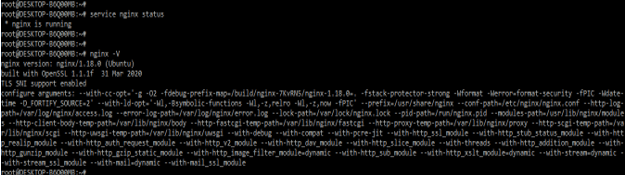
3. After installing the server in this step we are opening the configuration file of nginx for changing the port number. We are opening the configuration file using the vi commands as follows.
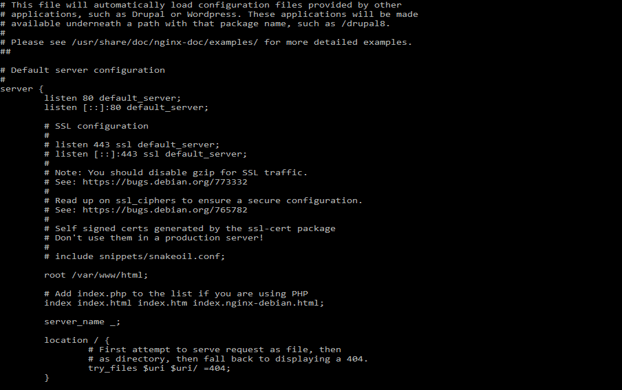
4. After opening the server configuration file now we are changing the port of the nginx server from 80 to 8080 as follows. We are changing the port value into the server directive.
Code –
server {

listen 8080 default_server;

listen [::]:8080 default_server;

……

}
5. After changing the port now in this step we are rebooting the server to take the effect of the changed port. Before restarting the server we are executing the nginx –t command to check whether the configuration file contains any error or not.
nginx –t

service nginx restart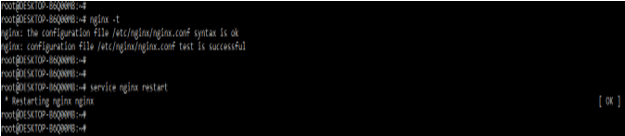
Nginx Port Configuration File
We can change the port into the configuration file of nginx. The default file location of the nginx port configuration is differ as per the OS that we are using for the installation of the nginx server.
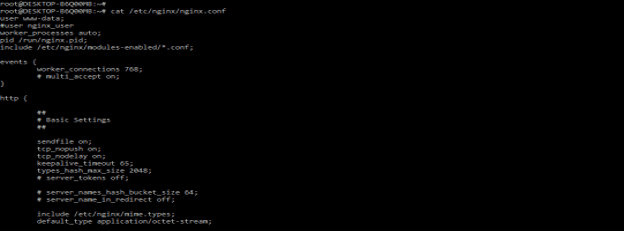
If suppose we are using the CentOS or Redhat system then the default location of the nginx port is /etc/nginx/nginx.conf as follows.
If suppose we are using the ubuntu system then the default location of the port is /etc/nginx/sites-available/default as follows.
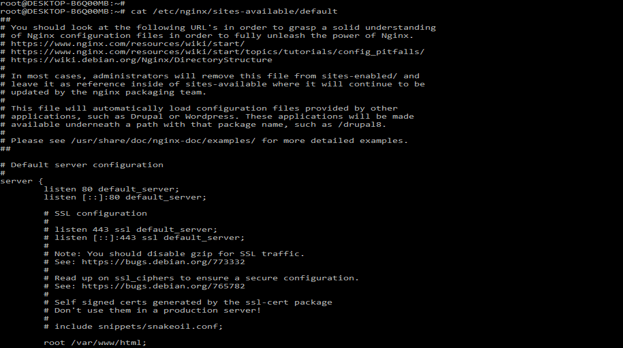
We are defining the nginx port configuration by using two lines. We need to define the port by using ipv4 as well as ipv6 addresses. In the first line, the server will listen to the incoming traffic by using ipv4 address. In the second line, the nginx server will listen to the incoming traffic by using ipv6 address.
listen 80 default_server;
listen [::]:80 default_server;
The default_server parameter is defined as the server used as the default server for listening to the incoming traffic request. We are defining the port configuration into the server directive. If suppose we want to change the port of the server same time also we need to define the port into the server directive, server will not listen to the port while we have to define the port outside into the server directive.
Conclusion
To change the port first we need to open the same to flow the network traffic through that port. By default the nginx http server will listen to the incoming connections from port no as 80, it is representing the web port which was standard.
Recommended Articles
This has been a guide to Nginx Port. Here we discussed the Definition, What is nginx port, How to change nginx port number, and examples with code implementation. You can also go through our other suggested articles to learn more –

