


Updated May 25, 2023

Introduction to MySQL Update Join
MySQL Update Join is a MySQL statement that performs a cross-table update using the JOIN MySQL clauses in the UPDATE MySQL query command. The MySQL Update Join executes the update statement and implements the INNER JOIN and LEFT JOIN MySQL clauses in the server. This Update JOIN clause in MySQL helps retrieve the data records from the related database tables and modify them with the query. This query process causes a cross-table update where one database table is joined and altered using others based on PRIMARY and FOREIGN Keys defined on the tables and a join condition in the database server.
Syntax
The MySQL Update Join statement has the following basic syntax code to perform the update query in the database:
UPDATE Table1, Table2, [LEFT JOIN clause| INNER JOIN clause]
Table1 ON Table1.ColA = Table2.ColA
SET Table1.ColB = Table2.ColB, Table2.ColC = Expression
WHERE Condition
Explanation: Let us elaborate on the terms included in the above syntax structure:
Firstly, take the main table (Table1) and another table (Table2), which joins the main table implemented after the UPDATE query. After the UPDATE clause, it is necessary to identify at least one table; otherwise, if the table is not specified, then the data rows in the table will not be updated on the execution of the UPDATE query.
Secondly, we need to state the JOIN clause after the clause UPDATE. You can take any JOIN you want to apply from the two mentioned above, i.e., INNER JOIN or LEFT JOIN, together with a predicate of join.
Now, you will set the new values and assign them to both table columns, i.e., Table1 and Table2, that you want to modify. The expression denotes any expressional values or column fields mentioned in the update clause. Finally, you can put a Join condition using the WHERE clause to provide a limit records to records for updating.
How does MySQL Update Join work?
The work process is the same as explained in the syntax described above. But in some cases, you may find the UPDATE query to alone perform the cross-table update without involving Joins. This is another way whose syntax can be written as:
Code:
UPDATE Table1, Table2, SET Table1.ColB = Table2.ColB, Table2.ColC = Expression WHERE Table1.ColA = Table2.ColBAND ConditionThe above UPDATE command works similarly to UPDATE JOIN with an implicit INNER JOIN or LEFT JOIN MySQL clauses. Thus, the above syntax can be redesigned as the UPDATE JOIN syntax displayed above, and the query can be executed, and the desired result can be gained.
We use MySQL Update Join to update the column values of one main table with the new values of other tables related to the previous table using either INNER JOIN or LEFT JOIN on both table column values. Also, the query is filtered by the WHERE clause against certain specified conditions so that the rows of the table can be appropriately updated.
You can also apply NULL values to any column by specifying in the UPDATE statement. We can also set multiple column values to update multiple table columns, which can be parted by a comma (,).
Examples to Implement MySQL Update Join
To better understand the UPDATE JOIN in MySQL, let us consider and use the examples below and notify the working of the Update statement with Joins and WHERE clauses.
For demonstration, let us create a database for a sample to use in the query, including the tables for the MySQL Update Join. Suppose we have created two tables in the database:
Create a table named Students which contains student’s data like student ids, performances, salaries, and Student names. The other table, Merit, has columns for student performances and percentage of merit.
Let’s start to create a database first, and if already present, then load it using the following statement:
Code:
CREATE DATABASE IF NOT EXISTS StudDb;Under this database, we will design two tables mentioned above, Students and Merit, which will be used for further Update Join queries.
SQL statement to create a Merit table:
Code:
CREATE TABLE Merit ( Mperformance INT NOT NULL, Mpercentage FLOAT NOT NULL, PRIMARY KEY (Mperformance) );SQL statement to create Students table:
Code:
CREATE TABLE Students ( StudID INT NOT NULL PRIMARY KEY AUTO_INCREMENT, StudName VARCHAR(255) NOT NULL, Mperformance INT DEFAULT NULL, salary FLOAT DEFAULT NULL, CONSTRAINT fk_mperformance FOREIGN KEY (Mperformance) REFERENCES Merit (Mperformance) );Also, insert some data values to both tables using the SQL command below:
SQL statement to insert rows in the Students table:
Code:
INSERT INTO Students(StudName,Mperformance,Salary) VALUES('Nikhil Sharma', 10, 8000), ('Rita Jain', 12, 9000), ('Sangam Kumar', 11, 4500), ('Divya Verma', 14, 6500), ('Anita Shah', 13, 8500);SQL statement to insert rows in the Merit table:
Code:
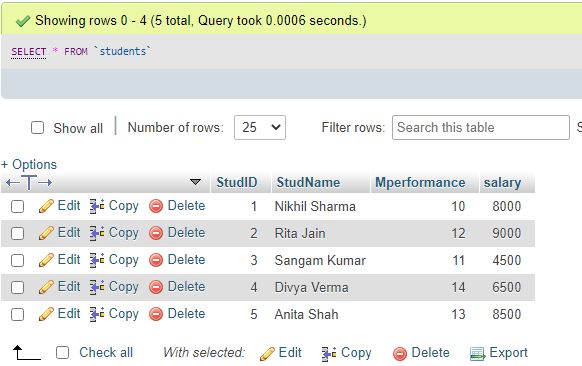
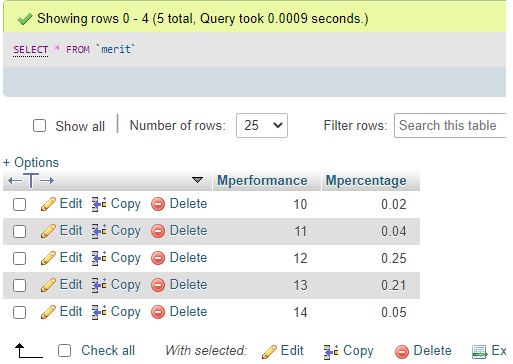
INSERT INTO Merit(Mperformance,Mpercentage) VALUES(10,0.02),(11,0.04),(12,0.25),(13,0.21),(14,0.05);Again, you can view the data records using the query:
SQL statement:
Code:
SELECT * FROM Students;Output:
SQL statement:
Code:
SELECT * FROM Merit;Output:
Example #1 – With INNER JOIN clause
Using INNER join, let us update the Salary column values in the Students table based on the student performance and percentage calculation from the Merit table using the succeeding query:
Code:
UPDATE students INNER JOIN Merit ON students.Mperformance = Merit.Mperformance SET Salary = Salary + Salary * Mpercentage;Output:

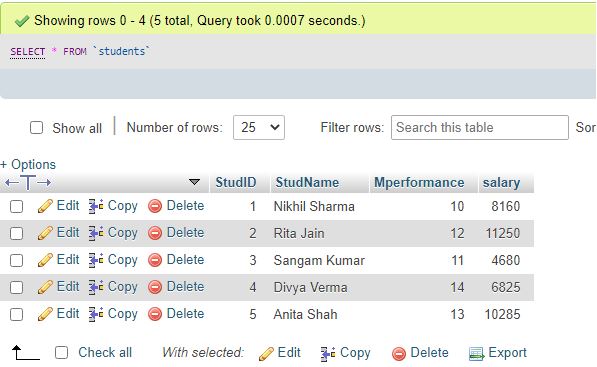
Explanation: Since the performance column links the two tables, the Salary values are adjusted according to the percentage values to new values, as shown in the above output.
Example #2 – With LEFT JOIN clause & WHERE clause
Suppose we have included two more students newly submitted in the student’s table, so their performance data are unavailable, and values are set to NULL.
Code:
select * from 'students';Output:
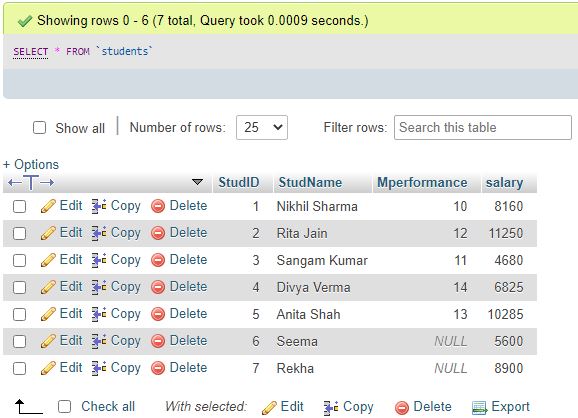
Due to this, we cannot use the INNER JOIN to update the table as no increment base is present in the other table, Merit. The LEFT JOIN will be implemented to update the newly admitted ones with NULL performance values. We can set some percentage value to calculate the salary for new students, like 1.25%, using the UPDATE LEFT JOIN statement as follows:
Code:
UPDATE students LEFT JOIN Merit ON students.Mperformance = Merit.Mperformance
SET Salary = Salary + Salary * 0.0125 WHERE Merit.Mpercentage IS NULL;
Output:

select * from 'students'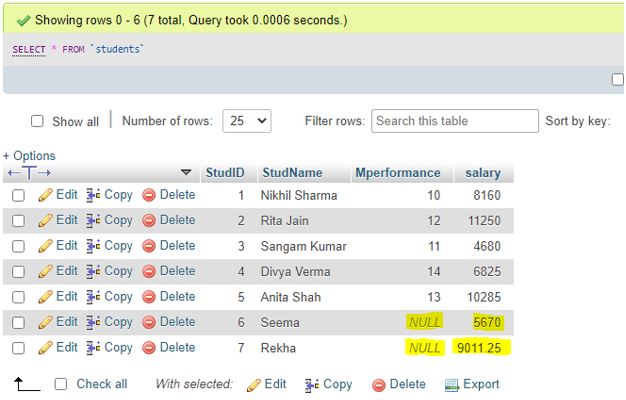
Conclusion
The MySQL Update Join is a MySQL query to update the existing record in one table with the new record values from the other database table and the JOIN clause condition. This query is important to modify specific columns specified through the WHERE clause in the statements containing the INNER JOIN and LEFT JOIN clauses.
Recommended Articles
We hope that this EDUCBA information on “MySQL Update Join” was beneficial to you. You can view EDUCBA’s recommended articles for more information.

