


Updated May 10, 2023
Introduction to MySQL Trigger
A Trigger in MySQL is a special kind of stored operation that invokes automatically when an event occurs in the database. It is a database object related to a table in the database and becomes active when a defined MySQL statement is initiated on the table. These DML (Data Manipulation Language) execution operations can be INSERT, DELETE, UPDATE, and triggers can be called before or after these events.
You can activate triggers when inserting a row into a table or modifying any of its columns. Typically, you design triggers to execute whenever you make any changes to the data within a table. Triggers are simply SQL code to run before or just after any DML action events on a particular table in a database.
MySQL has supported Triggers since version 5.0.2. The DBMS stores and manages triggers as they are event-driven SQL procedures.
Syntax
To create a new trigger in MySQL, we use the statement CREATE TRIGGER:
CREATE
[DEFINER = user]
TRIGGER trigger_name
trigger_time trigger_event
ON tbl_name FOR EACH ROW
trigger_body
trigger_time: { BEFORE | AFTER }
trigger_event: { INSERT | UPDATE | DELETE }
Parameters
- DEFINER clause: Identifies the MySQL account used for access at trigger initiation time.
- trigger_name: The name of all triggers should be unique inside a schema.
- trigger_time: Defines the trigger action time, which can be either before or after any row affected.
- trigger_event: Specifies the type of operation to activate the trigger.
- tbl_name: The table name should be of a permanent table, not a temporary or a view table to associate a trigger.
- trigger_body: When the trigger is fired, it displays a statement. The compound statement constructs BEGIN … END can be used to complete many statements.
This syntax is used to drop a trigger.
DROP TRIGGER [IF EXISTS] [schema_name.]trigger_nameThe schema name is optional, which drops the trigger from the default schema if omitted. To execute the DROP TRIGGER statement, the user needs to have the privilege of the trigger for the associated table. In addition, the use of IF EXISTS checks for the existence of the trigger before attempting to drop it, thus preventing any errors from occurring.
Types of Trigger in MYSQL
The SQL standard defines two types of triggers:
- Row-Level Trigger: The trigger executes itself for each row of a table that insertion, update, or deletion actions affect. If you insert, update, or delete 50 rows in a table, the trigger will automatically invoke itself 50 times.
- Statement-Level Trigger: This trigger invokes only once for a transaction regardless of the number of rows inserted, updated, or deleted.
MySQL supports Row-Level Trigger but not Statement-Level Trigger. So, the following are various types of triggers in MySQL:
1. Data Manipulation Language (DML) Triggers
DML queries like INSERT, UPDATE, or DELETE execute triggers on a table or view.
Handling MySQL Triggers:
BEFORE INSERT trigger:
CREATE TRIGGER trigger_name
BEFORE INSERT
ON table_name FOR EACH ROW
trigger_body;
AFTER INSERT trigger: Triggers after inserting data into a table.
CREATE TRIGGER trigger_name
AFTER INSERT
ON table_name FOR EACH ROW
trigger_body
BEFORE UPDATE trigger: When you write an update statement, you validate the data before executing the update.
CREATE TRIGGER trigger_name
BEFORE UPDATE
ON table_name FOR EACH ROW
trigger_body
AFTER UPDATE trigger: The trigger is invoked after implementing the update statement.
CREATE TRIGGER trigger_name
AFTER UPDATE
ON table_name FOR EACH ROW
trigger_body
BEFORE DELETE trigger: The instruction specifies triggering before executing any delete statement.
CREATE TRIGGER trigger_name
BEFORE DELETE
ON table_name FOR EACH ROW
trigger_body
AFTER DELETE trigger: The instruction is to specify that the trigger should execute after executing any delete statement.
CREATE TRIGGER trigger_name
AFTER DELETE
ON table_name FOR EACH ROW
trigger_body;
Create multiple triggers for a table with the same trigger event and time: A trigger invoked before or after a current trigger with the same event and action time.
DELIMITER $$
CREATE TRIGGER trigger_name
{BEFORE|AFTER}{INSERT|UPDATE|DELETE}
ON table_name FOR EACH ROW
{FOLLOWS|PRECEDES} existing_trigger_name
BEGIN
-- statements
END$$
DELIMITER ;
Show triggers: Show all triggers in a particular database or table using FROM, IN keyword, or any pattern matching clause.
SHOW TRIGGERS
[{FROM | IN} databasename]
[LIKE 'pattern' | WHERE searchcondition];
2. Data Definition Language (DDL) Triggers
When you execute DDL operations such as CREATE, DROP, ALTER, DENY, GRANT, UPDATE STATISTICS, and REVOKE statements, the system invokes these triggers.
3. LOGON Triggers
These triggers automatically activate in response to a LOGON event. Triggers invoke during the process of establishing a user session after successful authentication. However, if the authentication process fails, the trigger will not be executed.
4. CLR Triggers
The SQL CLR builds the trigger, which can be helpful if it requires heavy computation or refers to an object outside of SQL. The supported .NET CLR languages, like C#, VB.NET, etc., can be used to write DML and DDL triggers.
For example, let’s add a trigger to the Products table below:
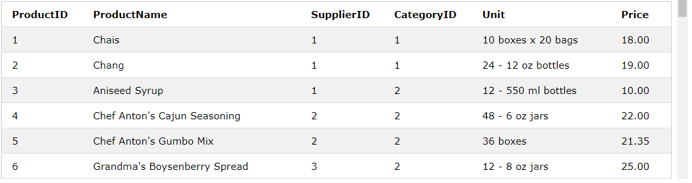
The trigger applied will insert Price = 10 automatically when we try to insert Price < 10.
DELIMITER //
Create Trigger before_inser_product_price BEFORE INSERT ON Products FOR EACH ROW
BEGIN
IF NEW.Price < 10 THEN SET NEW.Price = 10;
END IF;
END //
Now, for testing the trigger, we can execute the following statements:
INSERT INTO Products(ProductName, SupplierID, CategoryID, Unit, Price) values('Teatime
Chocolate Biscuits',8,3,'10 boxes x 12 pieces',9.20);
And then we display the product list:
Select * from Products;Output:
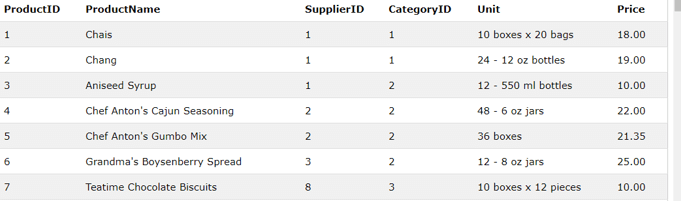
We can see that when we insert a product with a price value less than 10 in the table, the trigger will automatically insert 10 to its price, i.e.
7 Teatime Chocolate Biscuits 8 3 10 boxes x 12 pieces 10.00This is an example of a trigger with a combination of the trigger_event INSERT and the trigger _time BEFORE.
Conclusion
Yes, here we can say that a trigger is a small amount of relative energy that releases a large amount. However, a trigger may increase the server workload but helps in the field of Data integrity with referential and check constraints. Also, it can handle any error on the database layers. The Trigger in MYSQL is also helpful in running a scheduled task automatically.
Recommended Articles
We hope that this EDUCBA information on “MySQL Trigger” was beneficial to you. You can view EDUCBA’s recommended articles for more information.

