


Updated May 12, 2023

Introduction to MySQL LAG() Function
MySQL LAG() Function is responsible for fetching the result records from a table that includes the data info of a preceding row accessed from the present row in the same output. The MySQL LAG() function is a type of Windows function that allows you to look back at several records and access data values of that row from the existing one. Here, a Windows function is a MySQL query that is useful for solving any query problems in easier, new ways and with better performance. Hence, a LAG() function allows retrieving data value from the previous table row that precedes the present row. Its function is unlike MySQL LEAD() function, which evaluates to provide data from the row that succeeds in the existing row.
Syntax
MySQL LAG() function has the following syntax structure that illustrates the working of this MySQL function on the server:
LAG(Expr, OffsetValue, DefaultValue) OVER (PARTITION BY expression,…..
ORDER BY Expr [DESC/ASC],….);
Here are the descriptions of the terms used in the syntax of the LAG() function in MySQL:
- Expr:The LAG() function accesses the value returned by the previous row within the result or partition set, which can be accessed from the current row with the help of several rows.
- OffsetValue: It defines the value, either zero or any accurate positive integer, that is, the number of rows posterior from the current row from which we will receive the value. If the offset value is set to zero, the LAG() function will return the value of ‘expr’ for the current row; otherwise, if it is not specified, the LAG() function takes the value one by default.
- DefaultValue: The LAG() function uses this default value specified to display as a result if no preceding row exists in the function parameters. If you set the offset to 2, then the return value for the first row will be the default value. But if you do not provide a default value, the LAG() function results in NULL as a default result.
- OVER: The MySQL function that partitions rows into groups in query execution is called PARTITION BY. It works in conjunction with the LAG() function to divide the rows into partitions and apply the LAG() function to each partition separately. If the OVER() clause is missing or left empty with the LAG() function, then LAG() computes the result using all table rows.
- PARTITION BY: This MySQL clause is helpful for the LAG() function because PARTITION BY divides the table rows in the output set into partitions so that the LAG function can work properly. If the PARTITION BY is not applied to the LAG() function, the function will suppose the whole output set as one partition.
- ORDER BY: Before the LAG() function works, this clause defines the order of table rows in every partition. We can also add sorting terms used in MySQL for ordering. Then, we can use ASC and DESC.
How does MySQL LAG() Function work?
The MySQL LAG() function generates the previous value of any table row within its partition. It is a non-aggregate MySQL window function that operates on every partition record or window. Therefore, when queried, this function produces the result for each row, unlike an aggregate function in MySQL, which groups the rows and displays the result in a single record row. A current or present row is the row where the operation or query is to occur. A window represents a set of rows in a table that either have an association with the current row or allow the function to operate on the current table row. Here, the ‘expr’ in the syntax of LAG() can be any column or a built-in function in MySQL.
Examples of implementing the LAG() function in MySQL
Let us consider the following examples to implement a LAG() function in MySQL:
Suppose we have created a Table Persons with fields such as PersonID, PersonName, Address, Salary, and JoinDate and also inserted some data values in the sample table. The output of the table is given below:
select * from Persons;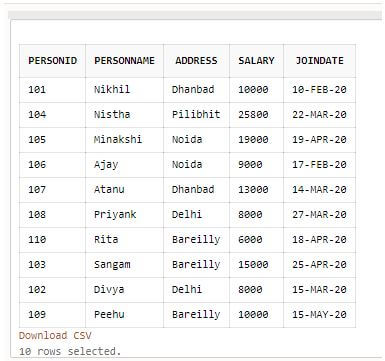
Example #1
Let’s query the following statement first to retrieve the data from the table ordered by the Salary column value:
Code:
SELECT PersonID, Personname, Address, Salary FROM Persons ORDER BY Salary;Output:
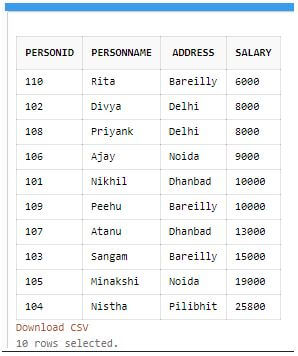
Example #2
Write a query for the LAG() function that produces the result where no PARTITION is specified, the offset value is set to 1, and the default value is set to 0. We will apply the LAG() function to the “Salary” column of the “Persons” table. The query is as follows:
Code:
SELECT PersonID, Personname, Address, Salary, JoinDate, LAG(Salary, 1, 0) OVER( ORDER BY JoinDate ASC) AS Previous_Salary FROM Persons;Output:
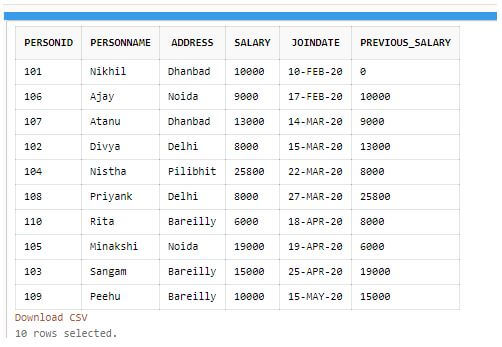
Explanation: As you can see, the first row of the LAG() function new column holds the previous value of the row, and as we have put offset one, it provides preceding values within the rows for the salary column.
Example #3
Let’s consider another query where we add the “JoinDate” column, on which we want to operate the LAG() function with an offset value of 2, and we don’t provide a default value. Below is the query:
Code:
SELECT PersonID, Personname, Address, Salary, JoinDate, LAG(JoinDate, 2) OVER(ORDER BY JoinDate ASC) AS Previous_Date FROM Persons;Output:
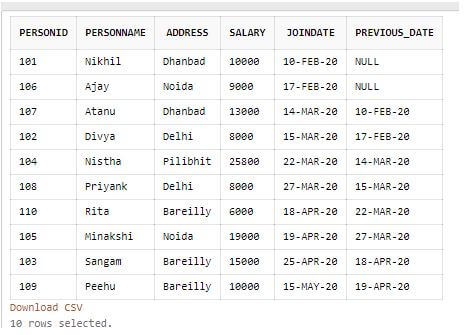
Explanation: We can notice that the first & seconds take the NULL as default values for the Previous_Date column in the result set as no previous rows are available. The offset value is 2, which means the Lag function uses the data from the two previous rows in the result set. But in 3rdrow it receives value from the first row in the JoinDate column.
Example #4
Using PARTITION BY in LAG() and OVER(), we group the Address column and apply the LAG() function accordingly, resulting in the following set:
Code:
SELECT PersonID, Personname, Address, Salary, JoinDate, LAG(Salary,1, 0) OVER( PARTITION BY Address ORDER BY JoinDate ASC) AS Previous_Salary FROM Persons;Output:
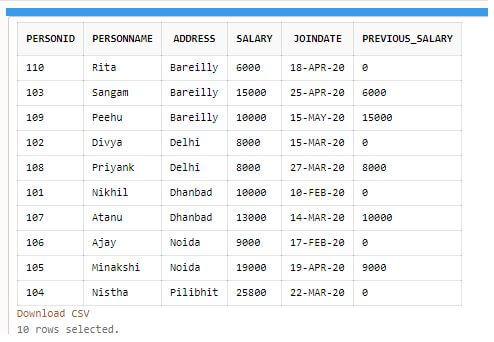
Explanation: To show the previous value in the “Previous_Salary” column from the “person” table, we take an offset of 1 and set the default value of 0 for the first row of each “Address” column.
Conclusion
We need to use a LAG function with the OVER() function, PARTITION BY, etc., in MySQL to run the LAG(); otherwise, it may produce an error on the server. Also, see if any other parameters are not missing in the function syntax code. Thus, the MySQL LAG() function significantly calculates the difference between the present and previous table rows to produce the desired result.
Recommended Articles
We hope that this EDUCBA information on “MySQL LAG()” was beneficial to you. You can view EDUCBA’s recommended articles for more information.

