

Updated March 4, 2023

Introduction to Matlab zeros()
The Matlab inbuilt method zeros() creates array containing all element as zero or empty value. This function allows user an empty array having a bunch of zeros in it. The Matlab programming language does not contain any dimension statement. In Matlab, storage allocation for matrices happens automatically. In case of large matrices, Matlab programs execution can be faster by means of the zeros function being used to keep storage for a matrix aside, which elements or a row or column are meant to be created one at a time.
Syntax of Matlab zeros()
Given below are the syntax :
| Syntax | Description |
| Z = zeros | This form of syntax returns an empty scalar i.e. a scalar having value 0 and the output is stored in the variable ‘Z’. |
| Z = zeros(n) | This form of syntax returns a matrix containing all elements as zeros of size nXn and the output is stored in the variable ‘Z’. |
| X = zeros(sz1,…,szN) | This form of syntax returns a matrix containing all elements as zeros having dimensions of size sz1,…,szN and the output is stored in the variable ‘Z’. |
| X = zeros(sz) | This form of syntax returns an array containing all elements as zeros the output is stored in the variable ‘Z’ of size ‘sz’. |
| X = zeros(___,typename) | This form of syntax returns an array containing all elements as zeros supported by the data type ‘typename’. |
| X = zeros(___,’like’,p) | This form of syntax returns an array containing all elements as zeros like the reference matrix p. The zero matrix should match the matrix p with respect to the same data type or class, complexity i.e real or complex values and sparsity. zeros() function can support typename or ‘like’ in a single command but not both together. |
Input Arguments:
- N: Defines the size of the output matrix Z. It supports integer data type.
- sz1,…,szN: Defines the size of each dimension for the output matrix Z. It supports integer data type.
- typename: Defines the Data type or class for the output matrix Z to create with. Typename can be specified as’uint64′, ‘double’, ‘uint8′, ‘int32’, ‘uint32’, ‘int64’, ‘single’,’int8′, ‘int16’, ‘uint16’, ‘logical’or the name of another class that provides zeros support.
- p: The reference array with which the resultant matrix or array should resemble in terms of data type or class, complexity i.e. real or complex values and sparsity.
Examples of Matlab zeros()
Given below are the examples mentioned :
Example #1
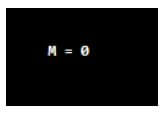
The below command generate a scalar variable M having value ‘0’.
Code:
M = zeros
Output:
Example #2
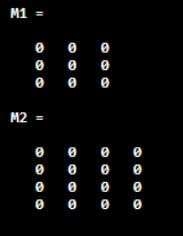
The below set of command is written to generate zero matrix of given size.
Code:
M1 = zeros(3)

M2= zeros(4)
Output:
The above code generates M1 matrix having all elements of 0 value each of size 3×3 and M2 matrix having all elements of 0 value each of size 4×4.
Example #3
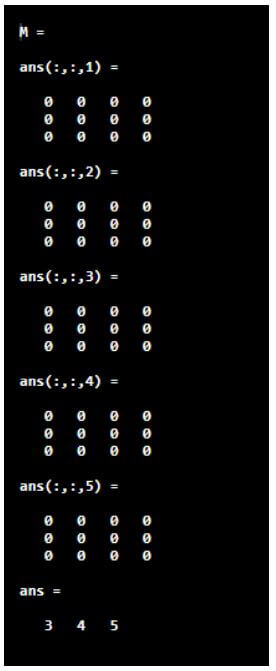
The below set of command is written to generate 3 dimensional array of zeros.
Code:
M = zeros(3,4,5)

size(M)
Output:
The above code generates 3 dimensional matrix of zeros having sizes for all 3 dimensions as 3,4 and 5 respectively.
Example #4
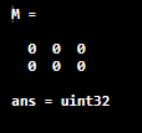
The below code generates 2 dimensional zero matrix ‘M’ having size 2 and 3 respectively and supported by the data type ‘uint32’.
Code:
M = zeros(2,3,'uint32')

class(M) %Display the datatype of the matrix M
Output:
Cloning Size Parameter from Input Argument Array
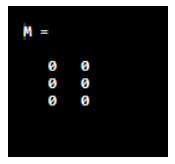
Zeros() method supports creating zero matrix of size same as that of an existing matrix. The below code is written to generate zero matrix of size same as the existing matrix M_ip.
Code:
M_ip = [1 4; 2 5; 3 6];

sz = size(M_ip);

M = zeros(sz)

M = zeros(size(M_ip));
Output:
Cloning Complexity Parameter from Input Argument Array
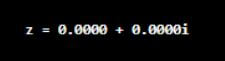
zeros() can create zero matrix depending on the complexity incorporated in the matrix given as input argument. The below set of command results in the zero matrix Z having complexity level same as that of the input argument matrix ‘compl’ i.e. of the form of real + i*imaginary.
Code:
compl = [2+5i 13i];

Z = zeros('like’, compl)
Output:
Cloning Sparsity Parameter from Input Argument Array
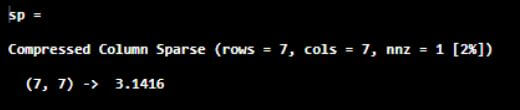
In terms of scientific computing and numerical analysis, a sparse matrix or an array is defined as a matrix or the array in which more than half of the elements are zero. Hence sparsity of a matrix is defined as the amount of zeros present in the matrix. zeros() can adopt the sparsity of the input matrix to the output matrix as shown in the below example.
Example:
The below example results in output zero matrix Z adopting the sparsity of the matrix sp.
Code:
sp = sparse(7,7,pi)

Z = zeros(2,3,'like',sp)
Output:
Cloning Size and Data Type Attributes from Input Argument Array
zeros() can create zero matrix depending on the size and data type incorporated in the matrix given as input argument.
Example:
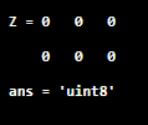
The below example results in output zero matrix Z adopting the size and data type of the matrix uM.
Code:
uM = uint8([11 23 50; 22 14 6]);

Z = zeros(size(uM),'like',uM)

class(Z)
Output:
The resultant output matrix is of size 2×3 and data type of unit 8 i.e same as the input matrix.
Additional Note:
The zeros()method is very easy to impliment. If two values are given as input argument, it forms matrix in rows by cols format. If either of rows or cols is unity, it results in an array. When more than 2 values are used as input argument to zeros() functional call, it results matrix of size defined by the arguments.
There are two situations where this functionality plays major role:
- When user needs to create a list of counters, having counting initial value as zero.
- When the program requires a large array to be created having pre-allocated reserved memory.
Recommended Articles
This is a guide to Matlab zeros(). Here we discuss the introduction, examples, cloning size, cloning complexity and sparsity parameter from input argument array, and cloning size and data type attributes from input argument array. You may also have a look at the following articles to learn more –

