

Updated June 16, 2023

Definition of Matlab Format
Matlab format function is used for changes in the appearance of the output display format. Matlab format function affects only how numbers are displayed in output windows. This style is used in changing the output display format in the Command Window to the format which is specified by style. Matlab format function, by default, resets the output format to short, which is used for fixed-decimal format for floating-point notation and loose line spacing for all output lines. In Numeric formats, Matlab format function affects only how numbers appear in Command Window or output Window.
Syntax:
The syntax is as follows
- format style
- format
How does Format Function work in Matlab?
Matlab format function affects only how numbers are displayed in output windows. The format function changes the numbers that appear in Command Window or output window to the format which is specified by style. There are different styles like short, Long, short e, long e, short g, long g, short eng. long eng, etc. There is different line spacing for output lines like compact and loose.
Steps for how to format function works are as follows:-
- Step 1: Take data into a variable or array.
- Step 2: Then, choose the appropriate style using the function with proper syntax.
- Step 3: After that, choose the appropriate line spacing for output lines by using the function with proper syntax.
- Step 4: Execute the Matlab code to get the output.
Following are the examples are given below:
Example #1
In this example, we see how to set the different output formats for pi in Matlab and display the value of pi. In this example, we see different format styles and different output formats of pi. Then we used format style along with the loose format. Style long contains scaled fixed point format, with 15 digits for double after that, execute the Matlab code to display the value of pi at command widows.
Code:
clc;

close all;

clear all;

format short

format compact

pi

format long

format loose

pi
Output – Command Window

After executing the Matlab code, we get the different output formats for values of pi in command windows.
Example #2
In this example, we see how to set the short engineering format output format with a compact line spacing format. For that, we first set the short engineering format with a compact line spacing format with proper syntax. “format shortEng and format compact” This line set the short engineering format with a compact line spacing format. Then we take random values in variable x. By default, the format is short, which is scaled fixed point format, with 5 digits, and the short engineering format is Floating point format, with 5 digits. So when we use only the format function, it will change the data format from the short engineering format to the short format.
Code:
clc;

close all;

clear all;

format shortEng

format compact

x = rand(2)

format

x
Output – Command Window
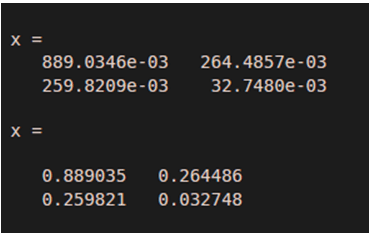
After executing the Matlab code, we get the short engineering format output format with compact line spacing format in the command window.
Example #3
In this example, we create a variable and display output in the short and shortG formats with loose line spacing for all output lines. Here we have x variable with random outputs display output in the shortG and short formats. so we take x variable. ‘x = [ 35 66.31566 465.55435 99344899999 ]’ his line return x variable with values. Then we used the Matlab format function to display output in the short format. After that, we used “format shortG” this syntax to display the output in the shortG format with loose line spacing for all output lines.
Code:
clc;

close all;

clear all;

x = [35 66.31566 465.55435 99344899999];

format short

x

format shortG

format      loose

x
Output- Command Window
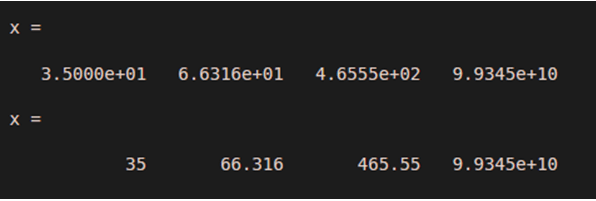
After executing the Matlab code, we get the display output in the short format and shortG format with loose line spacing for all output lines in the command window.
Conclusion
In this article, we saw the concept of the Matlab Format function. Basically, this Format function is used for changing the output display format in the Command Window. Then we saw the related syntax and how it works. The Matlab Format function was important in changing the format and styles.
Recommended Articles
This is a guide to Matlab Format. Here we also discuss the definition and how the format function works in Matlab. along with different examples and code implementation. You may also have a look at the following articles to learn more –

