

Updated March 27, 2023

Introduction to Matlab Count
To find the presence of a particular event in the Matlab program count command is used. If an input is a string then by using this command we can find out how many times a specific character occurs in the input string. We can apply count command on array also. If the input is set of numbers in the form of the array then by using count command we can find out how much time a particular number present in the array. The count command is used in two ways depending upon the parameter list.
How does Count work in Matlab?
The count command is used in two ways .one is case sensitive and the other one is not. Mostly this command is used in strings operations where we need to find out the occurrence of characters. But input string one character may be present multiple times and in both the cases upper case and lower case. Therefore the second way is used to ignore the case of alphabets.
Steps to use “count” command –
Step 1: Accept the input string.
Step 2: Declare variable to store count and apply the command count.
Step 3: Display the result.
Syntax:
Variable name = count (input, ‘event’)

Variable name = count (input, ‘event’, ‘ignoreCase’, true)
Examples of Matlab Count
The example of the following are given below:
Example #1
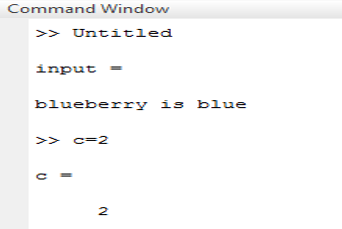
Let us consider input string as “blueberry is blue” and we need to find out the occurrence of “blue” in a given string. Table 1illustrate the Matlab code, for example, 1.here output is 2 because blue occurs two times one in a single string and second is along with other string (blueberry).
Code:
clc ;

input = ‘blueberry is blue’

c= count( input , ‘blue’)
Output:
Example #2
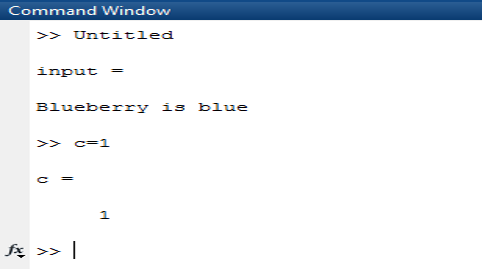
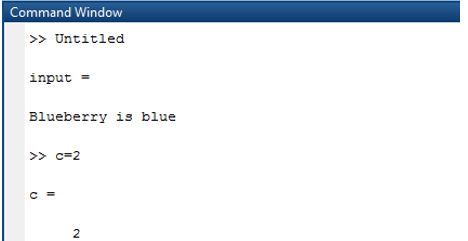
Let us consider input string as “Blueberry is blue” and we need to find out the occurrence of “blue” in the given string. Here the output is 1 because blue occurs two times one in a single string and second is along with other string (blueberry). But in uppercase therefore if we use the second method to write count command then the output will be 2. Table 2(a) illustrates the Matlab code for example 2 by using the first approach and .table 2(b) illustrates the Matlab code for example 2 by using the second approach.
Code:
input = ‘Blueberry is blue’

c= count( input , ‘blue’)
Output:
Code:
input = ‘Blueberry is blue’

c= count( input , ‘blue’ ,IgnoreCase’ ,true)
Output:
Example #3
Let us consider input string in multidimensional array as “ one, five, eleven, five, four, ten, one, four, three ”; “ one, zero, ten, zero, ten, one, two, ten, one, eight ” and we need to find out occurrence of “ one ” in given string. Here the output is different for different rows. The elements of two rows separated by “; ”. Table 3 illustrates the Matlab code for example 3.
Code:
Input = [“ one, five, eleven, five, four, ten, one, four, three ”; “ one, zero, ten, zero, ten, one, two, ten, one, eight ”]
c=count(input , “one”)
Output:

Example #4
Let us consider input string in multidimensional array as “ one, five, eleven, five, four, ten, one, four, three ”; “ one, zero, ten, zero, ten, one, two, ten, one, eight ” and we need to find out occurrence of two events simultaneously .“ one ”,” two” in given string. Here the output is different for different rows. The elements of two rows separated by “; ”. Tables 4 illustrate the Matlab code, for example, 4.here output is 2 and 4 because in the first string ‘one’ occurs two times and ‘two’ occurs zero times. And in the second string ‘one’ occurs three times and ‘ two ’ occurs one time.
Code:
Input = [“ one, five, eleven, five, four, ten, one, four, three ”; “ one, zero, ten, zero, ten, one, two, ten, one, eight ”]
c=count(input , [“one”,“two”]
Output:

Conclusion
As we have seen in the above example count command is used in multiple ways .we can apply this command one dimensional as well as multidimensional arrays .mostly count command is used in string operation to count the occurrence of alphabets in any manner.
Recommended Articles
This is a guide to Matlab Count. Here we discuss the introduction, How does Count work in Matlab and Examples along with the Syntax and the codes & outputs. You can also go through our other related articles to learn more–

