

Updated March 4, 2023

Introduction to Kafka Event
In Kafka, the Kafka events would be some sort of an action (read or write) that can perform on the Kafka partition when any action or task was executed. The action will be from the internal Kafka environment or from the external world. As per the requirement, we can choose any implement strategies for the Kafka events. The Kafka event majorly distributed into three major strategies like
- Single Topic
- topic-per-entity-type
- topic-per-entity
As per the requirement, we can select the above strategies. But before selecting it, we need to consider multiple factors like the data size, access request, and topic classification (it would be the single topic or separate topic for the Kafka events).
Syntax:
As such, there is no specific syntax available for the Kafka Event. Generally, we are using the Kafka Event value while creating new events or defining the new event strategies on the number of Kafka topics.
Note:
1) While working with the Kafka Event. We are using the core Kafka commands and Kafka Event command for the troubleshooting front.
2) At the time of Kafka Event configuration; we are using the CLI method. But generally, we can the Kafka logs as well for further troubleshooting.
How Kafka Event Works?
The Kafka Event is useful when any specific task or activity may occur and with respect to this activity, we need to execute the Kafka event. To manage this, we are having multiple ways to handle this event like
- Single Topic: It will store all the events with respect to all the entities in a single Kafka topic. In the same single topic, we can define multiple partitions.
- Topic per entity category: We can select a different topic for all the users associated with the events and all the entity related events.
- Topic per entity: We can select a separate topic for a single user and a single entity.
Below are the list of property and its value that we can use in the Kafka Event.
| Sr No | Configuration Parameter | Prominence | Description | Default Value of the Configuration |
| 1 | application.server | Low | We need to define the combination of the hostname and the port of the server. It is pointing to the embedded user that would be defined in the endpoint. It would help for discovering the locations of state stores of the single or multiple Kafka streams job or application. The configuration value may vary from the different Kafka architecture and server configuration. | the empty string |
| 2 | buffered.records.per.partition | Low | This configuration property will help the maximum number of records to the buffer per Kafka Events. | 1000 |
| 3 | cache.max.bytes.buffering | Medium | This configuration property will help to the maximum number of memory (in bytes) to be used for record caches (It will apply for all the all threads). | 10485760 bytes |
| 4 | client.id | Medium | The client id will be in the string format. While doing a request, it will help to pass to the server. The same configuration will pass to the consumer/producer clients in the Kafka streaming application. | the empty string |
| 5 | commit.interval.ms | Low | As per the configuration value, the frequency in which to save the position of Kafka events. | 30000 milliseconds |
| 6 | default.deserialization.exception.handler | Medium | This configuration value details with the exception handling class that implements the Deserialization ExceptionHandler interface. | LogAndContinueExceptionHandler |
| 7 | default.production.exception.handler | Medium | This configuration value details with the exception handling class that implements in the Production Exception Handler interface. | DefaultProductionExceptionHandler |
| 8 | key.serde | Medium | It will be the default deserializer and serialize class for record keys. It will implement the serde interface. The same value will be inherited from the key.serde configuration property. | serdes.ByteArray().getClass().getName() |
| 9 | metric.reporters | Low | This configuration property helps to list out the classes to use the metrics reporters. | the empty list |
| 10 | metrics.num.samples | Low | This configuration property helps to the number of samples to maintain the compute metrics. | 2 |
| 11 | metrics.recording.level | Low | This configuration property helps to the highest recording level for metrics. | Info |
| 12 | metrics.sample.window.ms | Low | This configuration property helps to the window of time a metrics sample (in computed over). | 30000 milliseconds |
| 13 | num.standby.replicas | Medium | It will help to define the number of standby replicas for each application or job. | 0 |
| 14 | num.stream.threads | Medium | It will help to define the number of threads to execute in the streaming processing. | 1 |
| 15 | partition.grouper | Low | This configuration property helps to the partition the grouper class that helps to implement the Partition Grouper interface. | See Partition Grouper |
| 16 | processing.guarantee | Low | This configuration property helps for the processing mode. It is having two different values like “at_least_once” (it will be the default) or the “exactly_once” value. | See Processing Guarantee |
| 17 | poll.ms | Low | This configuration property helps to define the amount of time in milliseconds. To block the waiting for input. | 100 milliseconds |
| 18 | replication.factor | High | It will help to define the replication factor for change log topics. The repartition topics were created by the application. | 1 |
| 19 | retries | Medium | It will be the value or the number of retries for broker requests. It will lead the return to the retryable error. | 0 |
| 20 | retry.backoff.ms | Medium | This configuration property helps to define the amount of time in milliseconds, before any request was retried. It will apply when the retries parameter was configured. But the value should be garter than zero. | 100 |
| 21 | state.cleanup.delay.ms
|
Low | This configuration property helps to define the amount of time in milliseconds. When the partition has migrated then it will wait before deleting state. | 600000 milliseconds |
| 22 | state.dir | High | The state.dir property will define the directory location for state stores. | /tmp/kafka-streams |
| 23 | timestamp.extractor | Medium | We can define the timestamp extractor class; it will help to implement the Timestamp Extractor interface. | See Timestamp Extractor |
Examples to Implement or Check Kafka Event
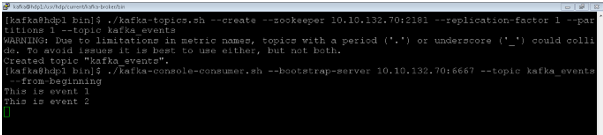
Create a Topic to Store the Events
In the Kafka environment, we can store the events.
Command :
Consume the Kafka Events:
./kafka-console-consumer.sh --bootstrap-server 10.10.132.70:6667 --topic kafka_events --from-beginning
Explanation :
As per the below screenshot, we have created “Kafka_events” topic and consume the events on the same topics.
Output :
Conclusion
We have seen the uncut concept of “Kafka Event” with the proper example, explanation, and methods with different outputs. As per the requirement, we can choose the Kafka strategies for the Kafka event handling like Single Topic, topic-per-entity-type, and topic-per-entity. If we want to execute and task, as per the previous event was happed in Kafka. In such cases, we are using Kafka events.
Recommended Articles
This is a guide to Kafka Event. Here we discuss the definition, How Kafka Event Works, and Examples to Implement or Check Kafka Event. You may also have a look at the following articles to learn more –

