

Updated March 4, 2023

Introduction to isempty function in MATLAB
MATLAB is a programming environment that is interactive and is used in scientific computing. It is extensively used in a lot of technical fields where problem-solving, data analysis, algorithm development, and experimentation is required. The software which is discipline-specific is extensively written using MATLAB. In this article, we will study how to use ‘isempty’ function in MATLAB. Before we start learning how ‘isempty’ function works in MATLAB, let us refresh our understanding of why we need ‘isempty’ function.
We use ‘isempty’ function on an array to check if the array is empty or otherwise. It is a very handy tool in data analysis where we have large sets of data and want to identify null or empty arrays. Sometimes in reporting, analysts need to send data without the empty values/arrays/cells. In such cases, isempty function becomes a life savior for data analysts.
Syntax
Let us now understand the syntax of ‘isempty’ function in MATLAB:
IE = isempty (X)
[Please keep in mind that isempty is a logical function and returns 0 or 1 as output]
Explanation: This function will return logical 1, signifying TRUE, if X is empty, The output will be logical 0, signifying FALSE, if X is not empty. If we have an empty array with a minimum one of its dimensions as length 0, ‘isempty’ will return 1 as output. [i.e an array of the form ‘0 X 3’ or ‘3 X 0’ etc.]
Examples to Implement isempty MATLAB
Let us now understand how the code for ‘isempty’ function looks like in MATLAB, with the help of various examples.
Example #1
In the first example, let us take an array of dimension 3 x 0 and see how the ‘isempty’ function works.
Code:
X = rand (3, 0)

IE = isempty (X)
Output:
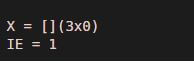
Explanation: Defining the input array with dimensions 3 x 0. Calling the isempty function using the input array ‘X’. As we can see in the output, we have obtained logical 1 for an array of dimension 3 x 0, as expected by us.
Example #2
Let us take an array with dimensions 0 x 4 and see how the ‘isempty’ function works.
Code:
X = rand (0, 4)

IE = isempty (X)
Output:
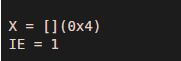
Explanation: Defining the input array with dimensions 0 x 4. Calling the isempty function using the input array ‘X’. As we can see in the output, we have obtained logical 1 for an array of dimension 0 x 4, as expected by us.
Example #3
Let us now take an array with dimensions that are not equal to zero and see how the results vary. We will be taking an array of dimensions 3 x 3 and see how the ‘isempty’ function works.
Code:
X = rand (3, 3)

IE = isempty (X)
Output:
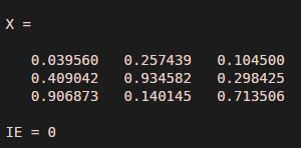
Explanation: Defining the input array with dimensions 3 x 3. Calling the isempty function using the input array ‘X’. As we can see in the output, we have obtained logical 0 for an array of dimension 3 x 3, as expected by us. A very important point to remember here is that ‘isempty’ function identifies empty arrays AND NOT the arrays with all the values as zero.
Example #4
Let us now take an array with dimensions that are not equal to zero, but all its elements are equal to zero.
Code:
X = zeros (3, 3)

IE = isempty (X)
Output:
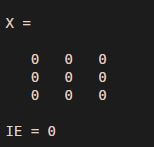
Explanation: Defining the input array with dimensions 3 x 3 and all the elements as zero. Calling the isempty function using the input array ‘X’. As we can see in the output, we have obtained logical 0 for an array of dimension 3 x 3 and all the elements as ‘0’. So, this can be concluded that an array with all the elements as zero, is not considered as an empty array. isempty function in MATLAB can also be used for a string array. Let us learn how to find out if a string array is empty or not using the ‘isempty’ function.
Example #4
Let us now take a string array with dimensions that are not equal to zero.
Code:
X = ["is"  "empty"  "function"]
IE = isempty (X)
Output:

Explanation: Defining the input string array with dimensions 1 x 3. Calling the isempty function using the input string array ‘X’. So, we have obtained logical 0 as our output since the input string array in our example is not empty.
Conclusion
MATLAB provides us with an ‘isempty’ function to check if the array is empty or not. Further, we can also check the same for a string vector by passing it as an argument to ‘isempty’ function. An important thing with ‘isempty’ function is that it checks for empty arrays, which should not be confused with arrays containing all zeros.
Recommended Articles
This is a guide to isempty MATLAB. Here we discuss an introduction to isempty MATLAB, syntax, with programming examples with explanation. You can also go through our other related articles to learn more –

