

Updated February 28, 2023

Introduction to HiveQL Group By
HiveQL Group By is grouping the particular hive table column values mentioned in the hive group by clause and display the output value in a group format rather than displaying the value in a single/individual format. It is just grouping the number of values in the tables and showcase/display the output in a group format. The hive group works on the hive column level only, but we can add the different and number of aggregation functions with the same select query.
Types of Aggregate Functions
In HiveQL Group By, it is mandatory to add the aggregate function in the select statement. Below are the 5 types of different aggregate functions that we can use in the group by the select statement.
- Maximum (MAX)
- Minimum (MIN)
- Count (COUNT)
- Average (AVG)
- Addition (SUM)
Syntax of HiveQL Group By:
SELECT [ALL | DISTINCT | Hive Column] select_expr1, select_expr2,….., select_expr_n

FROM table_name

[WHERE where_condition]
[GROUP BY column_list]
[HAVING having_condition]
[ORDER BY column_list]]
[LIMIT number];
How HiveQL Group By Query Works?
In HiveQL Group by is working with the aggregate function only. It aggregates the Hive Column output when we will enter the select statement with the group by command. As per the aggregation function provided ( MAX, MIN, COUNT, AVG, SUM ) in the select query. The query will aggregate the given hive column’s output and provided the result in a group format. If we do not provide the aggregate function in SQL select statement, then the group by the query will not work.
Examples to Implement HiveQL Group By
Below are the examples of HiveQL Group By:
Explanation:
We have a hive table (table name: – emp_group_by) in “emp” database of the hive. Below are the lists of fields/columns in the “emp_group_by” table.
- Adhar Number
- First Name
- Last Name
- Department
- Salary
- Location
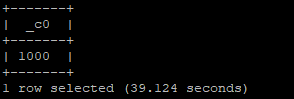
From the 1000 records, we have the employee data in the table. We see the different cases of “group by” with the different aggrade function, SQL query and output.
DDL Code for “emp_group_by” Table
Code:
create external table emp_group_by

(

adhar_no int,

first_name string,

last_name string,

department string,

salary float,

location string

)

ROW FORMAT DELIMITED

FIELDS TERMINATED BY ','

lines terminated by '\n'

tblproperties ("skip.header.line.count"="1")
Output:
We have 1000 records in the above table (manually loaded the data).
Sample “emp_group_by” Table View
Code:
select * from emp_group_by ;
Output:

1. Group By with Aggregate Function “MAX.”
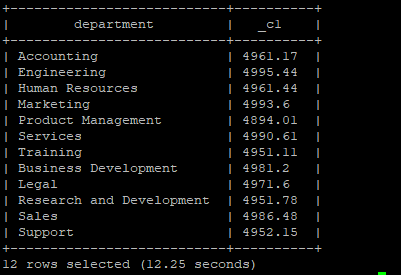
We have 1000 records in the “emp_group_by” table; we need the aggregated maximum salary of the individual department of “emp_group_by” table. We are using the aggregate function “MAX’ in the select SQL query. From the below SQL Query, we are selecting the “department” column and applying the “MAX” aggregated function on the salary column of “emp_group_by” table. For “group by” clause we are using the department column. So we will get the aggregated maximum salary of the individual department from the “emp_group_by” table.
Query:
select department,MAX(salary) from emp_group_by group by department;
Output:
2. Group By with Aggregate Function “MIN.”
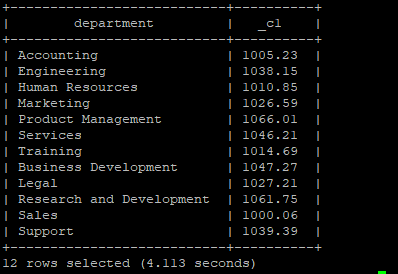
We have the number of records in the “emp_group_by” table; we need the minimum salary of the individual department of “emp_group_by” table. We are using the aggregate function “MIN” in the select SQL query.
From the below SQL Query, we are selecting the “department” column and applying the “MIN” aggregated function on the salary column of “emp_group_by” table. For “group by” clause, we are using the department column. So we will get the aggregated minimum salary of the individual department from the “emp_group_by” table.
Query:
select department,MIN(salary) from emp_group_by group by department;
Output:
3. Group by with Aggregate Function “COUNT.”
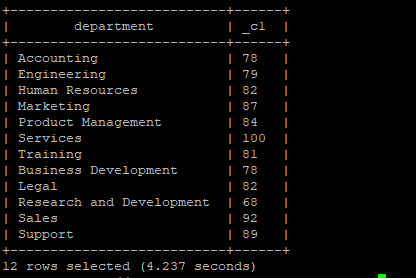
We have 1000 records in the table “emp_group_by”; we need the number of employees or people in the individual department of “emp_group_by” table. We are using the aggregate function “COUNT” in the select SQL query.
From the below SQL Query, we are selecting the “department” column and applying the “COUNT” aggregated function as “*” on the “emp_group_by” table. For “group by” clause, we are using the department column. So we will get the total number of employees or people in the individual department of the “emp_group_by” table.
Query:
select department,COUNT(*) from emp_group_by group by department;
Output:
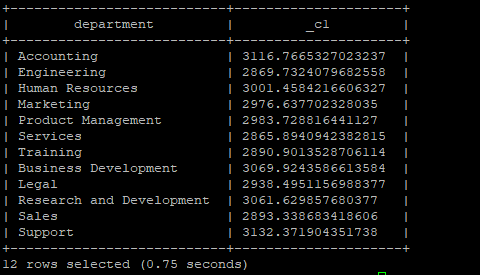
4. Group by with Aggregate Function “AVG.”
We have the number of records in the “emp_group_by” table. We need the average salary of the individual department of “emp_group_by” table. We are using the aggregate function “AVG” in the select SQL query.
From the below SQL Query, we are selecting the “department” column and applying the “AVG” aggregated function on the salary column of “emp_group_by” table. For the “group by” clause, we are using a department column. So we will get the aggregated average salary paid of the individual department from the “emp_group_by” table.
Query:
select department,AVG(salary) from emp_group_by group by department;
Output:
5. Group by with Aggregate Function “SUM.”
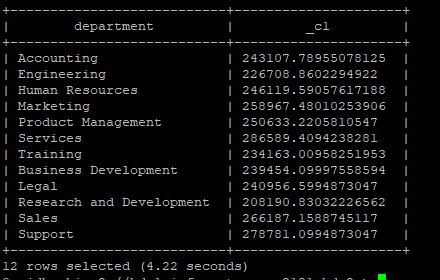
We have 1000 records in the table “emp_group_by”, we need the total salary paid by the individual department of “emp_group_by” table. We are using the aggregate function “SUM” in the select SQL query.
From the below SQL Query, we are selecting the “department” column and applying the “SUM” aggregated function on the salary column of “emp_group_by” table. For “group by” clause, we are using the department column. So we will get the aggregated total salary of the individual department paid to the individual department from the “emp_group_by” table.
SQL Query
select department,SUM(salary) from emp_group_by group by department;
Output:
Conclusion
We have seen the uncut concept of “HiveQL Group by” the Hive service query with the proper example, explanation, syntax, and code. When we need an output of the hive query in an aggregated format, we can use the “group by” with different aggregated function, and the result will come to the combined or aggregated format. It is not mandatory to use the single aggregated function with a single select statement. We can use the multiple aggregated functions in a single query with a different clause like group by, having, order by.
Recommended Articles
This is a guide to HiveQL Group By. Here we discuss the Introduction to HiveQL Group By and how the query works along with its examples. You can also go through our related articles to learn more –

