
Introduction
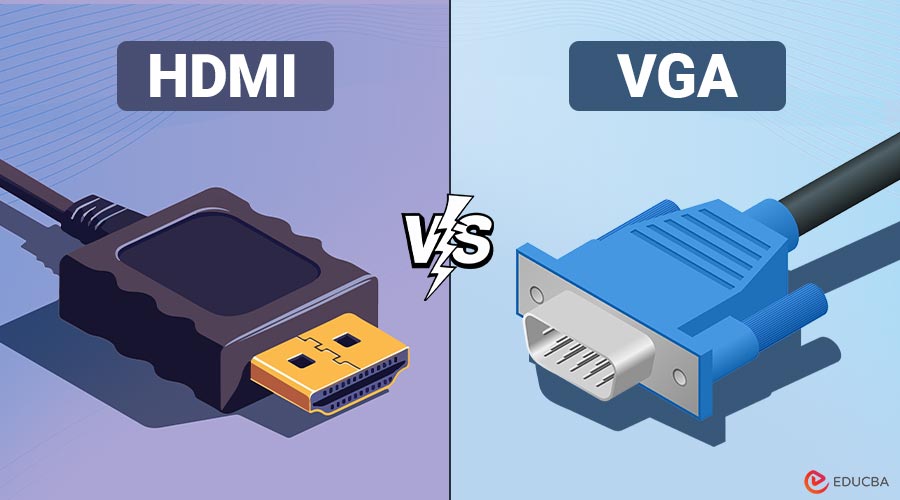
In the world of display technology, connecting a monitor, television, or projector to a computer or media device requires a reliable interface. Two of the most common display connection standards are HDMI (High-Definition Multimedia Interface) and VGA (Video Graphics Array). While HDMI is the modern digital standard, VGA is a legacy analog connector that has been around since the late 1980s.
Understanding the differences between HDMI and VGA is crucial for choosing the right connection for your devices, whether you are setting up a home theater, a professional workstation, or a gaming setup. In this blog, we will explore HDMI vs VGA in detail, including definitions, features, differences, pros, cons, use cases, and FAQs.
Table of Contents:
- Introduction
- What is HDMI?
- What is VGA?
- Key Differences
- Pros and Cons
- Which One Should You Choose?
- Use Cases
What is HDMI?
HDMI (High-Definition Multimedia Interface) is a digital audio/video interface introduced in 2003. It allows the transmission of uncompressed video data and compressed/uncompressed digital audio through a single cable. HDMI is now the industry standard for high-definition displays, gaming consoles, Blu-ray players, and modern laptops.
Key Features:
- Transmits both audio and video over a single wire.
- Supports high-definition (HD) and 4K resolutions.
- Offers digital signal transmission, resulting in superior image quality compared to analog signals.
- Includes support for advanced features like HDR (High Dynamic Range), 3D content, and CEC (Consumer Electronics Control).
- Backward compatibility with older HDMI versions.
What is VGA?
VGA (Video Graphics Array) is an analog video interface developed by IBM in 1987. It was once the dominant display standard for computers and monitors, but has gradually been replaced by digital interfaces such as HDMI, DVI, and DisplayPort.
Key Features:
- Transmits only video signals (no audio).
- Analog signal transmission can lead to signal degradation over long cable runs.
- The maximum resolution typically supported is 1080p (1920×1080), but image quality decreases compared to digital standards.
- Uses a 15-pin D-sub connector, which is relatively large in size.
- Still used in legacy systems, older monitors, and projectors.
HDMI vs VGA: Key Differences
The following table highlights the major differences between HDMI and VGA:
| Aspect | HDMI | VGA |
| Type of Signal | Digital (video + audio) | Analog (video only) |
| Audio Transmission | Yes, supports digital audio | No, requires separate audio cables |
| Resolution Support | Up to 8K in modern HDMI versions | Typically up to 1080p |
| Connector Type | 19-pin flat connector | 15-pin D-sub connector |
| Image Quality | Crisp and clear due to digital transmission | May degrade due to analog signal noise |
| Cable Length | Up to 15 meters (without signal booster) | Up to 50 meters (but with quality loss) |
| Modern Usage | TVs, laptops, gaming consoles, Blu-ray players | Legacy computers and projectors |
| Compatibility | Works with all modern devices | Limited compatibility with new devices |
Pros and Cons of HDMI and VGA
Given below are the pros and cons of HDMI and VGA:
Pros of HDMI:
- Superior Image Quality: Since HDMI is digital, it delivers sharper images with minimal signal interference or degradation.
- Audio and Video in One Cable: Reduces clutter by carrying both video and audio signals.
- Higher Resolution Support: Supports 4K, 8K, and HDR content.
- Compact Design: Compared to the large VGA connector, the 19-pin HDMI connector is substantially smaller and more manageable.
Cons of HDMI:
- Shorter Cable Length: The ideal range for HDMI cables is usually 10 to 15 meters. In addition, you require active cables or signal boosters.
- Cost: HDMI cables and compatible devices may be slightly more expensive compared to VGA-based devices.
- Compatibility with Older Devices: Many older projectors and monitors do not support HDMI, so adapters are often required.
- Signal Latency in Long Chains: When using HDMI with multiple splitters, converters, or long cable chains, minor signal latency or synchronization issues may occur.
Pros of VGA:
- Widespread Availability: VGA ports are common on older hardware and projectors, making it easy to find compatible devices.
- Longer Cable Runs: VGA cables can run up to 50 meters (with potential signal loss).
- Cost-Effective: VGA cables are generally less expensive than HDMI cables.
- Analog Signal Flexibility: VGA’s analog signal can be easily converted to other formats (like component video) using inexpensive adapters without complex electronics.
Cons of VGA:
- Lower Quality: Analog signals are prone to distortion, especially at higher resolutions.
- No Audio Transmission: Requires separate audio cables for sound.
- Obsolete Technology: VGA is slowly being phased out in favor of HDMI and DisplayPort.
- Bulky Connector: The 15-pin D-sub connector is larger and less convenient to use.
Which One Should You Choose?
When deciding between HDMI vs VGA, consider the following factors:
- Modern Devices: If you are using a modern TV, monitor, or laptop, HDMI is the preferred option because it supports both high-quality audio and video.
- Legacy Hardware: If you are connecting to an older projector or monitor that does not have HDMI, VGA might be your only option.
- Image and Audio Quality: For gaming, movies, or any high-resolution content, HDMI is superior due to its digital transmission.
- Cable Management: HDMI simplifies connections by combining video and audio into a single cable.
Real-World Use Cases
Below are some common real-world use cases where people effectively utilize HDMI and VGA connections.
HDMI Use Cases:
- Home Theaters: Connecting a Blu-ray Player or Streaming Device to a 4K TV.
- Gaming Consoles: Xbox and PlayStation rely on HDMI for high-definition gaming.
- Laptops and Monitors: Modern laptops use HDMI ports to connect to external displays.
- Professional AV Systems: Businesses and professionals widely use HDMI in conference rooms, digital signage, and modern projectors.
VGA Use Cases:
- Legacy Projectors: Many older projectors in schools or offices still rely on VGA.
- Industrial and Embedded Systems: Some older industrial machines still use VGA connections.
- Budget Monitors: Older, cost-effective monitors may still support VGA.
- KVM Switches: Many Keyboard-Video-Mouse (KVM) switches for managing multiple computers still support VGA due to its widespread legacy compatibility.
Final Thoughts – HDMI vs VGA
The HDMI vs VGA debate reflects the shift from analog to digital display technology. HDMI offers superior image quality, robust audio support, and higher resolutions, making it an ideal choice for modern devices. VGA, however, remains useful for legacy systems, older projectors, and budget monitors. Choosing HDMI is recommended, but a VGA adapter ensures compatibility with older equipment when needed.
Frequently Asked Questions (FAQs)
Q1. Can I convert VGA to HDMI?
Answer: Yes, you can use a VGA-to-HDMI adapter, but keep in mind that the quality may be limited due to the VGA signal being analog.
Q2. Does VGA support 1080p?
Answer: VGA can support 1080p resolutions, but the image may not be as sharp as with HDMI due to signal noise.
Q3. Can HDMI carry audio?
Answer: Yes, HDMI transmits both digital video and audio, removing the necessity for separate audio cables.
Q4. Is VGA obsolete?
Answer: VGA is largely considered obsolete, with modern devices preferring HDMI, DisplayPort, or USB-C.
Recommended Articles
We hope that this EDUCBA information on “HDMI vs VGA” was beneficial to you. You can view EDUCBA’s recommended articles for more information.

