
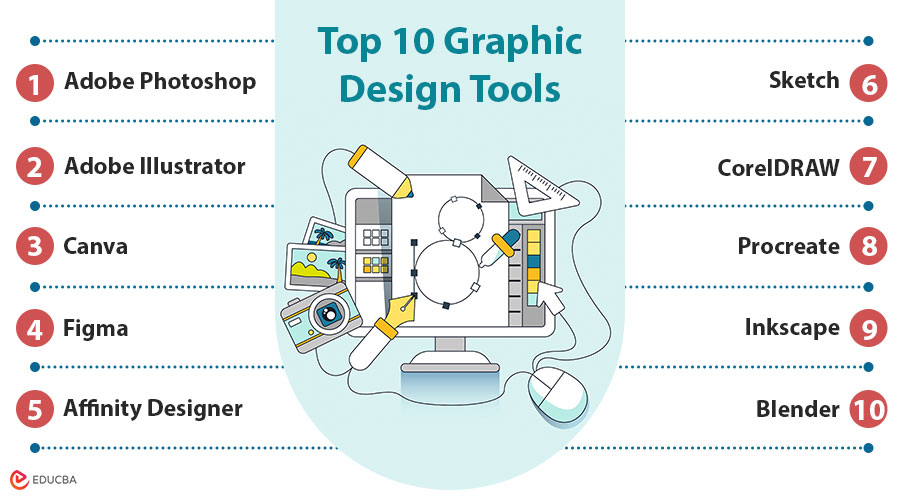
Introduction to Graphic Design Tools
Graphic design tools are software platforms or applications used to design, modify, enhance, and display visual content. These tools range from advanced professional software, such as Adobe Photoshop, to beginner-friendly web-based platforms like Canva. They support a wide array of design functions, including illustration, photo editing, layout design, 3D rendering, and animation.
Table of Contents:
- Introduction
- Why Choosing the Right Graphic Design Tool Matters?
- Top 10 Graphic Design Tools
- Tips for Choosing the Right Tool
Why Choosing the Right Graphic Design Tool Matters?
With so many tools available, selecting the right one can:
1. Enhance Productivity
Using the right design tool streamlines your workflow, automates tasks, and helps you complete projects faster with fewer manual steps.
2. Improve Design Quality
The right software offers advanced features, precise controls, and high-resolution output, ensuring professional and visually compelling results that bring out the best of creative as a design every time.
3. Optimize Collaboration
Collaborative tools enable multiple users to work simultaneously, share feedback in real-time, and maintain version control for seamless team-based projects.
4. Save Time and Costs
Efficient tools reduce repetitive work, minimize errors, and offer budget-friendly pricing plans, which help save both time and project expenses.
5. Enable Versatility Across Formats and Devices
A suitable tool supports multiple file types, screen resolutions, and operating systems, allowing for consistent design output across various platforms and devices.
Top 10 Graphic Design Tools
Here is a comprehensive list of the top 10 graphic design tools, each with features, pros, and cons to help you choose the right one for your creative needs.
#1. Adobe Photoshop
Adobe Photoshop is the industry-leading software for photo editing, digital painting, and compositing—ideal for professionals who demand advanced image manipulation and creative control.
Features:
- Layer-based editing
- Content-aware fill
- Smart objects and filters
- Cloud integration via Adobe Creative Cloud
Pros:
- Industry-standard
- Extensive plugin support
- Robust tutorials and community
Cons:
- Steep learning curve
- Subscription-based pricing
- Requires high system resources for optimal performance
#2. Adobe Illustrator
Adobe Illustrator is a leading vector graphic design tool, perfect for creating logos, typography, and scalable artwork. Designers use it for crisp, professional-grade visuals across print and digital platforms.
Features:
- Precision with paths and anchors
- Advanced typography tools
- Scalable vector artwork
- Works seamlessly with other Adobe apps
Pros:
- Ideal for branding and icons
- Excellent output for print and web
- Precise control
Cons:
- Expensive for individual users or freelancers
- A complex interface can overwhelm newcomers
- Resource-intensive on older machines
#3. Canva
Canva is an intuitive, web-based design platform ideal for beginners. It offers pre-made templates, drag-and-drop functionality, and design assets tailored for social media, marketing, and presentations.
Features:
- Drag-and-drop interface
- Thousands of templates
- Stock photos, icons, and fonts
- Team collaboration
Pros:
- Easy to use
- Great free plan
- Quick results for non-designers
Cons:
- Limited advanced design capabilities
- Overused templates may affect originality
- Internet connection required for full features
#4. Figma
Figma is a collaborative interface design platform tailored for UI/UX designers, offering real-time collaboration, interactive prototyping, and browser-based access—perfect for modern design teams and developers.
Features:
- Real-time team collaboration
- Vector editing and prototyping
- Auto layout and component systems
- Browser-based
Pros:
- Seamless collaboration
- Works on any OS
- Free for small teams
Cons:
- Lacks advanced raster editing tools
- Performance may lag on large projects
- Browser dependency can limit offline access
#5. Affinity Designer
Affinity Designer is a cost-effective, professional-grade vector and raster graphics software. It is a great Adobe Illustrator alternative for freelancers and illustrators seeking one-time payment software with robust tools.
Features:
- Advanced vector and raster editing
- One-time payment (no subscription)
- CMYK and RGB support
- Snapping and grid systems
Pros:
- Affordable
- Powerful features
- Mac, Windows, and iPad versions
Cons:
- Smaller community and support resources
- Fewer third-party integrations and plugins
- No cloud-based collaboration features
#6. Sketch
Sketch is a vector-based design app for macOS, ideal for UI/UX designers working on Apple platforms. It is widely used for wireframing, prototyping, and clean interface design.
Features:
- Vector editing with symbols and components
- Smart layout tools
- Plugins and integrations
- Design handoff via Sketch Cloud
Pros:
- Lightweight and fast
- Great for wireframing
- Clean interface
Cons:
- Only available for macOS
- Lacks built-in prototyping compared to Figma
- Requires plugins for some essential features
#7. CorelDRAW
CorelDRAW is a comprehensive graphic suite tailored for vector illustration and print design. It is popular among print professionals for its color precision and flexible licensing model.
Features:
- Powerful vector tools
- Typography and layout tools
- Native PDF and AI support
- AI-powered image enhancement
Pros:
- Strong in print media
- One-time purchase option
- Robust color management
Cons:
- Less intuitive interface compared to newer tools
- Limited popularity in the web/UI design industry
- Expensive compared to other vector design tools
#8. Procreate
Procreate is a powerful iPad painting app that offers artists natural brush strokes, fast performance, and an intuitive interface for sketching anywhere.
Features:
- Intuitive touch interface
- Vast brush library
- Time-lapse replay
- High-resolution export
Pros:
- Affordable
- Lightweight and fast
- Great for artists and illustrators
Cons:
- Only available on iPad
- Not suitable for vector-based work
- No native file syncing or cloud storage
#9. Inkscape
Inkscape is a free, open-source vector graphics editor ideal for beginners and hobbyists, offering essential SVG tools across Windows, macOS, and Linux platforms.
Features:
- SVG format support
- Node editing
- Path operations
- Layer support
Pros:
- Completely free and open-source
- Cross-platform
- Good for beginners in vector graphics
Cons:
- Dated user interface
- Slower performance with large files
- Limited advanced tools compared to premium software
#10. Blender
A free and open-source 3D creation tool for modeling, animation, rendering, and motion graphics is called Blender. It is perfect for graphic designers venturing into 3D visual design and VFX.
Features:
- 3D modeling and sculpting tools
- Rigging and character animation
- Motion tracking and VFX
- Powerful rendering engine (Cycles & Eevee)
Pros:
- Free and open-source
- Extremely powerful 3D toolset
- Regular updates and a strong community
Cons:
- Steep learning curve for new users
- Complex UI not tailored to traditional graphic design
- Requires a powerful computer for smooth performance
#11. DocHipo
DocHipo is a rapidly growing AI-powered document design tool ideal for marketers, content creators, solopreneurs, small business owners, and large teams who want a stress-free design experience. It features an intuitive drag-and-drop editor that lets you easily customize designs for a wide range of print and digital marketing materials.
Features:
- Industry-oriented, business-focused templates
- Unlimited stock images and videos
- On-theme vector graphic assets
- Real-time design collaboration
- Brand Kit for consistent branding
Pros:
- Intuitive, distraction-free interface
- No learning curve
- Watermark-free downloads
Cons:
- Available only as a web application
- Available only in English
- Limited offline access
Tips for Choosing the Right Tool
Here are some practical tips to help you select the most suitable graphic design tool based on your needs, budget, platform, and level of experience.
1. Define Your Project Needs
Before selecting a tool, identify your design goals—whether it is a logo, UI mockup, illustration, or social media graphic—to match the software’s strengths.
2. Check System Compatibility
Ensure the design software supports your operating system; for example, Sketch is exclusive to Mac, while Figma and Canva are accessible across Windows, macOS, and browsers.
3. Consider Your Skill Level
Match your experience level with the tool—beginners should opt for Canva or Inkscape, while advanced designers may benefit more from Adobe Creative Suite or Figma.
4. Budget Matters
Evaluate pricing models—choose between free tools like Inkscape, affordable one-time purchases like Affinity, or subscriptions like Adobe for long-term creative project flexibility.
5. Collaboration Needs
If working with a team, prioritize tools like Figma or Canva that offer real-time collaboration, cloud syncing, and version history to streamline the design workflow.
Frequently Asked Questions (FAQs)
Q1. What graphic design tool is best for creating animations or 3D graphics?
Answer: Blender is the top choice for 3D modeling, animation, and visual effects. It is free, open-source, and packed with features for motion graphics, making it ideal for advanced design projects.
Q2. Can I use multiple tools together?
Answer: Yes! Many designers combine tools (e.g., using Figma for layout and Photoshop for image editing).
Q3. How important is cloud storage in graphic design tools?
Answer: Cloud storage is vital for collaborative work, remote access, and version control. Tools like Figma, Canva, and Adobe Creative Cloud offer integrated cloud storage, ensuring your designs are secure and accessible at any time.
Q4. Are there any graphic design tools suitable for mobile or tablet use?
Answer: Yes, Procreate is a top choice for iPad users looking for digital sketching and painting tools. Additionally, Canva and Adobe Creative Cloud apps are available on mobile devices, offering flexible design on the go.
Recommended Articles
We hope that this EDUCBA information on “Graphic Design Tools” was beneficial to you. You can view EDUCBA’s recommended articles for more information.

