

Updated May 5, 2023
Differences Between Google Analytics vs Mixpanel
Today, web analytics is the key to measuring and analyzing web data to understand user behavior across web pages. Its focus is to analyze web data and determine the activity and behavior of a user on a website, i.e., how many users visited, which pages got hits, what items searched more, etc. Web analytics provide insights into data, and it also helps improve the website’s user experience since it measures page hits, views, clicks, etc. To perform web analytics, many tools available in the market are smart enough to achieve your organization’s goals. Some of the best web analytics tools are Google Analytics, Yahoo web analytics, Adobe Analytics, Crazy Eggs, Mixpanel, Click Tale, etc. Here we will see a detailed comparison between the most popular tools: Google Analytics vs Mixpanel.
Both these tools have overlapping features, so let us compare these two to choose the right analytics tool.
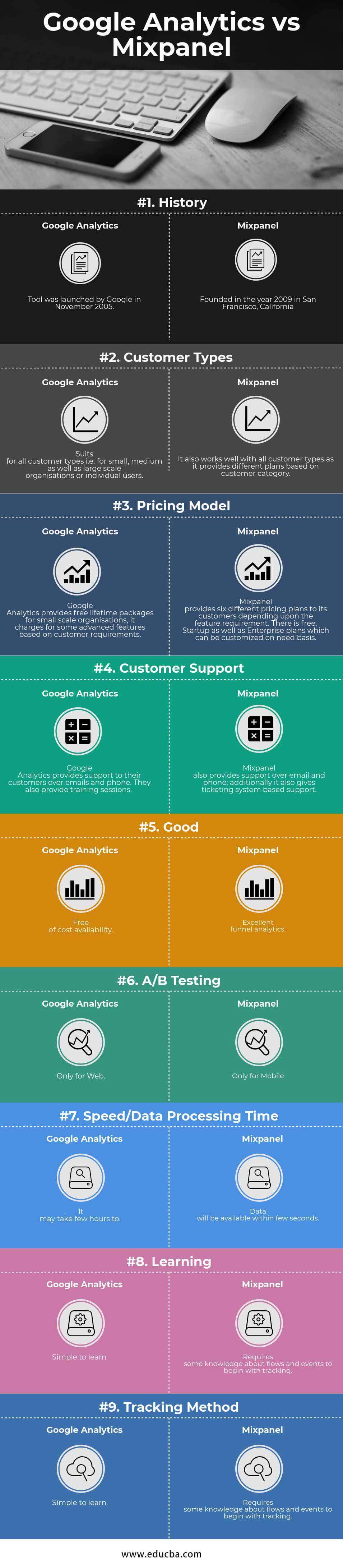
Head-to-Head Comparison Between Google Analytics and Mixpanel (Infographics)
Below are the top 9 comparisons between Google Analytics vs Mixpanel:
Key Differences Between Google Analytics vs Mixpanel
Below are the lists of points that describe the key differences between Google Analytics vs Mixpanel:
Although both these tools have most of the features in common, the key differences between these two, Google Analytics vs Mixpanel, can be described based on their speed, tracking method, pricing model, data processing time, and funnel analysis.
Some of the major differences are explained below:
1. Tracking Method
The tracking mechanism in Google Analytics is Page Based. It tracks the traffic on your website by page hits and gathers visitor information. It makes use of a javascript code for tracking purposes. On the other hand, the Mixpanel tracking mechanism is event-centric, i.e., it tracks visitor actions rather than page hits. The events can be a button click, video surfing, etc.
2. Real-Time Analysis
For real-time analysis, Google Analytics will take a long time for report generation in case of massive data. It could even take more than 24 hours for data processing. Mixpanel will be an excellent choice for real-time tracking. It can update the whole data within seconds. It is ideal for the instant processing of real-time data.
3. Funnel Analysis
Funnel analysis is done to measure a series of events performed by a visitor. In the case of Google Analytics, a customer has to specify all the steps of a funnel in advance. These funnels can be created on every page, but they are inaccurate. However, Mixpanel funnel analysis is exceptionally well. Users can develop funnels in the mix panel with simple steps. The mechanism is very flexible, and data analysis is accurate.
4. User Tracking
To track an individual user, Google Analytics makes use of browser cookies. This mechanism will not work well if the same user visits multiple devices. Mixpanel can overcome this by performing cross-device user tracking. It can track individual users.
5. Retention Analysis
For a small business, the cohort analysis done by Google Analytics is enough for decision-making. Still, it does not provide analysis such as which feature is most used by visitors, the behavior of new visitors, etc. Mixapanel will provide you with answers to all these questions with its retention analysis feature.
6. Segmentation and Reporting
Both tools are good concerning segmentation and reporting. The only difference is Mixpanel will do this in a few simple steps. However, Google Analytics requires some more steps.
7. Pricing
Google Analytics provides free services. If there are less than 10 million hits per month on your site, it charges for hits more than 10 million.
In Mixpanel, the pricing model is based on several data points.
Pros and Cons of Google Analytics vs Mixpanel
1. Google Analytics
Pros:
- Free service for most use cases.
- Frequent releases of new features.
- Free training to learn the tool.
- The tag manager of Google Analytics is helpful for non-technical users.
Cons:
- Lack of support.
- Cannot perform individual user-based analysis.
- Not a good solution for real-time traffic monitoring.
2. MixPanel
Pros:
- It allows real-time monitoring.
- An interface is easy to learn and adapt.
- A great feature of Funnel analysis.
- Easy to use and fully supported.
- Much sophisticated API.
- Intuitive Machine learning interface.
Cons:
- Mixpanel mainly provides paid services.
- Complex code integration process.
Google Analytics vs Mixpanel Comparison Table
Below are the lists of points that describe the comparisons between Google Analytics vs Mixpanel:
| Basis of Comparison | Google Analytics | Mixpanel |
| History | Google launched the tool in November 2005. | Founded in the year 2009 in San Francisco, California. |
| Customer Types | Suits for all customer types, i.e., small, medium, and large-scale organizations or individual users. | It also works well with all customer types, providing different plans based on customer category. |
| Pricing Model | Google Analytics provides free lifetime packages for small-scale organizations; it charges for some advanced features based on customer requirements. | Mixpanel provides customers with six different pricing plans depending on the feature requirement. It is free, with Startup and Enterprise plans which can be customized on a need basis. |
| Customer Support | Google Analytics provides support to its customers over email and phone. They also offer training sessions. | Mixpanel also provides support for email and phone; additionally, it also gives ticketing system-based support. |
| Good | Free of cost availability. | Excellent funnel analytics. |
| A/B Testing | Only for Web. | Only for Mobile. |
| Speed/ Data Processing Time | It may take a few hours to generate reports from data. | Data will be available within a few seconds. |
| Learning | Simple to learn. | Requires some knowledge about flows and events to begin with tracking. |
| Tracking Method | For Page Based Tracking. | For Event-Based Tracking. |
Conclusion
Put, both Google Analytics and Mixpanel have some unique abilities. It depends on the customer’s needs to choose an appropriate tool from their organization. None of these tools will cost you much. But after considering all the differences between these two tools, we can conclude that Google Analytics will work well for small or medium-scale organizations. For organizations that require fast and focussed real-time analysis and tracking capabilities, Mixpanel will be the go-to tool. Some customers even combine these two tools to get the best of both.
Recommended Articles
This has been a guide to the difference between Google Analytics vs. Mixpanel. Here we have discussed Google Analytics vs Mixpanel head-to-head comparison, key differences, infographics, and comparison table. You may also look at the following articles to learn more –

