
Updated April 19, 2023
Introduction to Flask config
Flask config is defined as the system of arrangements that enables the running of functional units together in accordance with the nature of the run, number, and chief characteristics of the web application being built. The choice of hardware, software, firmware, etc. are the widely the ways of configuring the system to achieve its optimum performance. Hence, we can fairly assume that the change of configuration affects the performance and functionality of the web application developed by Flask. Understanding of configuration is by and for the most important part of Flask application as without configuration, the application may even fail to run. Nowadays with the advent of plug-and-play capability, the configurations are performed automatically for the minimum run though, for the most optimum run, the modifications is inevitable!
How to perform config in Flask?
Before we learn the ways of performing config, we need to understand some concepts on the implications of config. There are different aspects of configurations that need intervention depending on the environment in which the application is running, debug mode toggling, the secret key setting up, environment-specific things, and so on. When the application starts up, the configuration is needed to be read and it is made possible through 3 ways which we will discuss in detail in this article. To just know the gist, one can hard code the config in the code itself, which is okay for a small application but becomes a mammoth task in making changes if the application is a huge code base or many parameters included in making the application run to its optimized way. Irrespective of how the config is loaded, there is an object value that stores the config values which are loaded for the running of the application. The place where Flask puts the values is the config attribute of the Flask object. Not only does the config attribute allows storage of the Flask config, but also homes configuration values for extensions. The config attribute is like a sib class of dictionary and can be modified like any other dictionary using the concept of key-value pair.
It is now time for us to know how config is performed in Flask. As we have mentioned in our previous paragraph that there are 3 ways by which are:
1. Inline Configuration
Though this is a pointer that is discussed at the top of the line in our list, it is the one that is highly discouraged. This is one of the best software development practices. Now the reason why we call this as a best software development practice is analogously understood if we can understand the clear fact that why would one wait to set a variable like Flask environment when we already have created a Flask app object in the code. The whole point of configuring to enable the most optimum way of the run is hampered. Not only that just think about changing mammoth variables within the code itself, which pose a high threat to the readability and debug of the code. And last but not least we are exposing highly sensitive values like secret keys in a land of nowhere in the codebase! Nevertheless, the duty of this article is to keep you informed, hence right out at the start let us have this as a disclaimer of what not to use! In a quest to improve our way of configuration, let’s explore better options than this in our next 2 points.
2. Configuration from a .py file
What’s the best alternative to in-line code parameterization? Maybe something which looks exactly the same and for the code feels the same. For this, since the Flask application is written in python how about having all the configurations in a .py file and then allow the codebase which has the flask application to take the parameters first, execute them, and then start building the Flask application. This henceforth solves the mess that is created as a result of so many parameters in the codebase. The variables are immediately recognized by Flask and implemented in its way. But we are still left with the problem of sensitive information being compromised. For this, we can set an environment variable and allow the Flask application to take that parameter from the environment variable. we do this by using the command export <variable name> before we run the flask application. Thus, we have a cleaner and a secured approach to config variables!
3. Configuration through class objects
In the purview of modularization using variables from config through class objects. We make config.py using a class object in the code we can take the config setting to one notch higher than the .py method. Using the notion of not one size fits all, we can customize config for different cases, like one for development and one for production. One can retrieve the config using the method or in other words the code < Flask App Object >.config.from_object(‘< Config Class >.< Config group >’). Here the config group extends the functions from the base class which is the one that replaces < Config Class > and adds it to the ones which is present in the class of < Config group >.
Examples of Flask config
Here are the follwoing examples mention below
Example #1
Setting the config from the code:
Syntax:
from flask import Flask
appFlask = Flask(__name__)
appFlask.config['ENV'] = 'development'
appFlask.config['SECRET_KEY'] = 'Am12979019Ky'
appFlask.config['DEBUG'] = False
print(appFlask.config)
if __name__ == '__main__':
appFlask.run(debug = True)
Output:

Example #2
Setting the config from the .py File:
Syntax:
devConfig.py
ENV="development"
SECRET_KEY="EduCBA28032019"
DEBUG=False
configFlask.py
from flask import Flask
appFlask = Flask(__name__)
appFlask.config.from_pyfile('devConfig.py')
print(f"Environment: {appFlask.config['ENV']}")
print(f"Debug: {appFlask.config['DEBUG']}")
print(f"Secret key: {appFlask.config['SECRET_KEY']}")
if __name__ == '__main__':
appFlask.run(debug = True)
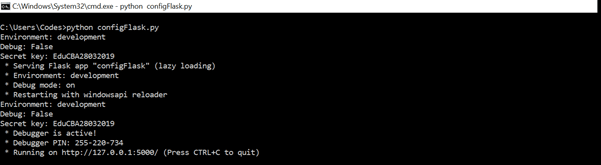
Output:
Conclusion
In this article, we have understood a wide variety of ways by which configurations can be while building a Flask application in Python. Not only this we also know what NOT to do while we are building a Flask application and with keeping that in mind, but we also build the Flask application to fulfill its utility!
Recommended Articles
This is a guide to Flask config. Here we discuss How to perform config in Flask along with the examples and outputs. You may also have a look at the following articles to learn more –

