

Updated March 28, 2023
Introduction to FETCH in SQL
FETCH is a structured query language(SQL) command used with an ORDER BY clause in conjunction with an OFFSET set to retrieve or fetch selected rows sequentially using a cursor which advances through rows and sequentially processes rows one by one till the cursor reaches the terminating condition mentioned in the command.
The essential steps which are involved in declaring a FETCH command are:
- Declaration of the cursor which will sequentially process each row one at a time
- Opening of the declared cursor
- Fetching one row at a time
- Closing the cursor on the termination condition, i.e. on reaching the last row in the count of rows to be processed (as mentioned as a part of the FETCH command).
Syntax and Parameters
The basic syntax for using a FETCH command in SQL is as follows:
Syntax:
SELECT column_name(s)
FROM table_name
ORDER BY column_name
OFFSET starting_point
FETCH NEXT terminating_point ROWS ONLY;
The parameters used in the above syntax are:
SELECT: It is used to select the required data from the database.
column_name(s): Specify the column name which you want to be in the resultant set.
FROM: It is used to specify the source from which data has to be fetched.
ORDER BY column_name: ORDER BY is used to arrange the data in the ascending or descending order. Specify the column_name by which you want to sort the records.
OFFSET starting_point: OFFSET is always used in an ORDER BY clause. It is used to specify the row number from which the cursor should start processing/counting rows.
FETCH NEXT terminating_point ROWS ONLY: FETCH command is to sequentially select the mentioned number of rows.NEXT is for the cursor to understand that it has to fetch the next number of rows (the terminating_point). ONLY is for the cursor to understand that it has to close the FETCH operation.
Of the above-mentioned parameters, all the parameters are mandatory. You may use JOINS, WHERE, GROUP BY AND HAVING clauses based on your requirement.
Going ahead we will be discussing the above-mentioned FETCH command in great detail.
In order to understand the concept better, we will take the help of these two tables, “employees” ( contains personal details of all the employees) and “department” (contains details like department id, name, and hod).
The data in the “department” table look something like this:
| departmentid | departmentname | head |
| 4001 | Sales & Marketing | 10024 |
| 4002 | Products | 10023 |
| 4003 | Human Resources | 10022 |
The data in the “employees” table is as follows:
| employeeid | lastname | firstname | departmentid | address | city | created_at | Salary |
| 10028 | Becker | Todd | 4001 | 27 street | Oslo | 2007-1-03 | 12000 |
| 10029 | Rebecca | Ginny | 4001 | 27 street | Manhattan | 2007-12-03 | 12000 |
| 10027 | Tobby | Riya | 4002 | 31 street | Manhattan | 2006-1-03 | 15000 |
| 10026 | Sharma | Deepak | 4002 | 10th street | New Delhi | 2006-1-02 | 15000 |
| 10024 | Krishna | Lina | 4001 | 27 street | Oslo | 2002-1-31 | 12000 |
| 10023 | Jackson | David | 4002 | 27 street | Manhattan | 2001-12-31 | 15000 |
| 10022 | Mayers | David | 4003 | 27 street | Manhattan | 2000-12-31 | 10000 |
Examples of FETCH in SQL
Here are a few examples to understand the FETCH command in detail.
Example #1
The basic SQL query to illustrate the OFFSET and FETCH command.
Code:
SELECT employeeid,departmentid,address,city
FROM employees
ORDER BY employeeid
OFFSET 0
FETCH NEXT 3 ROWS ONLY;
Output:
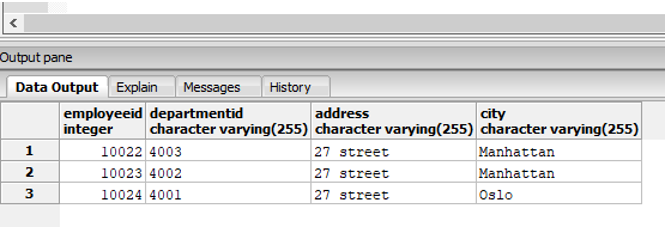
In the above example, the SQL cursor starts from the mentioned offset ‘0’ and keeps fetching rows till it reaches the row number ‘3’.
Example #2
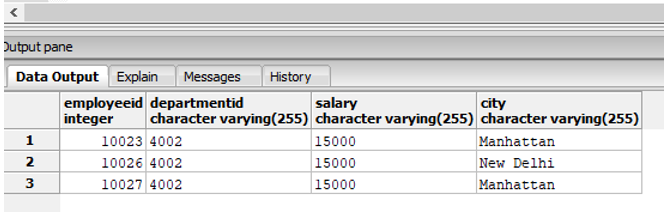
Find the details like employeeid, departmentid, city and salary of top three employees on the basis of their salary.
Code:
SELECT employeeid,departmentid,salary,city
FROM employees
ORDER BY salary DESC
OFFSET 0
FETCH NEXT 3 ROWS ONLY;
Output:
Example #3
Find the details like employeeid, departmentid, city and salary of the employee who joined the firm somewhere in the middle. (Assuming that the first employee joined at the foundation of the company and there are 7 employees in total).
Code:
SELECT employeeid,departmentid,city, salary, create_dt
FROM employees
ORDER BY create_dt
OFFSET 3
FETCH NEXT 1 ROWS ONLY;
Output:
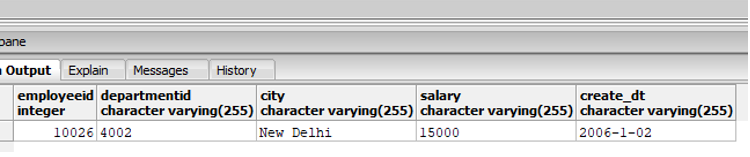
In this example, we tried to tweak the OFFSET to start the cursor from the desired row number i.e. 3 and retrieve the next 1 row.
Example #4
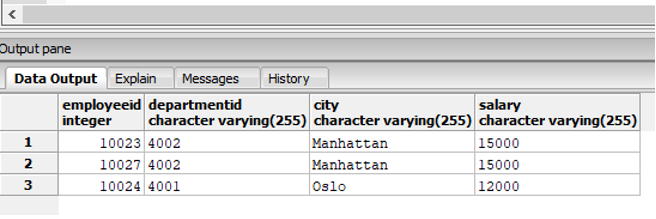
Find the details like employeeid, departmentid, city and salary of top three employees on the basis of their salary who are from “Manhattan” or “Oslo”.
Code:
SELECT employeeid,departmentid,city, salary
FROM employees
WHERE city = 'Manhattan' OR city = 'Oslo'
ORDER BY salary DESC
OFFSET 0
FETCH NEXT 3 ROWS ONLY;
Output:
Example #5
Find the top two departments where the company spends maximum on paying employee salaries.
Code:
SELECT departmentid,SUM(salary :: integer) as "Total Salary of Employees"
FROM employees
GROUP BY departmentid
ORDER BY 2 DESC
OFFSET 0
FETCH NEXT 2 ROWS ONLY;
Output:
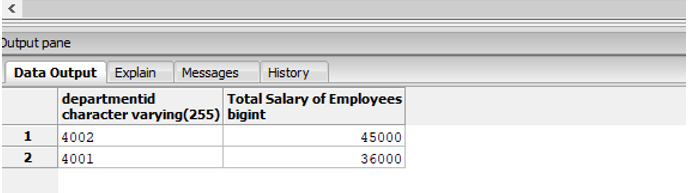
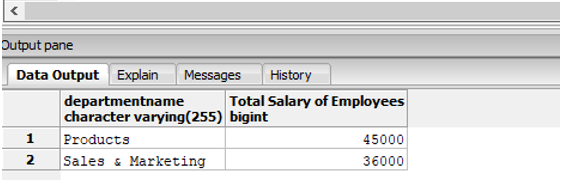
In the above example, just the department id does not give a very good picture of the person who does not know them. So, let’s try to add department names instead. For this, we will require a join operation.
Code:
SELECT d.departmentname,
SUM(e.salary :: integer) as "Total Salary of Employees"
FROM employees as e JOIN department as d
ON e.departmentid :: integer = d.departmentid
GROUP BY d.departmentname
ORDER BY 2 DESC
OFFSET 0
FETCH NEXT 2 ROWS ONLY;
Output:
Conclusion
SQL FETCH COMMAND is used to fetch or retrieve selected rows from a table sequentially. It is always used with an ORDER BY clause in conjunction with OFFSET. They are never used as stand-alone statements. It comes very handily if you want to select a limited number of rows from an ordered set, like top 3, top 10 or bottom 3, etc.
Recommended Articles
We hope that this EDUCBA information on “FETCH in SQL” was beneficial to you. You can view EDUCBA’s recommended articles for more information.

