
What are Feature Flags?
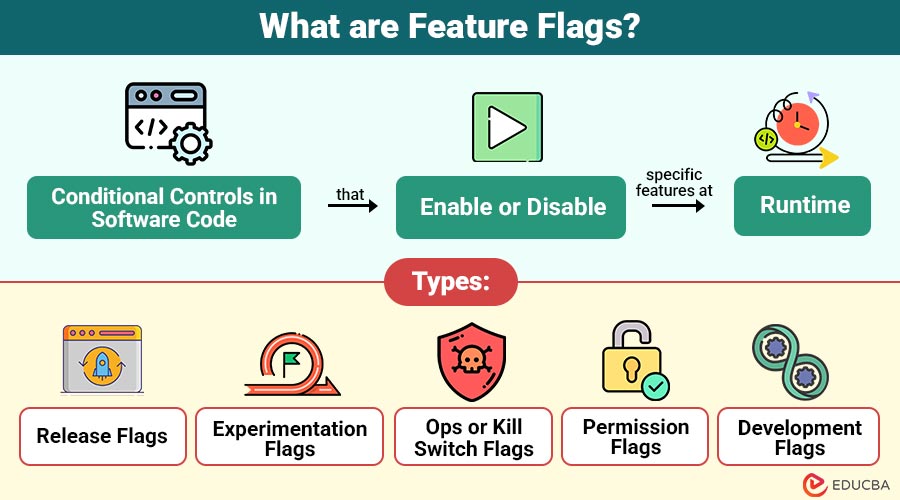
Feature flags are conditional controls in software code that enable or disable specific features at runtime. Developers add flags to control the visibility or availability of a feature without requiring a complete redeployment.
For example: If you are building a new checkout flow for your e-commerce app, you can wrap it in a feature flag. This allows you to enable the new flow for a small set of beta users while keeping the old flow for everyone else.
Table of Contents:
Key Takeaways:
- Feature flags enable the toggling of features on/off at runtime without requiring the redeployment of application code.
- They enable safe rollouts, experimentation, A/B testing, and instant rollbacks in the event of failures.
- Proper lifecycle management and cleanup prevent technical debt, complexity, and security risks.
- Tools like LaunchDarkly and ConfigCat streamline centralized management and monitoring of flags.
How Feature Flags Work?
Feature flags are typically implemented as conditional statements in the application code. A simple example in pseudocode would be:
Python:
if feature_flag_enabled("new_checkout"):
render_new_checkout()
else:
render_old_checkout()
A configuration service or management dashboard is often used to toggle these flags dynamically, without requiring the deployment of new code. Feature flagging platforms like LaunchDarkly, Flagsmith, or Unleash offer APIs and dashboards to manage flags efficiently.
Types of Feature Flags
It can be classified according to their intended purpose and the stages of their lifecycle.
1. Release Flags
Release flags enable controlled rollouts of new features by selectively exposing them to specific user segments, allowing teams to monitor performance and gather feedback before full deployment.
2. Experimentation Flags
Experimentation flags are used for A/B or multivariate testing, helping teams analyze user interactions, measure performance metrics, and make data-driven decisions for product improvements or feature optimization.
3. Ops or Kill Switch Flags
Ops or kill switch flags act as safety toggles, allowing for the immediate deactivation of features during failures, outages, or performance issues, thereby reducing downtime and safeguarding the user experience.
4. Permission Flags
Permission flags control access to premium or restricted functionalities by defining user entitlements, ensuring certain features are only available to specific roles, subscription tiers, or customer segments.
5. Development Flags
Development flags temporarily hide incomplete features during the build process, enabling developers to merge code without affecting end-users, and are typically removed once features are production-ready.
Use Cases of Feature Flags
Widely used in DevOps, CI/CD pipelines, and agile product development. Some common scenarios include:
1. Canary Releases
Gradually release features to a limited user subset, monitor performance, and detect issues before deploying to the entire user base.
2. A/B Testing
Use feature flags to compare multiple feature variations, analyze user engagement, and determine which version delivers optimal performance or user satisfaction.
3. Blue-Green Deployments
Seamlessly switch between two identical environments during deployment, reducing downtime and ensuring smooth feature rollout with minimal risk or disruption.
4. Instant Rollbacks
Quickly disable faulty features via flags, avoiding full redeployments, minimizing downtime, and ensuring uninterrupted user experience during unexpected failures or bugs.
5. Progressive Delivery
Control feature rollouts by targeting specific user groups, locations, or devices, enabling precise testing and feedback collection during staged releases.
6. Continuous Integration
Integrate incomplete or experimental code into the main branch without impacting production, keeping features hidden until they are ready for production.
Benefits of Using Feature Flags
Provides several benefits that align with agile and DevOps principles:
1. Faster Release Cycles
Enable developers to deploy code frequently, release partially complete features, and deliver updates without waiting for full production readiness.
2. Safe Experimentation
Teams can test new features in live environments, gather user feedback, and validate performance before committing fully to a permanent release.
3. Reduced Deployment Risk
Minimize risks by allowing immediate deactivation of unstable features, preventing downtime, performance issues, or negative user impact during deployments.
4. Better Collaboration
They facilitate parallel work by decoupling feature releases from deployments, allowing developers, QA, and product managers to collaborate seamlessly on evolving products.
5. Seamless Rollbacks
Flags enable quick rollbacks of problematic features without redeployment, allowing teams to address bugs instantly and restore stable user experiences.
Challenges of Feature Flags
While feature flags are powerful, they come with certain challenges if not managed properly:
1. Technical Debt
Unused or outdated feature flags clutter the codebase, increasing complexity, making debugging difficult, and slowing future development and maintenance efforts.
2. Complexity Management
Managing too many flags complicates testing scenarios, increases the chance of conflicts, and introduces unpredictable behaviors during feature rollouts or updates.
3. Performance Overhead
Poorly optimized feature flag evaluations can increase application latency, degrade performance, and impact user experience, especially in high-traffic production environments.
4. Security Risks
Misconfigured or poorly controlled feature flags may unintentionally expose sensitive features, leading to unauthorized access, data leaks, or other security vulnerabilities.
5. Lifecycle Management
Best Practices
To maximize the benefits, follow these best practices:
1. Plan a Flag Lifecycle
Establish clear guidelines for creating, using, and retiring flags to avoid unnecessary clutter and ensure smooth long-term maintenance.
2. Use Naming Conventions
Adopt descriptive and meaningful names, such as enable_new_checkout_flow, to make the flag’s purpose clear and improve team communication during development.
3. Monitor Flag Usage
Continuously track metrics, logs, and user interactions to identify actively used flags and ensure unnecessary flags do not remain enabled.
4. Automate Cleanup
Implement automated checks or scripts to remove stale, unused, or expired flags, minimizing technical debt and simplifying the codebase.
5. Integrate with CI/CD
Leverage feature flags within CI/CD pipelines to gain precise control over rollouts, deployments, and environment-specific configurations during releases.
6. Test All Flag Combinations
Thoroughly test different flag states (on/off) to ensure no conflicts, unexpected behaviors, or performance issues occur during feature toggling.
7. Use a Centralized Flag Management Tool
Adopt platforms like LaunchDarkly, Optimizely, or ConfigCat to efficiently manage, monitor, and audit flags across multiple environments and teams.
Real-World Examples
Below are some notable real-world examples of how leading companies leverage feature flags for better deployment and testing.
1. Facebook
Uses feature flags for testing new UI elements and deploying updates to a small group of users.
2. Netflix
It uses feature flags to test different personalized recommendations by showing variations to different user groups (A/B testing).
3. Amazon
Tests different layouts, promotions, and algorithms with feature flags to optimize user experience.
Tools for Feature Flag Management
Some popular feature flag management platforms include:
1. LaunchDarkly
A leading feature management platform that helps teams release, control, and experiment with features safely across multiple environments and platforms.
2. Flagsmith
It is a free, open-source tool that helps developers turn features on or off and change app settings without updating the code. It can be used on your own server or in the cloud and connects easily through an API.
3. Unleash
4. Optimizely Rollouts
A free tool that lets you turn features on or off, test different versions (A/B testing), deliver updates step by step, target specific users, and track results with powerful analytics.
5. ConfigCat
6. Firebase Remote Config
A Google Firebase tool enabling developers to modify app behavior and appearance instantly without requiring user updates or new releases.
Final Thoughts
Feature flags have revolutionized how software teams deliver features, test user behavior, and manage risk. By separating deployment from feature release, they offer flexibility, reduce downtime, and enable data-driven decision-making for products. However, they must be handled carefully to avoid unnecessary complexity and technical debt. As organizations move toward continuous delivery and progressive deployment, feature flags will remain a cornerstone of modern software engineering.
Frequently Asked Questions (FAQs)
Q1. What is the main purpose of feature flags?
Answer: It allow teams to release features safely and progressively by toggling them on or off without code redeployment.
Q2. Are feature flags suitable for all types of applications?
Answer: Yes, it can be implemented in web, mobile, and backend services, making them versatile for different platforms.
Q3. Can feature flags replace testing?
Answer: No, feature flags complement testing but do not eliminate the need for robust test practices.
Q4. How do you manage feature flags in large projects?
Answer: Use a centralized flag management tool, maintain proper naming conventions, and regularly clean up unused flags.
Recommended Articles
We hope that this EDUCBA information on “Feature Flags” was beneficial to you. You can view EDUCBA’s recommended articles for more information.

