


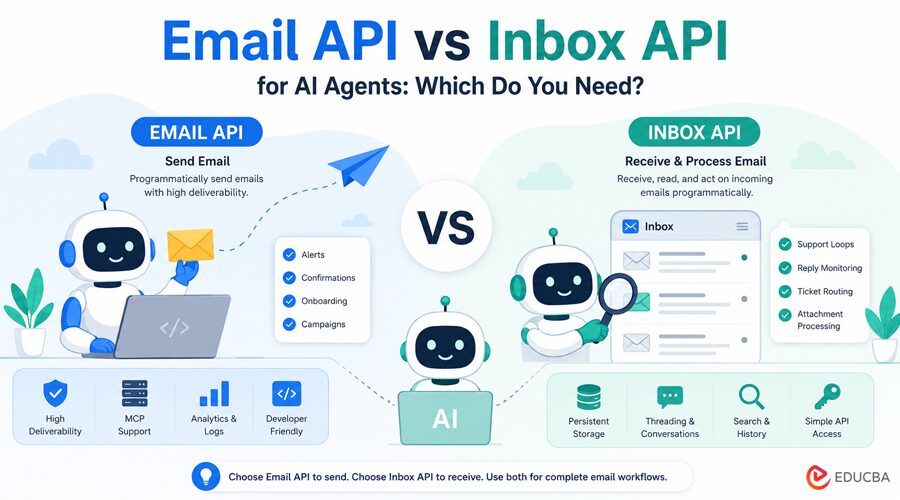
An email API sends email programmatically. An inbox API receives and processes it. Mailtrap, Postmark, Mailgun, and AgentMail all handle AI agent email workflows, but they sit on different sides of that distinction. Most agent email failures trace back to picking the wrong category for the job. Understanding the Email API vs. inbox API is important when building AI agent workflows, as each handles a different part of the email infrastructure.
Summary
If your agent sends an email, you need an email API. Tools like Mailtrap (high deliverability, MCP server, stream separation) and Postmark (delivery speed) handle this. If your agent receives email and needs to read, store, or act on incoming messages, you need an inbox API. Tools like AgentMail or InboxAgents cover that side. Most agent workflows start with sending only, and adding receiving later.
Email API vs Inbox API: Comparison
| Email API | Inbox API | |
| Primary function | Send email | Receive and read email |
| Stores messages | No | Yes |
| Agent use case | Alerts, confirmations, onboarding, campaigns | Support loops, reply monitoring, ticket routing |
| MCP support | Common | Less common |
| Example tools | Mailtrap, Postmark | AgentMail, InboxAgents |
How to Choose Between Email API vs Inbox API for Your Agent?
- If your agent sends alerts, confirmations, onboarding messages, or campaign messages, you need an email API. Mailtrap includes an MCP server, stream separation by default, 30-day log retention, and SDKs for Node.js, Python, PHP, Ruby, Java, .NET, and Elixir. Postmark is the alternative when delivery speed is the primary requirement.
- If your agent receives ticket routing, reply monitoring, and document processing from attachments, you need an inbox API. AgentMail covers the full inbox model with persistent storage, threading, and conversation history across sessions.
- If your agent sends and receives within a single workflow, consider Mailtrap first: it covers sending, inbound routing, and sandbox testing in a single platform. Postmark also natively handles sending and receiving within a single account.
What is an Email API for AI Agents?
An email API is a programmatic interface for sending outbound email. It manages SMTP relay, IP reputation, authentication (SPF, DKIM, DMARC), bounce tracking, and delivery analytics. The agent supplies the content, and the recipient; the email API handles getting the message delivered reliably.
In the broader Email API vs inbox API discussion, email APIs focus entirely on outbound delivery. For AI agents specifically, the email API is the part of the stack that runs most often: every confirmation, alert, notification, and campaign goes through it, which is why deliverability and autonomous tooling matter more here than anywhere else in the email infrastructure.
That includes everything from how the agent authenticates sending domains to how it handles bounces and monitors delivery stats without a human checking a dashboard, which is why picking the right email sending API for AI agents matters early in the build.
Email APIs for AI Agents
Mailtrap
Mailtrap is an email-sending API for AI agents, built for developers and product teams who value high deliverability. Transactional and bulk streams are separated by default, so operational alerts do not share IP reputation with marketing campaigns.
The MCP server covers sending, domain management, template configuration, and delivery stats, and an AI onboarding page serves as an extended skills file that walks agents through platform setup. Step-by-step integrations are available for Claude Code, Cursor, and any other MCP-compatible tool.
DKIM keys rotate automatically every 30 days, and SPF, DKIM, and DMARC are configured during domain verification, with no manual DNS work beyond adding the initial records. Log retention runs 30 days, including full email body and headers. SDKs cover Node.js, Python, PHP, Ruby, Java, .NET, and Elixir. Free tier: 4,000 emails per month with no credit card required.
Postmark
Postmark focuses on delivery speed and maintains a strict account review before enabling live sending, which keeps its shared IP pool clean and protects placement rates across all accounts on the platform.
It is particularly well-suited for agents that need sub-second delivery for time-sensitive messages such as authentication codes, payment confirmations, and real-time alerts, where inbox placement speed matters as much as reliability.
Email API for AI Agents: Key Features
Autonomous Setup Without Human Intervention
The agent operates without a human configuring credentials or verifying domains mid-workflow. MCP server support makes this possible: an agent connected to an official MCP server can handle domain verification, template management, and sending stats via tool calls without a human step in between.
Mailtrap ships a MCP server alongside its sending infrastructure, so an agent can go from a blank account to a verified domain to live sends on its own. Step-by-step integrations are available for Claude Code, Cursor, and Lovable. Without MCP, a human still has to configure the sending setup before the agent can operate, which breaks the autonomous model before the first email goes out.
Stream Separation for Mixed Sending Workloads
An agent might fire transactional alerts, onboarding sequences, and bulk campaigns from the same codebase. If those share an IP pool, a single bad bulk run can damage deliverability for operational messages, and the agent has no way to detect it without checking logs. Email APIs that separate transactional and bulk streams by default solve this at the infrastructure level rather than requiring manual reputation management. This matters specifically for agents because they often handle multiple sending patterns simultaneously, whereas a traditional app typically sends a single email type from a single integration.
Log Retention for Post-hoc Debugging
When an agent sends something, it should not format a template incorrectly or encounter a deliverability issue with a specific provider; you need logs to debug it. Providers vary in retention periods, from 3 days to 30 days, and some only log delivery events, while others retain the full email body, including HTML and headers. For autonomous agents, failure modes are often silent and only detected days later when a user reports them. A provider that retains full message content for 30 days gives you the visibility to reconstruct what happened without relying on external logging infrastructure.
What is an Inbox API for AI Agents?
An inbox API gives the agent programmatic access to incoming email: reading messages, parsing content, tracking threads, and acting on replies. An agent that monitors a support mailbox, processes reply-by-email confirmations, routes incoming tickets, or maintains a two-way conversation with a user needs an inbox API. This is the part of the email stack that most developers underplan for: the sending side is well-documented and well-tooled, but the receiving side requires more upfront architectural decisions.
Best Inbox APIs for AI agents
AgentMail
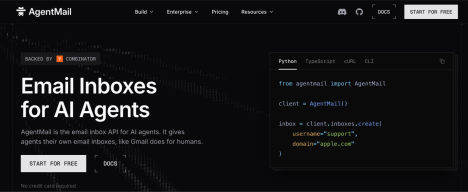
AgentMail provides programmatic inbox creation, persistent storage, threading, and search through a single API key. Native integrations exist for LangChain, LlamaIndex, and CrewAI. The agent creates and manages isolated mailboxes via the API, with full conversation history available across sessions.
InboxAgents
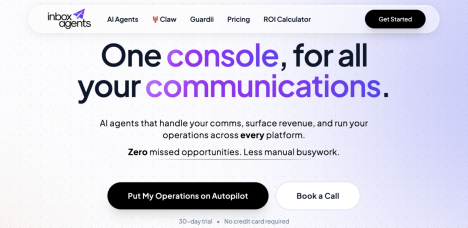
InboxAgents provides managed inboxes for AI agents, with programmatic access to incoming email, threading, and reply handling, all designed for autonomous workflows.
Inbox API for AI Agents: Key Features
Inbox APIs provide persistent storage, threading, and search. The agent retrieves past messages, navigates threads across sessions, and maintains conversation state without
building its own storage layer. Authentication is typically a simple API key with no OAuth refresh cycle, which eliminates the need for re-authentication in long-running autonomous workflows. An OAuth token that expires mid-workflow requires a human to step in and re-authenticate, breaking the autonomous model.
Email API and Inbox API Providers
- Mailtrap: sending, inbound routing, and sandbox testing
- Postmark: sending with native inbound processing
- Mailgun: sending with webhook-based inbound routing
Final Thoughts
The distinction between the email API and the inbox API for AI agents comes down to directionality: sending, receiving, or both. Email APIs like Mailtrap and Postmark handle outbound delivery with the deliverability infrastructure, stream separation, and MCP tooling that autonomous agents need. Inbox APIs like AgentMail and InboxAgents handle the receiving side; the choice between them depends on whether the agent needs persistent conversation history or just webhook-based message routing.
Most agent workflows start with sending only, and add receiving as the product matures. Picking an email API with solid deliverability, MCP support, and stream separation from the start means the outbound layer does not need to be rebuilt when inbox capability gets added. The two sides of the stack are independent and can be extended without redesigning the other. For teams
Starting, Mailtrap covers the email API side with agent tooling, SDK coverage, and log retention, helping you get from prototype to production without switching providers.
Frequently Asked Questions (FAQs)
Q1. What is the difference between Email API vs inbox API?
Answer: An email API handles outbound email delivery, while an inbox API manages incoming email, threading, storage, and reply processing for AI agents.
Q2. Can I use one tool for both sending and receiving email in my AI agent?
Answer: Yes. Mailtrap covers sending, inbound routing, and sandbox testing on a single platform, making it the most complete option for agent workflows that need to send, receive, and test safely before going live.
Q3. Does an AI agent need a different email API than a traditional web app?
Answer: The API itself is the same, but the requirements around it differ. A traditional app sends a single type of email and has a human available to fix configuration issues. An AI agent operates autonomously, handles multiple sending patterns simultaneously, and generates content dynamically. That combination makes the MCP server’s support, stream separation, and log retention matter more than they do in a manually operated system.
Q4. What happens if an AI agent uses the wrong email infrastructure?
Answer: The failure modes depend on the direction of the mismatch. An agent using an email API that lacks inbox capability cannot read incoming messages, breaking any workflow that depends on replies or inbound routing. An agent using an inbox API when it only needs to send ends up with unnecessary complexity and often weaker deliverability than a dedicated email API provides.
Recommended Articles
We hope this guide on Email API vs inbox API helps you understand outbound and inbound email workflows for AI agents. Explore the recommended articles below for more insights on email automation, AI infrastructure, deliverability, and developer communication tools.


